AI agent for vice president of sales
Price Change Impact Modeling Agent
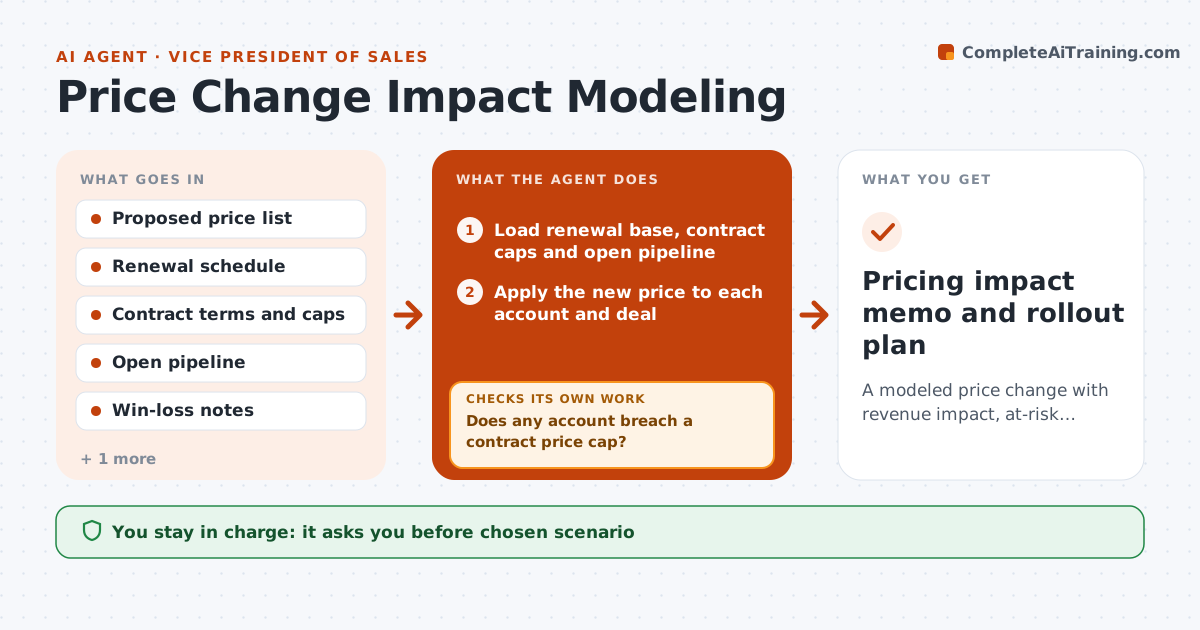
A modeled price change with revenue impact, at-risk accounts and a rollout plan
What it does
When a company plans a price change, the sales leader has to answer three questions fast: how much revenue it adds, which customers are likely to push back, and what the reps need to say. This is usually done in a rushed spreadsheet. This agent takes the proposed price change and applies it to the renewal base and open pipeline, account by account. It flags accounts where the increase crosses a contract cap, a past pushback, or a competitor quote on file. It models three scenarios: full increase, capped increase for at-risk accounts, and phased timing. After modeling it checks the totals against the finance plan and the contract terms; if a contract cap is breached, it rebuilds that account at the cap. It drafts rep talking points from approved positioning. You choose the scenario and approve the rollout. Edge case: multi-year deals locked at current prices are excluded.
How it works
Follow the arrows from top to bottom. The orange dashed arrow is the loop: when a check fails, the agent goes back and tries again.
Read the steps as a list
- Price change proposed
- Load renewal base, contract caps and open pipeline
- Apply the new price to each account and deal
- Does any account breach a contract price cap?If not: recalculate those accounts at the cap and mark them. Back to step 3.
- Flag at-risk accounts from pushback history and competitor quotes
- Model full, capped and phased scenarios with expected churn
- Do scenario totals reconcile with the finance plan base?If not: find missing or duplicate accounts and reload. Back to step 2.
- Draft rep talking points from approved positioning
- VP of Sales chooses scenario and approves rolloutThe agent waits here for your OK.
- Pricing impact memo and rollout plan
How it decides
An account is at risk if the increase exceeds its contract cap, it pushed back on the last increase, or a competitor quote is on file. Scenarios are compared on net revenue after expected churn.
- Accounts with locked multi-year pricing are excluded
- Increase above contract cap is never modeled
- Accounts with a competitor quote in the last 12 months are at risk
- Churn assumption defaults to last year's rate for at-risk accounts
Make it yours
Every agent is a starting point. You choose these settings for your own situation.
- Churn assumption for at-risk accounts (default last year's rate)
- Competitor quote lookback (default 12 months)
- Scenarios to model (default full, capped, phased)
- Minimum account size to model individually (default 10,000 dollars)
What keeps you in control
It always asks you first
- Chosen scenario
- Rollout communication to reps
Hard limits
- Never changes prices in billing systems
- Never sends messages to customers
It stops when
- Done: scenario chosen and memo shared
- Stop: contract data missing for more than 10% of revenue
Set it up
We guide you through the set-up, step by step
Members get the full set-up guide for this agent. No technical skills needed: you copy, paste and upload.
- One set of instructions to paste into your AI, with the clicks for ChatGPT, Claude, Microsoft 365 Copilot, Gemini and Grok
- The agent then walks you through connecting your own data, one source at a time
- A downloadable copy with the flow chart, the rules and the full guide