AI agent for legal secretaries
Pro Se Filing Defect Review Agent
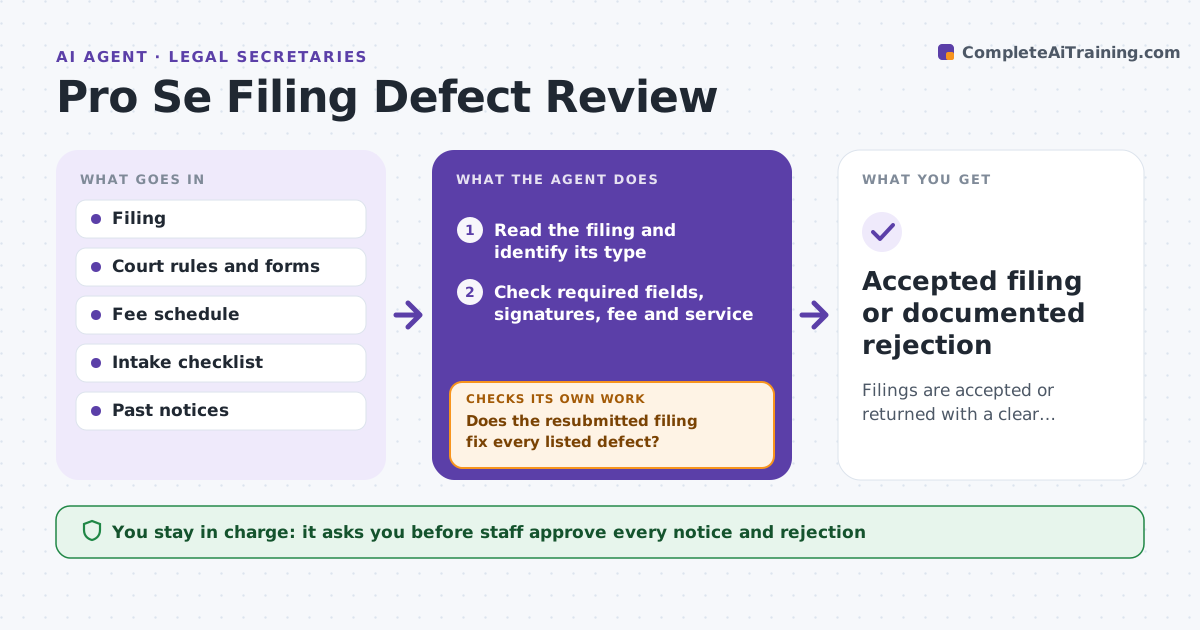
Filings are accepted or returned with a clear notice that tells the filer exactly how to fix them.
What it does
Self-represented filers are often rejected for fixable defects such as a missing signature or fee waiver form, and never learn why. Court staff spend time on repeat rejections. This agent checks each filing for required fields, signatures, fees and proof of service. It drafts a plain-language defect notice that states what to fix and how, and rechecks resubmissions. It stays within the court's rules and does not give legal advice. Staff approve notices and rejections. Edge case: a filer sends a motion with no certificate of service, so the agent drafts a notice explaining what a certificate of service is and where to put it.
How it works
Follow the arrows from top to bottom. The orange dashed arrow is the loop: when a check fails, the agent goes back and tries again.
Read the steps as a list
- A self-represented filing arrives
- Read the filing and identify its type
- Check required fields, signatures, fee and service
- List each defect with the rule it breaks
- Draft a plain notice with fixes and deadlines
- Staff approve the notice or rejectionThe agent waits here for your OK.
- Receive and read the resubmission
- Does the resubmitted filing fix every listed defect?If not: draft a second notice listing the remaining defects. Back to step 3.
- Accepted filing or documented rejection
How it decides
It compares the filing to the checklist for its type. It returns a notice only for defects the rules list, and uses plain language.
- List a defect only when a rule requires it
- Use plain language at about an 8th grade level
- Include the deadline to fix
- Do not give legal advice
Make it yours
Every agent is a starting point. You choose these settings for your own situation.
- Checklist per filing type
- Notice language and reading level
- Fix deadline days
- Fee rules
- Languages offered
What keeps you in control
It always asks you first
- Staff approve every notice and rejection
Hard limits
- Never give legal advice
- Never reject a filing without staff approval
It stops when
- Done: filing accepted or rejected with an approved notice
- Stop: the defect is a legal question for a judge
Set it up
We guide you through the set-up, step by step
Members get the full set-up guide for this agent. No technical skills needed: you copy, paste and upload.
- One set of instructions to paste into your AI, with the clicks for ChatGPT, Claude, Microsoft 365 Copilot, Gemini and Grok
- The agent then walks you through connecting your own data, one source at a time
- A downloadable copy with the flow chart, the rules and the full guide