AI agent for policy analysts
Program Evaluation Monitoring Agent
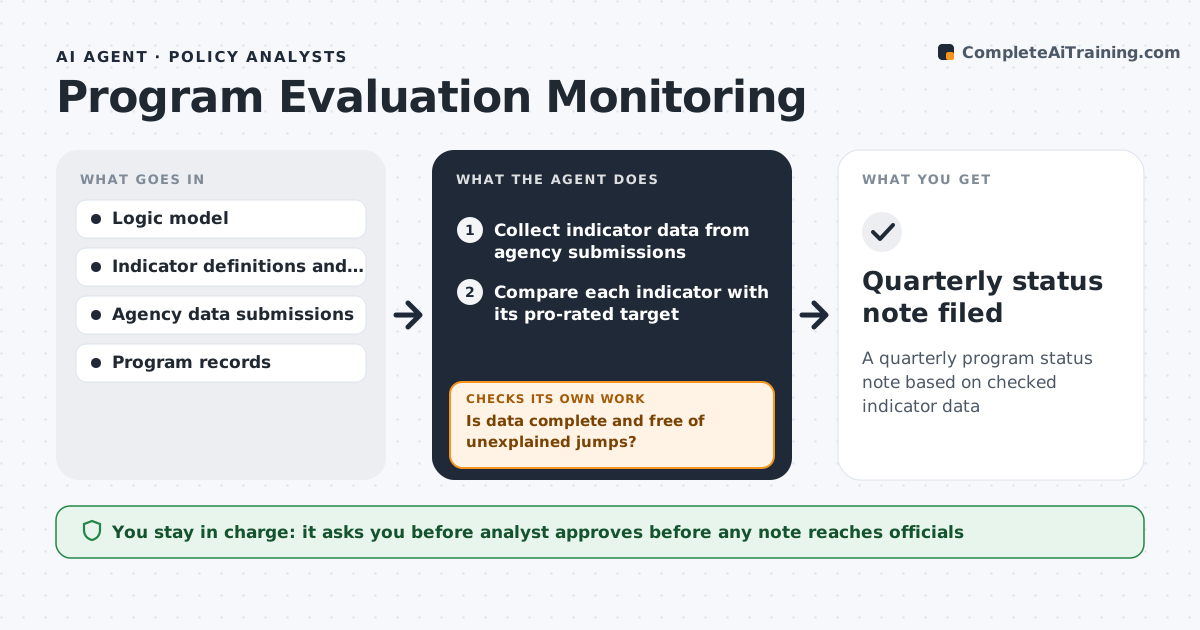
A quarterly program status note based on checked indicator data
What it does
Public programs report outputs and outcomes every quarter, but data arrives from different agencies in different formats and with gaps. This agent collects the latest indicator data and first checks quality: missing months or jumps with no explanation trigger a correction request to the data owner, and it waits for the resubmission before going further. It then compares each indicator with its pro-rated target and the logic model. Anything more than 10% below target counts as off track. For those, it looks in program records for reasons, never guessing. It drafts a short status note with charts. The analyst reviews it and decides what goes to officials. Edge case: if an indicator definition changed mid-year, the agent shows the old and new series separately instead of joining them into one line.
How it works
Follow the arrows from top to bottom. The orange dashed arrow is the loop: when a check fails, the agent goes back and tries again.
Read the steps as a list
- Quarterly data due date
- Collect indicator data from agency submissions
- Is data complete and free of unexplained jumps?If not: send a correction request to the data owner and wait for resubmission. Back to step 2.
- Compare each indicator with its pro-rated target
- Look for reasons in program records for off-track indicators
- Draft the status note with charts
- Analyst approves the note for officialsThe agent waits here for your OK.
- Quarterly status note filed
How it decides
An indicator is off track when it is more than 10% below its pro-rated target. Data with missing months or sudden jumps is checked with the source before use.
- More than 10% below target is off track
- Changed definitions are shown as separate series
- Reasons must come from program records, not guesses
Make it yours
Every agent is a starting point. You choose these settings for your own situation.
- Off-track threshold (default 10% below target)
- Reporting frequency
- Indicators to include
- Note format and audience
What keeps you in control
It always asks you first
- Analyst approves before any note reaches officials
Hard limits
- Never publishes findings
- Does not contact program participants
It stops when
- Done: all indicators assessed
- Stop: data owner has not resubmitted after two requests; report the gap
Set it up
We guide you through the set-up, step by step
Members get the full set-up guide for this agent. No technical skills needed: you copy, paste and upload.
- One set of instructions to paste into your AI, with the clicks for ChatGPT, Claude, Microsoft 365 Copilot, Gemini and Grok
- The agent then walks you through connecting your own data, one source at a time
- A downloadable copy with the flow chart, the rules and the full guide