
AI agent for nonprofit program managers
Program Outcome Data Quality Agent
Clean participant data each month and an accurate view of progress toward outcome targets
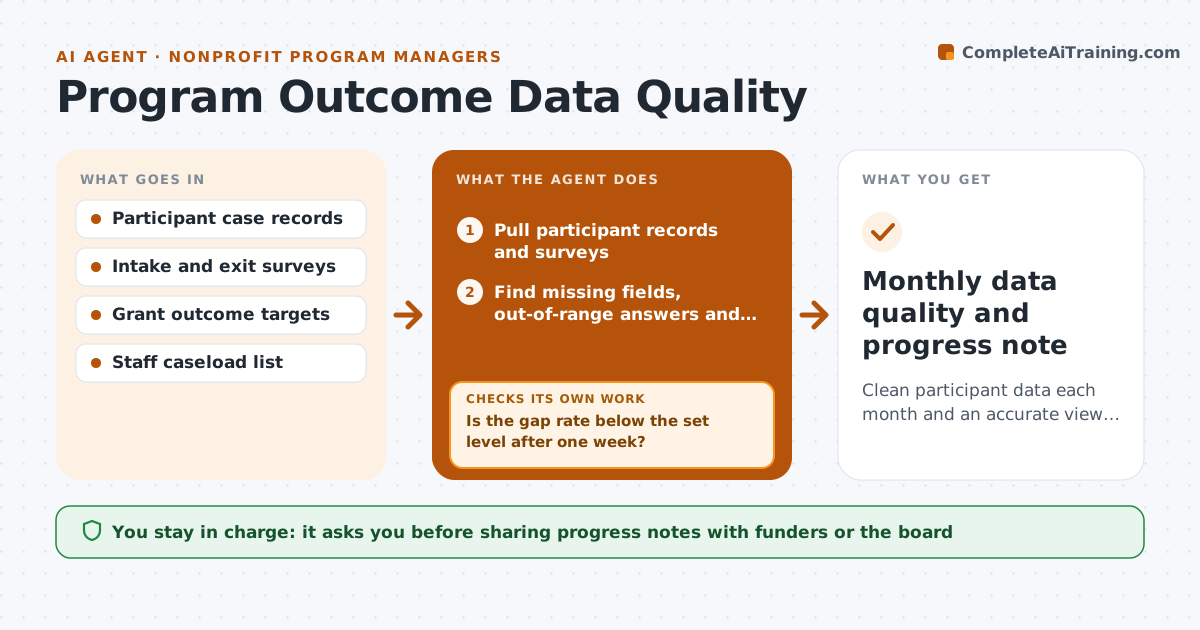
What it does
Funders ask for outcome numbers, and gaps in participant records are often found only when the report is due. Each month this agent checks case records for missing intake or exit surveys, answers outside the allowed range, duplicate participants and records with no program end date. It lists gaps by staff member so each person knows what to fix, then checks again a week later. If gaps remain, it sends a second list and flags them to the manager. Participants who left early are counted as early exits, not dropped from the totals. Once data is clean, it compares outcomes with grant targets and drafts a short progress note. The program manager approves the note before it is shared.
How it works
Follow the arrows from top to bottom. The orange dashed arrow is the loop: when a check fails, the agent goes back and tries again.
Read the steps as a list
- Month closes
- Pull participant records and surveys
- Find missing fields, out-of-range answers and duplicates
- Send each staff member their list of gaps
- Is the gap rate below the set level after one week?If not: send a second list and flag remaining gaps to the manager. Back to step 4.
- Calculate outcomes against grant targets
- Draft progress note
- Manager approves the note before sharingThe agent waits here for your OK.
- Monthly data quality and progress note
How it decides
It flags any record missing a required field or with a value outside the allowed range, and reports progress only once the gap rate is under the set level.
- Early exits stay in the totals
- Duplicate participants are flagged, never auto-removed
- Progress is reported only when gaps are below 5%
Make it yours
Every agent is a starting point. You choose these settings for your own situation.
- Required fields per program
- Gap rate allowed (default 5%)
- Outcome targets per grant
- Days between first and second gap list
What keeps you in control
It always asks you first
- Sharing progress notes with funders or the board
Hard limits
- Never edits case records
- Never shares participant names in the progress note
It stops when
- Done: data clean and note approved
- Stop: case system export fails; report last clean month
Set it up
We guide you through the set-up, step by step
Members get the full set-up guide for this agent. No technical skills needed: you copy, paste and upload.
- One set of instructions to paste into your AI, with the clicks for ChatGPT, Claude, Microsoft 365 Copilot, Gemini and Grok
- The agent then walks you through connecting your own data, one source at a time
- A downloadable copy with the flow chart, the rules and the full guide



