AI agent for civil servants
Public Health Program Grant Report Agent
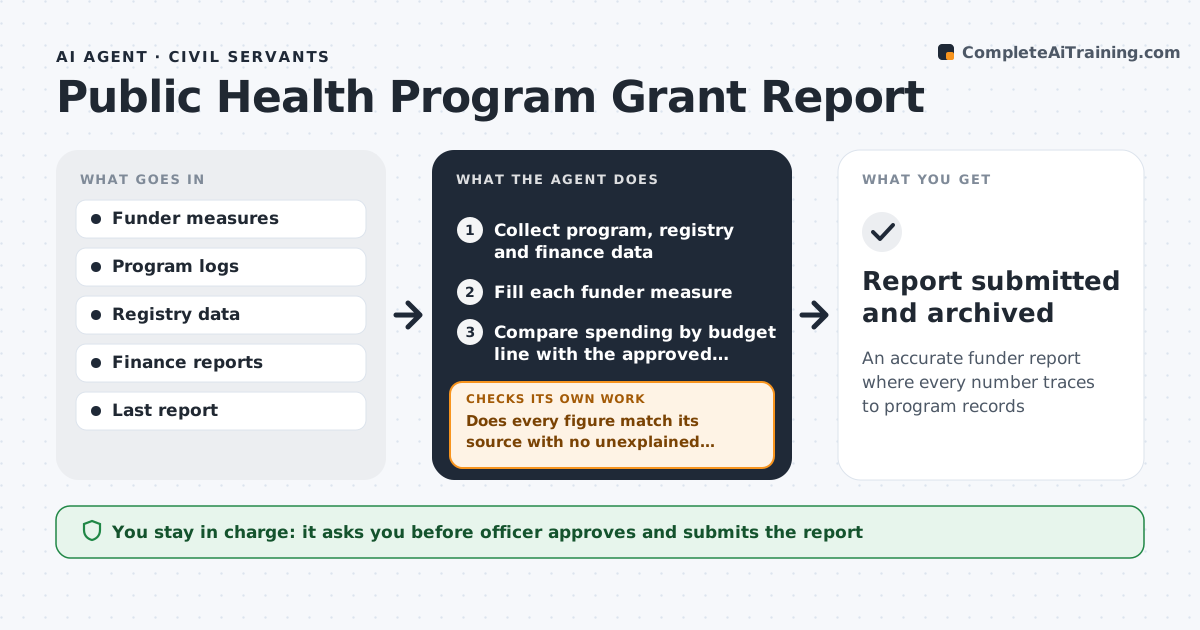
An accurate funder report where every number traces to program records
What it does
Public health programs funded by grants must report outputs, outcomes and spending on fixed deadlines, and the numbers sit in program logs, registries and finance systems. This agent starts 30 days before the deadline. It collects the data, fills each funder measure, and checks every figure against its source and the previous report. Changes over 25% need an explanation, so it asks the program lead or finance to confirm and then refills the measure. It also compares spending with the budget, and any line more than 10% over plan gets a variance note request to finance. It drafts the narrative only from approved program updates, then assembles the full report for review. The health officer approves and submits. Edge case: a sudden enrollment jump is never smoothed over; it waits for the lead's explanation.
How it works
Follow the arrows from top to bottom. The orange dashed arrow is the loop: when a check fails, the agent goes back and tries again.
Read the steps as a list
- Reporting deadline in 30 days
- Collect program, registry and finance data
- Fill each funder measure
- Does every figure match its source with no unexplained jumps?If not: ask the program lead or finance to confirm or explain and refill. Back to step 3.
- Compare spending by budget line with the approved budget
- Is every budget line within 10% of plan or explained?If not: request a variance note from finance and add it. Back to step 5.
- Draft the narrative from approved program updates
- Officer approves and submitsThe agent waits here for your OK.
- Report submitted and archived
How it decides
Each figure must match its source. Changes over 25% from last period or budget lines over 10% off plan need an explanation.
- Changes over 25% need an explanation
- Budget lines over 10% of plan need a variance note
- Narrative uses only approved updates
Make it yours
Every agent is a starting point. You choose these settings for your own situation.
- Days before deadline to start (default 30)
- Jump threshold (default 25%)
- Budget variance threshold (default 10%)
- Funder template
What keeps you in control
It always asks you first
- Officer approves and submits the report
Hard limits
- Never submits to the funder
- No individual client data in reports
It stops when
- Done: report ready
- Stop: finance data not closed for the period
Set it up
We guide you through the set-up, step by step
Members get the full set-up guide for this agent. No technical skills needed: you copy, paste and upload.
- One set of instructions to paste into your AI, with the clicks for ChatGPT, Claude, Microsoft 365 Copilot, Gemini and Grok
- The agent then walks you through connecting your own data, one source at a time
- A downloadable copy with the flow chart, the rules and the full guide