AI agent for urban planners
Public Hearing Notice Compliance Agent
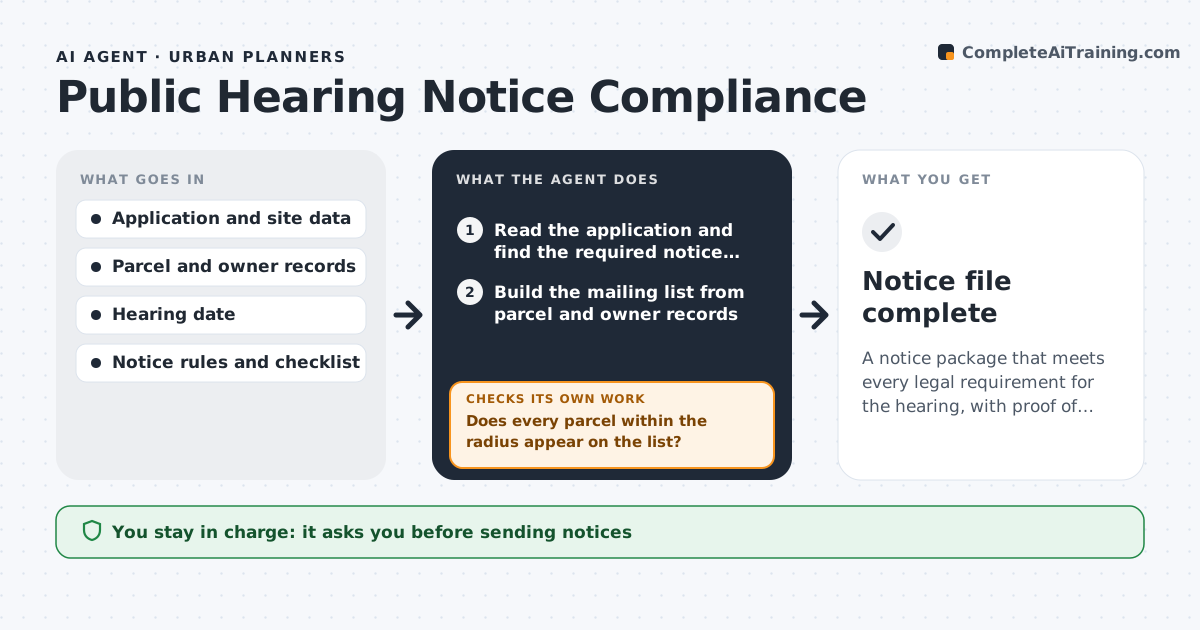
A notice package that meets every legal requirement for the hearing, with proof of mailing and posting
What it does
If a hearing notice misses an address or goes out a day late, the hearing can be voided and the whole schedule slips. This agent reads the application and builds the mailing list of property owners within the required radius from parcel data. It checks the dates against the notice period, the contents against the legal checklist and the posting and publication rules. It flags defects such as a missing parcel, a wrong hearing date or a notice that reaches an owner too late. After the planner fixes the problems, it reruns all the checks. It also checks that the hearing date still leaves enough days if the schedule has changed. The planner approves before any notice goes out. Edge case: a parcel owned by an LLC with a mailing address abroad is flagged for a second notice method.
How it works
Follow the arrows from top to bottom. The orange dashed arrow is the loop: when a check fails, the agent goes back and tries again.
Read the steps as a list
- Hearing date set for an application
- Read the application and find the required notice rules
- Build the mailing list from parcel and owner records
- Draft the notice, the sign and the publication text
- Does every parcel within the radius appear on the list?If not: rerun the radius selection and add the missing owners. Back to step 3.
- Do dates and contents meet the notice period and checklist?If not: correct the dates or text and recheck against the rules. Back to step 4.
- Flag owners needing extra notice methods
- Planner approves before notices go outThe agent waits here for your OK.
- Send notices and record proof of mailing and posting
- Notice file complete
How it decides
The mailing list is every owner within the required distance. The notice passes when dates, content and delivery methods meet the rules for that type of hearing.
- Include every owner within the legal radius, plus occupants if required
- Set the mailing date at least the required days before the hearing
- Flag owners with out-of-country or business addresses for a second method
- Reject a notice with a missing legal element
Make it yours
Every agent is a starting point. You choose these settings for your own situation.
- Notice radius and period by hearing type
- Parcel data source
- Notice template
- Extra notice methods
What keeps you in control
It always asks you first
- Sending notices
- Posting and publication
Hard limits
- Never mails notices itself
- Does not change the hearing date
It stops when
- Done: the notice package is complete and approved
- Stop: the hearing type has no rule loaded
Set it up
We guide you through the set-up, step by step
Members get the full set-up guide for this agent. No technical skills needed: you copy, paste and upload.
- One set of instructions to paste into your AI, with the clicks for ChatGPT, Claude, Microsoft 365 Copilot, Gemini and Grok
- The agent then walks you through connecting your own data, one source at a time
- A downloadable copy with the flow chart, the rules and the full guide