AI agent for surgeons
Readmission Review Agent
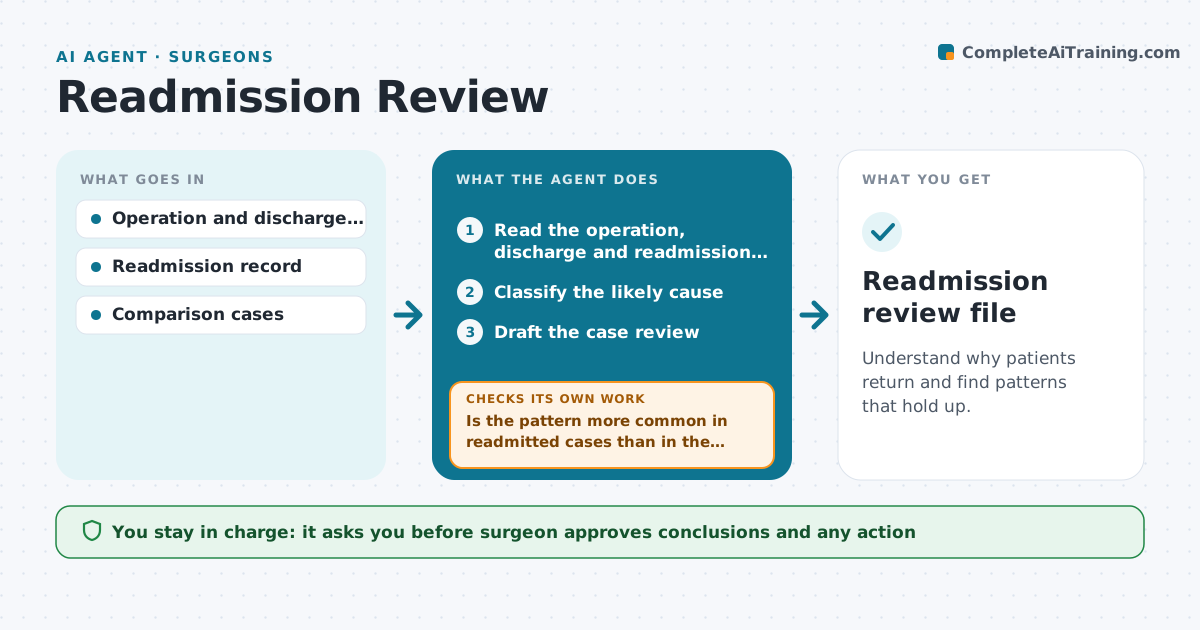
Understand why patients return and find patterns that hold up.
What it does
Surgical readmissions are reviewed case by case, if at all, and patterns are missed. This agent runs on each readmission within 30 days. It reads the original operation, discharge notes and the readmission record, classifies the likely cause, such as infection, pain, dehydration or a missed instruction, and drafts a case review. It then looks for patterns across cases. The patterns it finds are tested against a sample of non-readmitted cases before the review, so a pattern is not just common in all patients. The surgeon reviews and approves the conclusions. Edge case: a pattern appears only in one ward, so the agent notes it as local.
How it works
Follow the arrows from top to bottom. The orange dashed arrow is the loop: when a check fails, the agent goes back and tries again.
Read the steps as a list
- A readmission within 30 days is logged
- Read the operation, discharge and readmission records
- Classify the likely cause
- Draft the case review
- Search past readmissions for patterns
- Pull a sample of non-readmitted cases for comparison
- Is the pattern more common in readmitted cases than in the sample?If not: drop the pattern and look for another. Back to step 5.
- Write the pattern findings with numbers
- Surgeon approves the review and findingsThe agent waits here for your OK.
- Readmission review file
How it decides
A pattern is kept only if it appears more in readmitted cases than in a matched sample.
- Compare against at least 20 matched non-readmitted cases
- Keep a pattern only if it is at least twice as common
- Note local patterns by ward
- Flag preventable causes for quality review
Make it yours
Every agent is a starting point. You choose these settings for your own situation.
- Window (default 30 days)
- Sample size (default 20+)
- Ratio to keep a pattern (default 2x)
- Cause categories
What keeps you in control
It always asks you first
- Surgeon approves conclusions and any action
Hard limits
- Never blame individuals
- Never change a clinical record
It stops when
- Done: review approved
- Stop: data too small, report that
Set it up
We guide you through the set-up, step by step
Members get the full set-up guide for this agent. No technical skills needed: you copy, paste and upload.
- One set of instructions to paste into your AI, with the clicks for ChatGPT, Claude, Microsoft 365 Copilot, Gemini and Grok
- The agent then walks you through connecting your own data, one source at a time
- A downloadable copy with the flow chart, the rules and the full guide