AI agent for seo specialists
Redirect Map Migration QA Agent
Launch a migration where every important old URL reaches the right new page in one hop
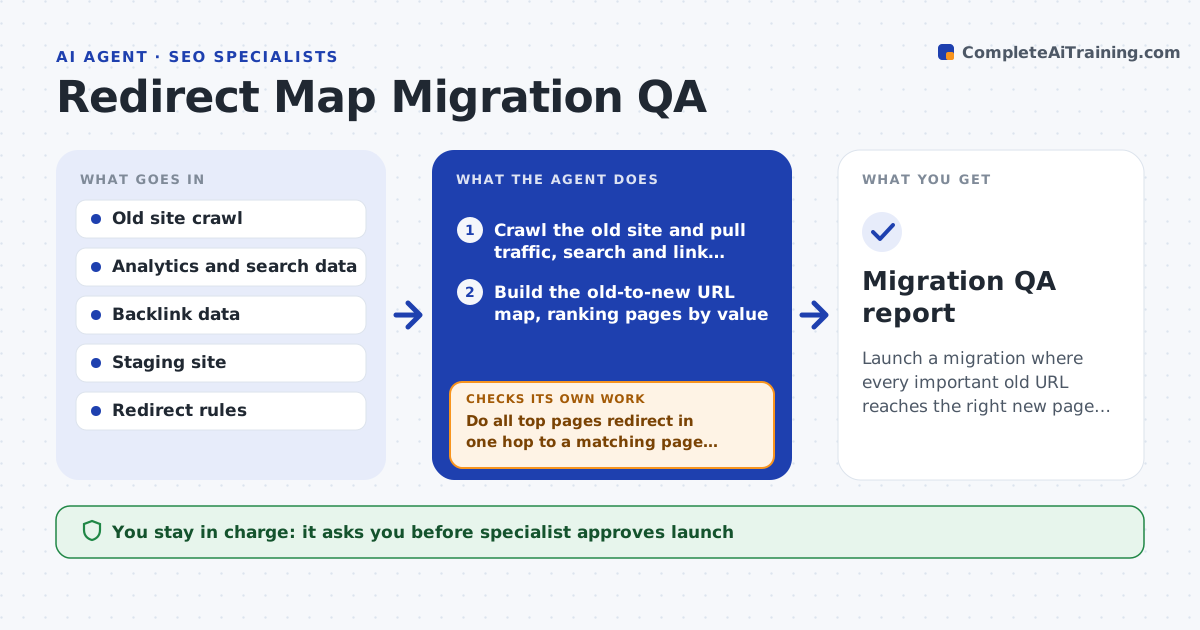
What it does
A site migration launches with 8,000 redirects and a month later organic traffic is down 30% because key pages return errors or loop. This agent builds the old-to-new URL map from crawls of the old site, analytics and search data, so pages with traffic and links come first. It tests each redirect on staging: status code, final destination, chain length and loops. It fixes the map for errors, such as a redirect to a 404, a chain of four hops or a mismatch in the content of the target. It retests the whole set after every fix, again on launch day and again a week after launch. The specialist approves launch. Edge case: many old URLs use query strings that the redirect rules ignore, so the agent adds rules for them.
How it works
Follow the arrows from top to bottom. The orange dashed arrow is the loop: when a check fails, the agent goes back and tries again.
Read the steps as a list
- Migration planned
- Crawl the old site and pull traffic, search and link data
- Build the old-to-new URL map, ranking pages by value
- Test every redirect on staging
- List errors, chains, loops and content mismatches
- Fix the map and the rules
- Do all top pages redirect in one hop to a matching page with status 200?If not: fix the remaining redirects and test the whole set again. Back to step 3.
- Specialist approves launchThe agent waits here for your OK.
- Retest the full set on launch day and after a week
- Do live results match staging with no new errors or traffic drop on top pages?If not: list the failures with priority and fix them first. Back to step 5.
- Migration QA report
How it decides
It ranks old URLs by traffic and links, requires one-hop redirects to a matching page, and treats errors on top pages as blockers.
- Block launch if any top 500 page redirects to an error
- Allow at most one hop for every redirect
- Check that the target content matches the old page topic
- Add rules for query strings and trailing slashes
Make it yours
Every agent is a starting point. You choose these settings for your own situation.
- Top pages count (default 500)
- Maximum hops (default 1)
- Matching method for content
- Test timing after launch
- Redirect rule format
What keeps you in control
It always asks you first
- Specialist approves launch
- Developer approves redirect rule deployment
Hard limits
- Never deploy rules to production
- Never redirect many pages to the home page
It stops when
- Done: live redirects pass and traffic is stable after a week
- Stop: the migration is delayed until blockers are fixed
Set it up
We guide you through the set-up, step by step
Members get the full set-up guide for this agent. No technical skills needed: you copy, paste and upload.
- One set of instructions to paste into your AI, with the clicks for ChatGPT, Claude, Microsoft 365 Copilot, Gemini and Grok
- The agent then walks you through connecting your own data, one source at a time
- A downloadable copy with the flow chart, the rules and the full guide