AI agent for animators
Rig Deformation Test Agent
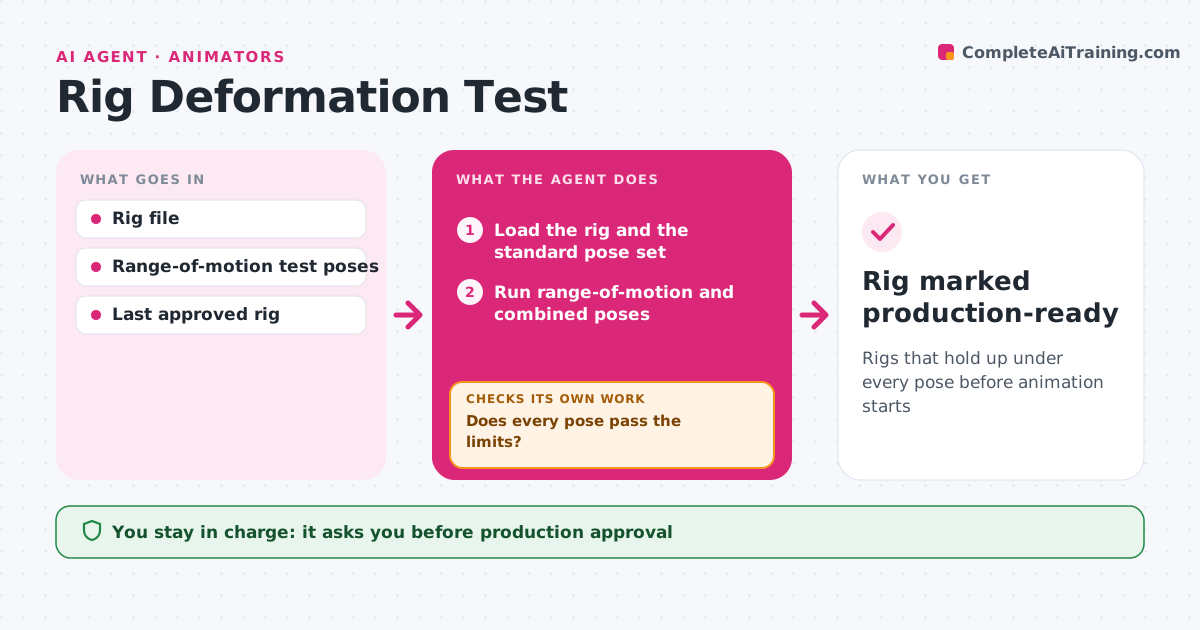
Rigs that hold up under every pose before animation starts
What it does
A rig that breaks in certain poses can ruin many shots before anyone notices. When a rig is updated, this agent runs a standard range-of-motion test. It poses each joint through its full range, plus combined poses like a deep crouch or an arm raise with twist. It renders each pose and checks for mesh intersections, volume loss at elbows and knees, stretching textures and controls that flip. It compares results with the last approved rig version to catch new issues. Problems go to the rigger with frames and joint names. After fixes, it reruns the full test. The lead approves the rig for production. Edge case: a costume piece with its own rig is tested together with the body, not alone.
How it works
Follow the arrows from top to bottom. The orange dashed arrow is the loop: when a check fails, the agent goes back and tries again.
Read the steps as a list
- Rig version published
- Load the rig and the standard pose set
- Run range-of-motion and combined poses
- Render and measure intersections and volume loss
- Does every pose pass the limits?If not: send frames and joint names to the rigger and rerun after fixes. Back to step 3.
- Compare with the last approved rig
- Are there no new issues compared with the last version?If not: report the new issue to the rigger and rerun. Back to step 3.
- Lead approves the rig for productionThe agent waits here for your OK.
- Rig marked production-ready
How it decides
It flags poses with intersection, volume loss or control flips beyond set limits and compares with the last approved version.
- Volume loss over 15% at joints fails
- Any control flip fails
- New issues versus last version are highlighted
Make it yours
Every agent is a starting point. You choose these settings for your own situation.
- Test pose set
- Volume loss limit
- Costume pieces included
- Render quality
What keeps you in control
It always asks you first
- Production approval
Hard limits
- Never edits the rig
- Never publishes rigs
It stops when
- Done: rig approved
- Stop: rig file fails to load
Set it up
We guide you through the set-up, step by step
Members get the full set-up guide for this agent. No technical skills needed: you copy, paste and upload.
- One set of instructions to paste into your AI, with the clicks for ChatGPT, Claude, Microsoft 365 Copilot, Gemini and Grok
- The agent then walks you through connecting your own data, one source at a time
- A downloadable copy with the flow chart, the rules and the full guide