AI agent for network engineers
Routing Anomaly Watch Agent
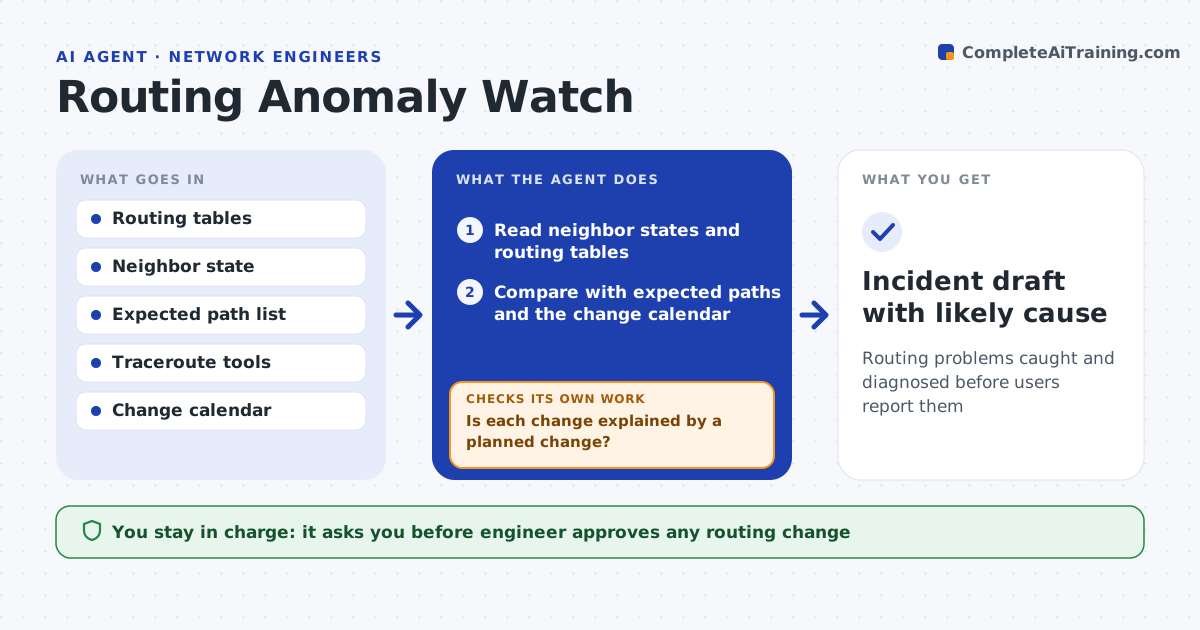
Routing problems caught and diagnosed before users report them
What it does
Route flaps and wrong paths go unnoticed until users report slow or failed access. This agent watches neighbor changes and the routing table and compares them with your expected paths. When something looks wrong, it tests the suspect routes with traceroutes to see where traffic is going. If an anomaly lasts beyond a set time, it opens a draft incident with the likely cause, such as a link flapping or an unexpected route advertisement. It checks again to see whether the anomaly clears on its own. The engineer approves any routing change. Edge case: a route flaps three times in a minute and stays stable, so the agent logs it and watches it without raising an incident.
How it works
Follow the arrows from top to bottom. The orange dashed arrow is the loop: when a check fails, the agent goes back and tries again.
Read the steps as a list
- Routing watch is running
- Read neighbor states and routing tables
- Compare with expected paths and the change calendar
- Is each change explained by a planned change?If not: run traceroutes on the suspect routes. Back to step 2.
- Test whether the path is wrong or only unusual
- Has the anomaly lasted longer than the set time?If not: keep watching and log the event. Back to step 2.
- Find the likely cause such as a flapping link or a bad advertisement
- Open a draft incident with the evidence
- Engineer approves any routing changeThe agent waits here for your OK.
- Incident draft with likely cause
How it decides
An anomaly is raised when a neighbor or route changes outside a change window and persists past the set time.
- Ignore changes inside approved windows
- Raise an anomaly that lasts over five minutes
- Raise at once if traffic goes through an unexpected network
- Log short flaps for pattern review
Make it yours
Every agent is a starting point. You choose these settings for your own situation.
- Persistence time (default: 5 minutes)
- Expected path list
- Alert routing
- Change calendar source
What keeps you in control
It always asks you first
- Engineer approves any routing change
Hard limits
- Never changes routes itself
- Never shuts down an interface
It stops when
- Done: the anomaly is cleared or an incident is handed over
- Stop: monitoring data is unavailable
Set it up
We guide you through the set-up, step by step
Members get the full set-up guide for this agent. No technical skills needed: you copy, paste and upload.
- One set of instructions to paste into your AI, with the clicks for ChatGPT, Claude, Microsoft 365 Copilot, Gemini and Grok
- The agent then walks you through connecting your own data, one source at a time
- A downloadable copy with the flow chart, the rules and the full guide