AI agent for film composers
Royalty Statement Check Agent
Every royalty owed is collected and every work registered correctly
What it does
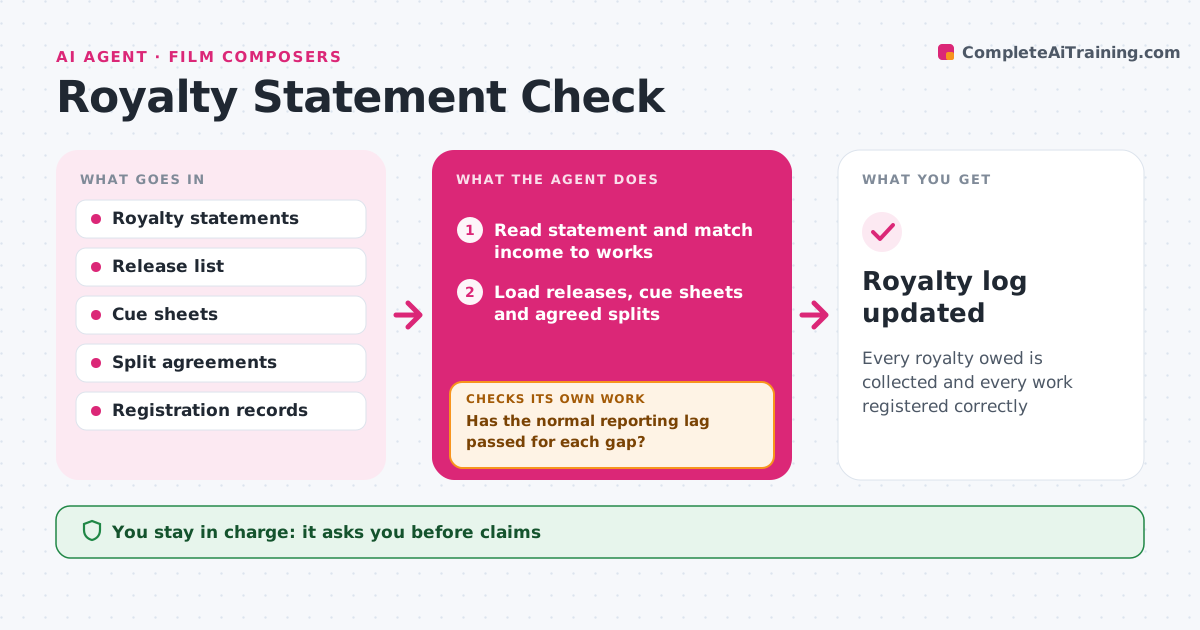
Musicians and composers lose income when a placement is registered wrong or a statement leaves something out, and statements are hard to read. When statements arrive from distributors, performing rights organizations or publishers, this agent reads them and matches income to each work. It compares income with what is expected: known releases, broadcasts, film and TV placements from cue sheets, and agreed splits. It checks every work is registered with the right splits. Gaps, such as a TV placement with no performance income after the usual delay, are listed with evidence. It drafts claims or registration fixes. The musician approves any claim or change. Edge case: income that is late only because of the normal reporting lag is not flagged until the lag has passed.
How it works
Follow the arrows from top to bottom. The orange dashed arrow is the loop: when a check fails, the agent goes back and tries again.
Read the steps as a list
- Statement arrives
- Read statement and match income to works
- Load releases, cue sheets and agreed splits
- Compare income with expected uses and splits
- Has the normal reporting lag passed for each gap?If not: hold the item and recheck on the next statement. Back to step 4.
- Check registrations for each work
- Is all expected income present and are splits right?If not: list the gap with evidence and draft a claim or fix. Back to step 6.
- Musician approves claims and registration changesThe agent waits here for your OK.
- Royalty log updated
How it decides
It flags expected income missing after the normal reporting lag and splits that differ from agreements.
- Wait the usual reporting lag before flagging
- Splits must match signed agreements
- Unregistered works are registered first
Make it yours
Every agent is a starting point. You choose these settings for your own situation.
- Reporting lag per source
- Sources tracked
- Expected uses list
- Claim templates
What keeps you in control
It always asks you first
- Claims
- Registration changes
Hard limits
- Never submits claims without approval
- Never shares split agreements
It stops when
- Done: statement reconciled
- Stop: statement format unreadable
Set it up
We guide you through the set-up, step by step
Members get the full set-up guide for this agent. No technical skills needed: you copy, paste and upload.
- One set of instructions to paste into your AI, with the clicks for ChatGPT, Claude, Microsoft 365 Copilot, Gemini and Grok
- The agent then walks you through connecting your own data, one source at a time
- A downloadable copy with the flow chart, the rules and the full guide