AI agent for office managers
Safety Equipment Inspection Agent
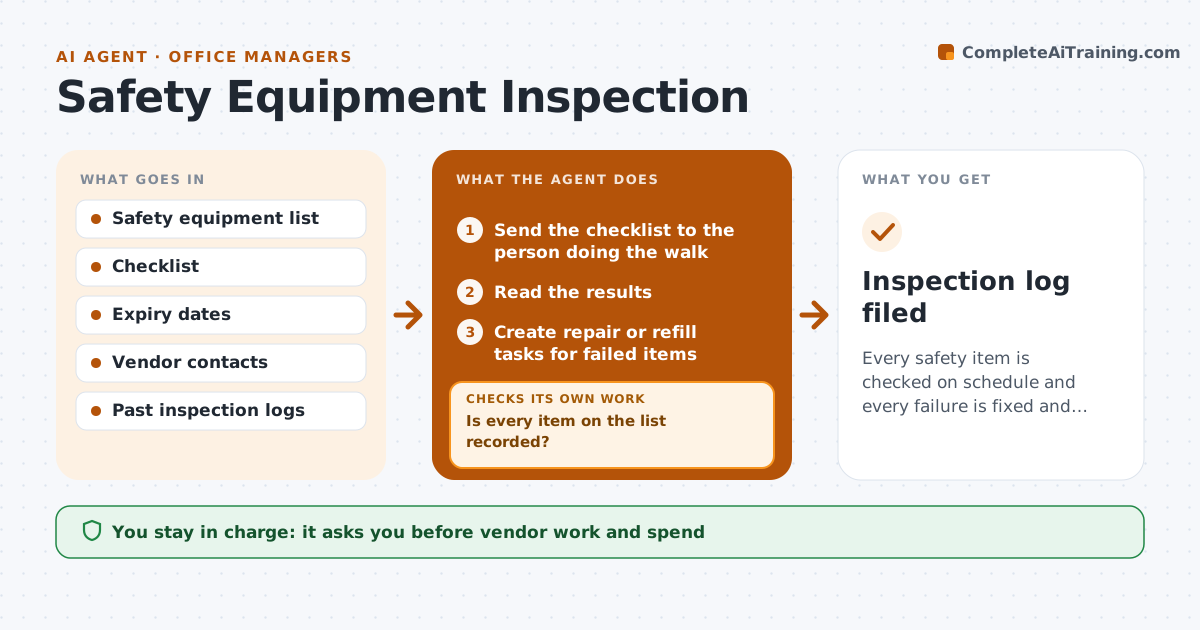
Every safety item is checked on schedule and every failure is fixed and verified
What it does
Extinguishers, first aid kits and exit lights are not checked on time, and gaps are found by an inspector. Each month this agent schedules the safety walk and sends the checklist to the person doing it. It logs the results and creates a repair or refill task for every failed item. On the next check it confirms each earlier fix and reopens any task that is still failing. It also keeps track of expiry dates on items such as extinguisher tags and first aid supplies. The manager approves vendor work and spend. Edge case: an exit light is reported out on a Friday, so the agent marks it urgent and asks for a temporary sign until it is repaired.
How it works
Follow the arrows from top to bottom. The orange dashed arrow is the loop: when a check fails, the agent goes back and tries again.
Read the steps as a list
- Monthly safety walk is due
- Send the checklist to the person doing the walk
- Read the results
- Is every item on the list recorded?If not: ask the walker for the missing items and reread the results. Back to step 2.
- Create repair or refill tasks for failed items
- Manager approves vendor work and spendThe agent waits here for your OK.
- Send the order and track the date
- Read the next check results
- Does each earlier failed item now pass?If not: reopen the task, raise its priority and tell the manager. Back to step 5.
- Inspection log filed
How it decides
An item passes only when the walk records it as present, working and in date. A failed item stays open until a later check passes.
- Mark an exit light failure as urgent
- Flag extinguisher tags older than 12 months
- Reopen any item that fails twice
- Remind weekly about open tasks
Make it yours
Every agent is a starting point. You choose these settings for your own situation.
- Inspection day
- Items on the list
- Reminder frequency
- Spend limit before approval
What keeps you in control
It always asks you first
- Vendor work and spend
Hard limits
- Never mark a fix done without a later check
- Never approve spend
It stops when
- Done: all items pass on the latest check
- Stop: walk is not carried out
Set it up
We guide you through the set-up, step by step
Members get the full set-up guide for this agent. No technical skills needed: you copy, paste and upload.
- One set of instructions to paste into your AI, with the clicks for ChatGPT, Claude, Microsoft 365 Copilot, Gemini and Grok
- The agent then walks you through connecting your own data, one source at a time
- A downloadable copy with the flow chart, the rules and the full guide