AI agent for pharmaceutical sales representatives
Sample Inventory Reconciliation Agent
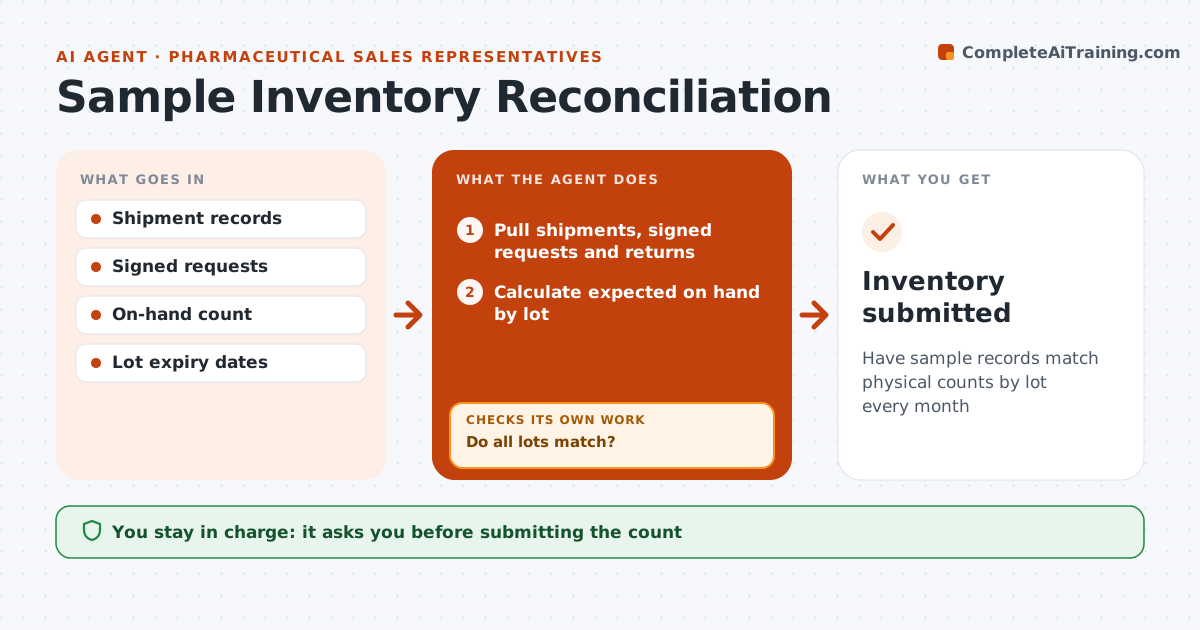
Have sample records match physical counts by lot every month
What it does
Pharmaceutical reps must account for every drug sample by lot, and gaps can trigger formal investigations. Each month this agent pulls shipments received, signed provider requests and returns, then calculates the expected on-hand quantity for each product and lot. It compares that with the rep's physical count and flags differences, missing signatures and expired lots. For each difference, it looks for a cause, such as a request logged against the wrong lot or a transfer between reps that was never recorded. After the rep corrects records, it checks again. Gaps that remain unexplained are not forced to match; they go to the rep for the company's official discrepancy process. The rep approves every correction and submits the count. Edge case: expired samples must be returned through the official process and are never counted as given out to providers.
How it works
Follow the arrows from top to bottom. The orange dashed arrow is the loop: when a check fails, the agent goes back and tries again.
Read the steps as a list
- Monthly sample count
- Pull shipments, signed requests and returns
- Calculate expected on hand by lot
- Compare with the rep's physical count
- Do all lots match?If not: look for wrong lot entries or unrecorded transfers and correct. Back to step 3.
- Rep approves corrections and submits the countThe agent waits here for your OK.
- Inventory submitted
How it decides
Expected on hand equals received minus signed requests minus returns. Any lot difference is investigated.
- Expired lots go to returns
- Requests without signature flagged
- Unexplained gaps go to the official process
Make it yours
Every agent is a starting point. You choose these settings for your own situation.
- Count schedule
- Products covered
- Expiry warning window
What keeps you in control
It always asks you first
- Submitting the count
- Any correction
Hard limits
- Never alters signed requests
- Never hides gaps
It stops when
- Done: count submitted
- Stop: shipment records missing
Set it up
We guide you through the set-up, step by step
Members get the full set-up guide for this agent. No technical skills needed: you copy, paste and upload.
- One set of instructions to paste into your AI, with the clicks for ChatGPT, Claude, Microsoft 365 Copilot, Gemini and Grok
- The agent then walks you through connecting your own data, one source at a time
- A downloadable copy with the flow chart, the rules and the full guide