AI agent for headteachers
School Event Planning Logistics Agent
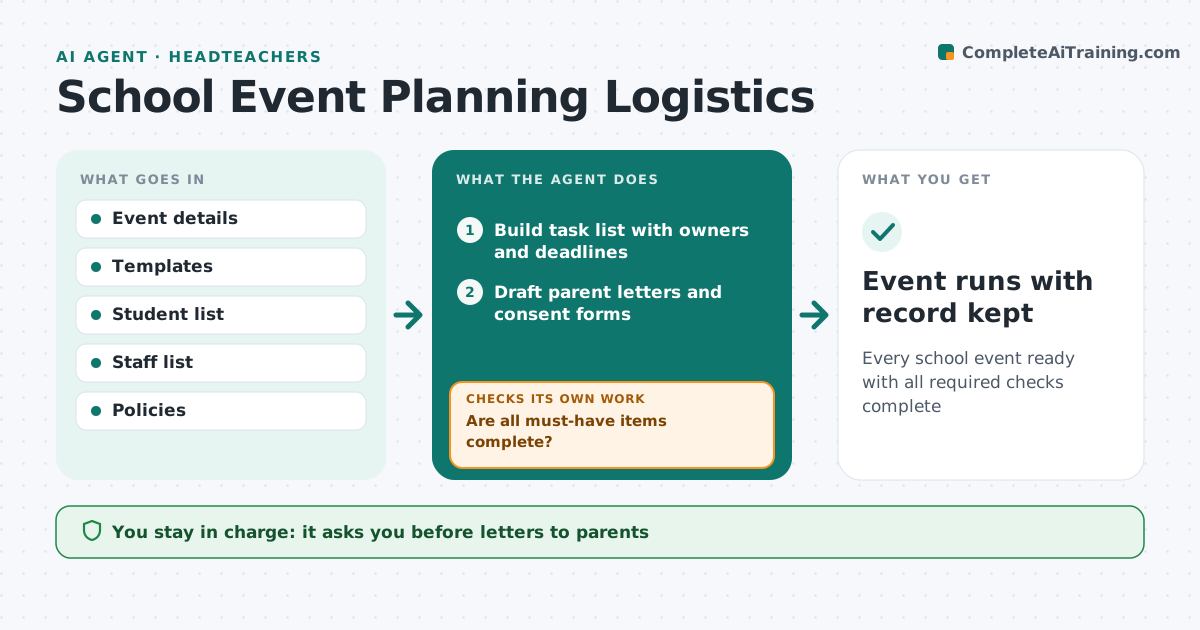
Every school event ready with all required checks complete
What it does
Trips, sports days and open evenings need staff, rooms, consent forms, risk assessments and parent letters, and one missing piece can cancel the event. This agent builds the task list from an event template, assigns owners and deadlines, and drafts parent letters and consent forms for the leader to approve. It then tracks consents, staffing and the risk assessment. Before the event it checks every must-have item: consent from each student, staff ratios under policy, a signed risk assessment and medical plans where needed. If something is missing, it chases the owner or family and checks again. Students without consent stay at school. The leader gives the final go-ahead. Edge case: a student needs medication on a trip, so the agent adds a medical plan check before departure.
How it works
Follow the arrows from top to bottom. The orange dashed arrow is the loop: when a check fails, the agent goes back and tries again.
Read the steps as a list
- Event is added
- Build task list with owners and deadlines
- Draft parent letters and consent forms
- Leader approves lettersThe agent waits here for your OK.
- Track consents, staffing and risk assessment
- Are all must-have items complete?If not: chase owners and families and recheck. Back to step 5.
- Leader gives the go-aheadThe agent waits here for your OK.
- Event runs with record kept
How it decides
It requires all must-have items, such as consent, ratios and signed risk assessment, before recommending go-ahead.
- No consent means the student stays at school
- Staff ratios follow policy
- Medical plans checked for every student who needs one
Make it yours
Every agent is a starting point. You choose these settings for your own situation.
- Event templates
- Staff ratio rules
- Reminder schedule
- Approval steps
What keeps you in control
It always asks you first
- Letters to parents
- Event go-ahead
Hard limits
- Never sends letters itself
- Medical information shared only with trip staff
It stops when
- Done: event completed
- Stop: must-haves missing on deadline, postpone
Set it up
We guide you through the set-up, step by step
Members get the full set-up guide for this agent. No technical skills needed: you copy, paste and upload.
- One set of instructions to paste into your AI, with the clicks for ChatGPT, Claude, Microsoft 365 Copilot, Gemini and Grok
- The agent then walks you through connecting your own data, one source at a time
- A downloadable copy with the flow chart, the rules and the full guide