AI agent for plant managers
Scrap and Rework Cost Review Agent
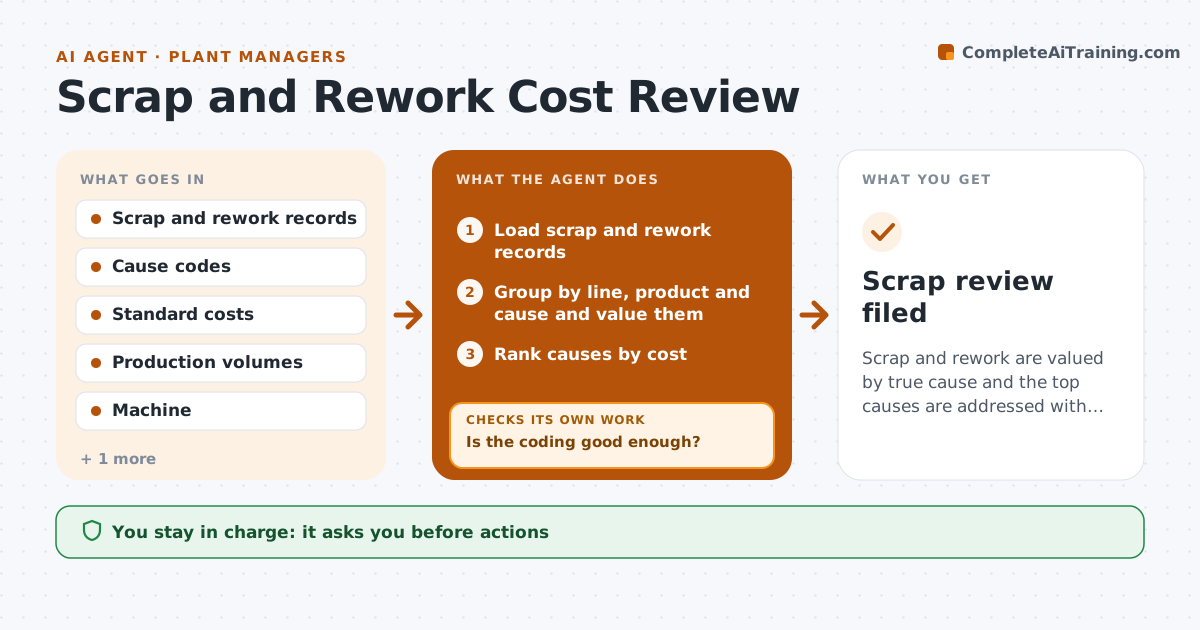
Scrap and rework are valued by true cause and the top causes are addressed with evidence
What it does
Scrap costs are known in total but not by cause, so fixes are guesses. Every week this agent groups scrap and rework by line, product and cause code and values them with standard costs. It checks the coding quality, such as too many entries under 'other' or causes that do not fit the line. Doubtful coding is sent back to the supervisors and the numbers are recalculated. It traces the top causes to records such as machine logs and material lots. It proposes actions and later checks whether the scrap dropped. The manager approves actions. Edge case: one line puts 40 percent of scrap under 'other', so the agent recodes only after the supervisor confirms.
How it works
Follow the arrows from top to bottom. The orange dashed arrow is the loop: when a check fails, the agent goes back and tries again.
Read the steps as a list
- Week closes
- Load scrap and rework records
- Group by line, product and cause and value them
- Is the coding good enough?If not: send doubtful entries to supervisors and recalculate with their answers. Back to step 3.
- Rank causes by cost
- Trace top causes to machine and material records
- Propose actions for the top causes
- Manager approves actionsThe agent waits here for your OK.
- Measure scrap in the following weeks
- Did scrap for that cause fall?If not: propose a second action and retest. Back to step 7.
- Scrap review filed
How it decides
Coding is accepted when 'other' stays under the limit and the causes fit the line. The agent ranks causes by cost, not count.
- Accept 'other' under 10 percent of scrap
- Value at standard cost
- Trace causes that exceed 15 percent of total cost
- Judge an action after 3 weeks
Make it yours
Every agent is a starting point. You choose these settings for your own situation.
- Cause code limit (default 10 percent)
- Cost basis
- Action review period (default 3 weeks)
- Lines covered
What keeps you in control
It always asks you first
- Actions
Hard limits
- Never change records on its own
- Never assign blame to individuals
It stops when
- Done: top causes addressed and measured
- Stop: records are missing for the week
Set it up
We guide you through the set-up, step by step
Members get the full set-up guide for this agent. No technical skills needed: you copy, paste and upload.
- One set of instructions to paste into your AI, with the clicks for ChatGPT, Claude, Microsoft 365 Copilot, Gemini and Grok
- The agent then walks you through connecting your own data, one source at a time
- A downloadable copy with the flow chart, the rules and the full guide