AI agent for security engineers
Security Incident Timeline Agent
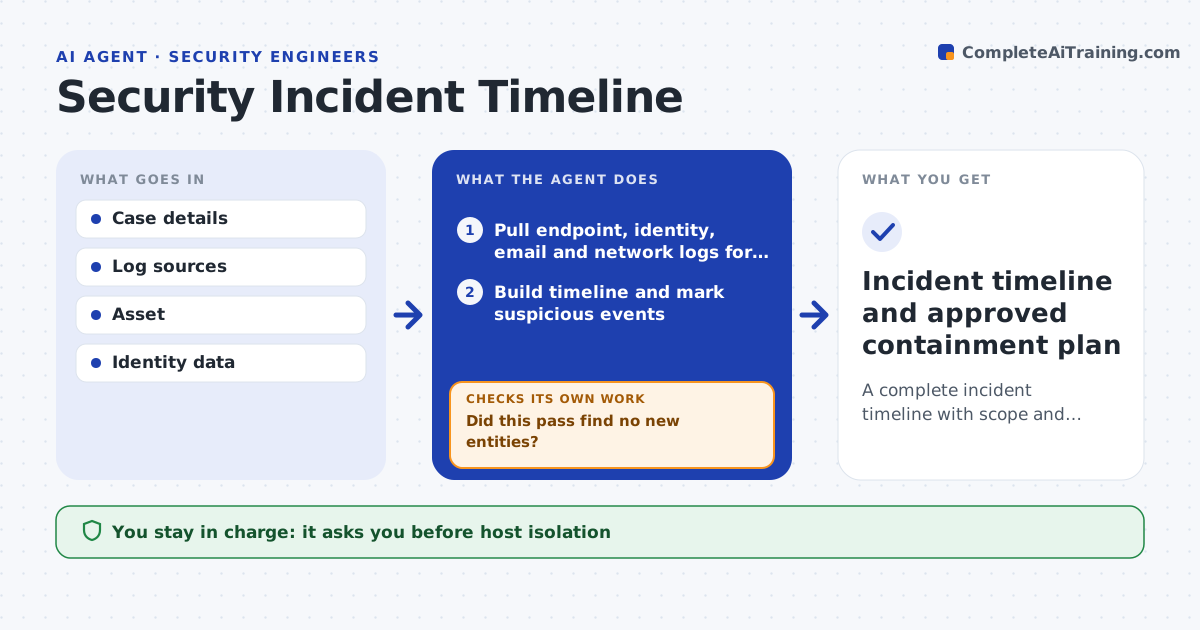
A complete incident timeline with scope and proposed containment
What it does
When an incident is opened, investigators need to know quickly what happened, when and where, but logs live in five different tools. This agent pulls endpoint, identity, email and network logs for the affected users and hosts and builds one timeline, marking suspicious events. It looks for the entry point and any spread. Every new host or account it finds goes back into the search, and it repeats until a pass finds no new related entities. Activity from known admin tools is labeled as possibly legitimate and confirmed with the admin team. It then drafts a scope summary and containment steps, such as isolating a host or resetting credentials. A security engineer must approve every containment action; the agent never executes one alone. Edge case: a shared service account that appears everywhere is flagged for review rather than expanding the search without limit.
How it works
Follow the arrows from top to bottom. The orange dashed arrow is the loop: when a check fails, the agent goes back and tries again.
Read the steps as a list
- Incident case opened
- Pull endpoint, identity, email and network logs for known entities
- Build timeline and mark suspicious events
- Identify new related hosts and accounts
- Did this pass find no new entities?If not: add the new entities and search again. Back to step 2.
- Draft scope summary and containment steps
- Security engineer approves containment actionsThe agent waits here for your OK.
- Incident timeline and approved containment plan
How it decides
It expands the search from each newly found host or account and treats the scope as complete when a pass finds no new entities.
- Each new entity widens the search
- Admin tool activity is confirmed with owners
- Containment is proposed, never executed alone
Make it yours
Every agent is a starting point. You choose these settings for your own situation.
- Log sources connected
- Lookback window (default 14 days)
- Maximum search passes (default 6)
- Containment playbook
What keeps you in control
It always asks you first
- Host isolation
- Credential resets
- Notifying anyone outside security
Hard limits
- Read-only access to logs
- No containment action without approval
It stops when
- Done: scope complete and containment approved
- Stop: log gaps prevent scoping, report what is missing
Set it up
We guide you through the set-up, step by step
Members get the full set-up guide for this agent. No technical skills needed: you copy, paste and upload.
- One set of instructions to paste into your AI, with the clicks for ChatGPT, Claude, Microsoft 365 Copilot, Gemini and Grok
- The agent then walks you through connecting your own data, one source at a time
- A downloadable copy with the flow chart, the rules and the full guide