AI agent for field service technicians
Service Report Completeness Agent
A complete, clear service report filed before the technician leaves site
What it does
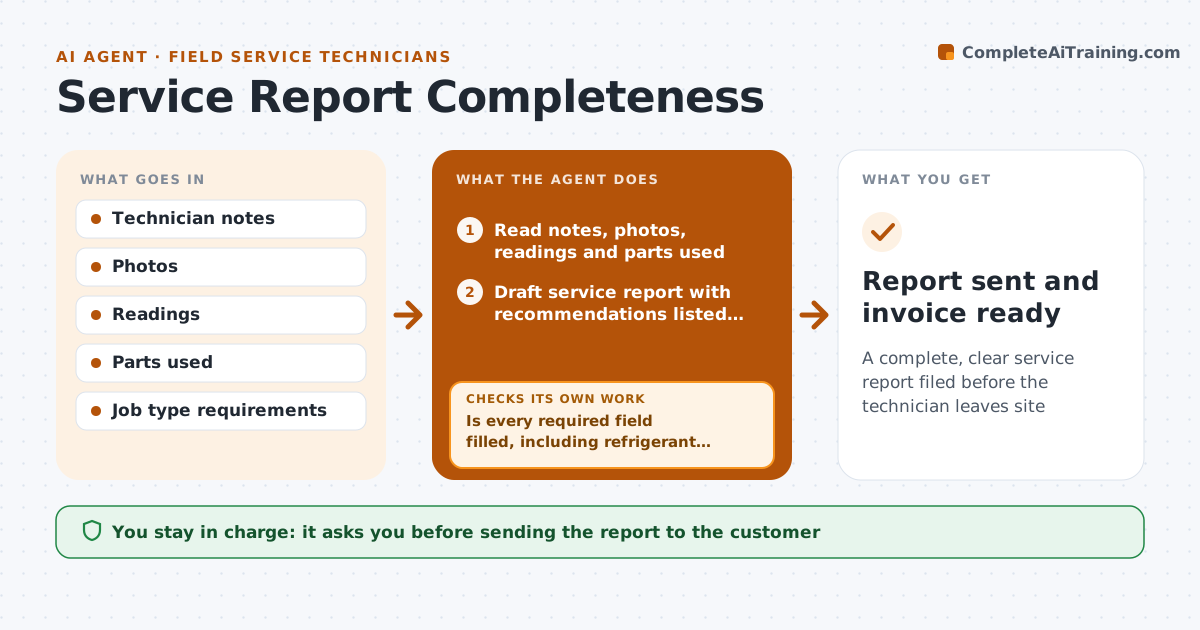
Every service call ends with a report the customer, the office and sometimes the maker rely on, and missing details cause rejected warranty claims and billing delays. When a job is marked complete, this agent reads the technician's notes, photos, readings and parts used and drafts a clear report, listing recommendations separately from work done. It checks the report against the required fields for that job type, such as serial numbers, before and after readings and the customer signature. Refrigerant added or recovered needs the amount and cylinder number for compliance logs. It also checks that parts listed match van stock movements. If something is missing, it asks the technician while they are still on site. The technician approves the report before it goes to the customer, and the invoice is prepared. Edge case: a customer who refuses to sign gets a note with the time and reason.
How it works
Follow the arrows from top to bottom. The orange dashed arrow is the loop: when a check fails, the agent goes back and tries again.
Read the steps as a list
- Job marked complete
- Read notes, photos, readings and parts used
- Draft service report with recommendations listed separately
- Check required fields for the job type
- Is every required field filled, including refrigerant details?If not: ask the technician for the missing item while on site. Back to step 3.
- Compare parts listed with van stock movements
- Do parts used match van stock changes?If not: ask the technician to correct the parts list. Back to step 3.
- Technician approves the reportThe agent waits here for your OK.
- Report sent and invoice ready
How it decides
A report is complete only when every required field for its job type is filled and parts match van stock movements.
- Refrigerant entries need amount and cylinder number
- Recommendations are listed separately from work done
- Parts must match van stock changes
Make it yours
Every agent is a starting point. You choose these settings for your own situation.
- Required fields per job type
- Report layout
- Signature method
- Recommendation wording
What keeps you in control
It always asks you first
- Sending the report to the customer
Hard limits
- Never invents readings
- Never sends reports without technician approval
It stops when
- Done: report approved and filed
- Stop: customer not available to sign, mark for follow-up
Set it up
We guide you through the set-up, step by step
Members get the full set-up guide for this agent. No technical skills needed: you copy, paste and upload.
- One set of instructions to paste into your AI, with the clicks for ChatGPT, Claude, Microsoft 365 Copilot, Gemini and Grok
- The agent then walks you through connecting your own data, one source at a time
- A downloadable copy with the flow chart, the rules and the full guide