AI agent for security engineers
SIEM Alert Rule Tuning Agent
Fewer false alerts with no loss of real detections
What it does
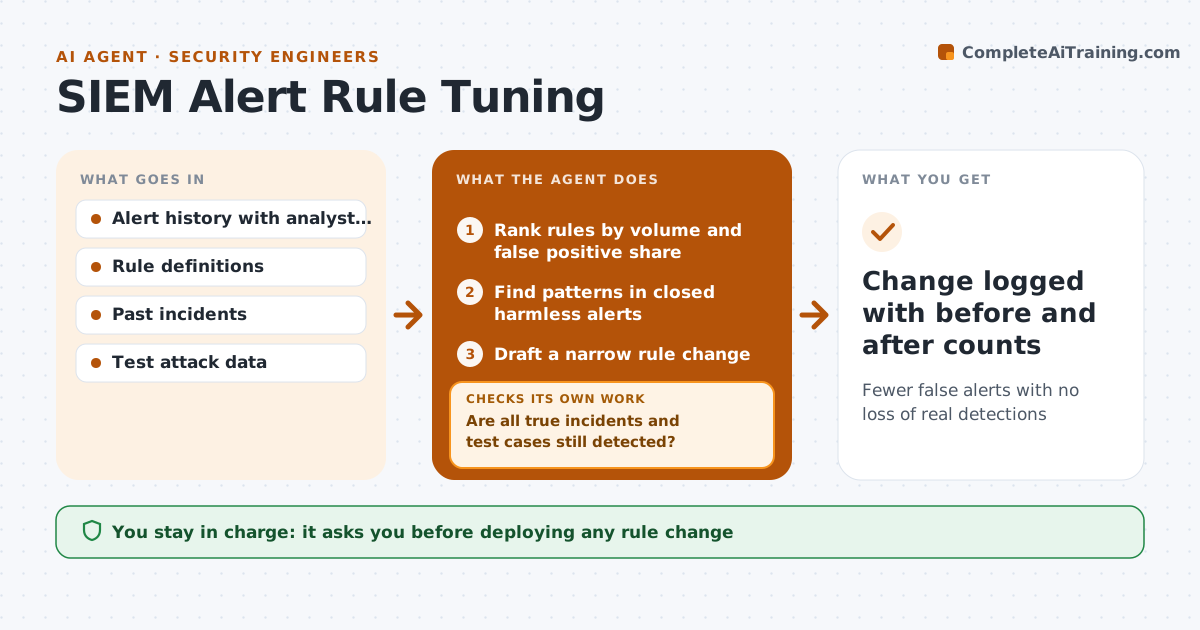
Many alerts in a security monitoring system are false positives, and noisy rules bury real threats and burn out analysts. Each week this agent ranks rules by alert volume and by the share closed as harmless. It reads the closed alerts for patterns, such as one backup server always triggering the same rule. It drafts a tuned rule, for example excluding that server for that action only. Before proposing it, it replays the tuned rule against the last 90 days and confirms it would still catch every true incident and test case. If any true positive would be missed, it narrows the change and replays again. You approve every rule change before it goes live. Edge case: a rule with no alerts at all is tested to see whether it is broken, not just quiet.
How it works
Follow the arrows from top to bottom. The orange dashed arrow is the loop: when a check fails, the agent goes back and tries again.
Read the steps as a list
- Weekly tuning review
- Rank rules by volume and false positive share
- Find patterns in closed harmless alerts
- Draft a narrow rule change
- Replay the tuned rule on 90 days of data and test cases
- Are all true incidents and test cases still detected?If not: narrow the exclusion and replay again. Back to step 4.
- SOC lead approves the rule changeThe agent waits here for your OK.
- Change logged with before and after counts
How it decides
A rule is tuned when most of its alerts are closed as harmless and a clear pattern explains them. A change is proposed only if replay keeps every true positive.
- Tune rules where over 80% of alerts are closed as harmless
- Exclusions must be as narrow as possible
- Flag silent rules for a health check
Make it yours
Every agent is a starting point. You choose these settings for your own situation.
- False positive share that triggers tuning (default 80%)
- Replay period (default 90 days)
- Rules excluded from tuning
- Approver
What keeps you in control
It always asks you first
- Deploying any rule change
Hard limits
- Changes stay in draft until approved
- Never disables a rule entirely
It stops when
- Done: top noisy rules tuned or reviewed
- Stop: alert verdicts are missing
Set it up
We guide you through the set-up, step by step
Members get the full set-up guide for this agent. No technical skills needed: you copy, paste and upload.
- One set of instructions to paste into your AI, with the clicks for ChatGPT, Claude, Microsoft 365 Copilot, Gemini and Grok
- The agent then walks you through connecting your own data, one source at a time
- A downloadable copy with the flow chart, the rules and the full guide