AI agent for presentation designers
Slide Deck Client Revision Round Agent
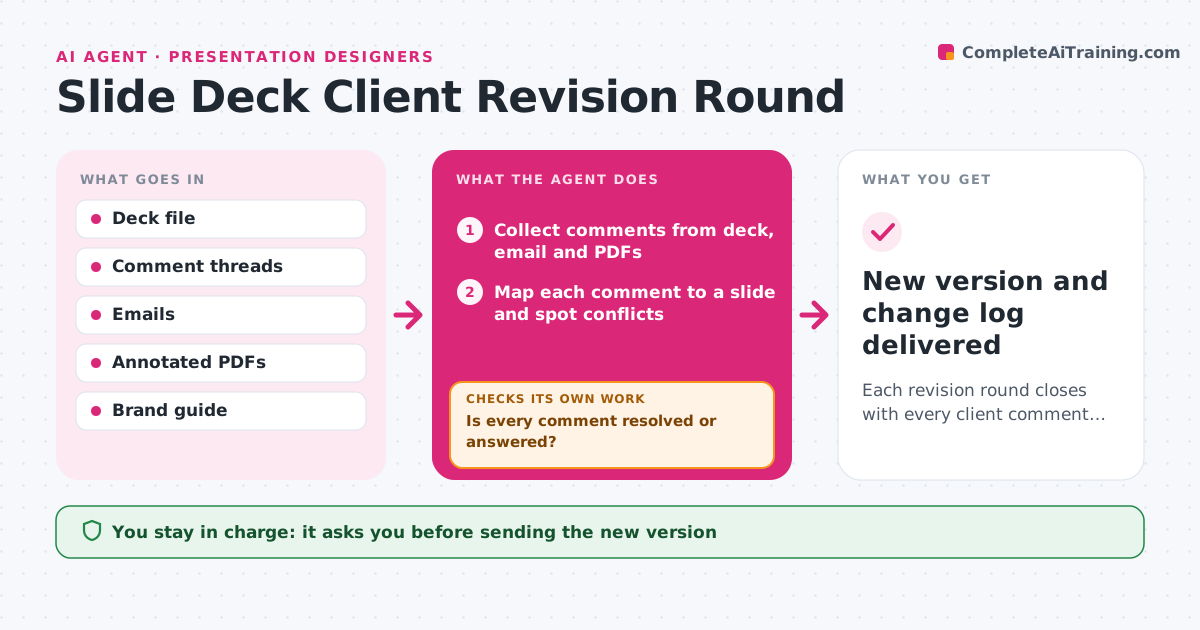
Each revision round closes with every client comment resolved or answered
What it does
Revision rounds go wrong when feedback is spread across email, slide comments and annotated PDFs. This agent gathers every comment for the round, maps each one to a slide and spots conflicts, such as two reviewers asking for opposite changes. It applies clear text and layout fixes in a working copy and lists the items that need the designer's judgment. It does not apply a change that breaks the brand guide; it drafts a short note explaining why and offers an option. It then compares the new version with the full comment list and checks that every item is resolved or answered. Anything still open goes back to the designer. It writes a change log for the client and counts the round against the contract. The designer reviews and sends the new version. Edge case: two reviewers in conflict both see their options laid out.
How it works
Follow the arrows from top to bottom. The orange dashed arrow is the loop: when a check fails, the agent goes back and tries again.
Read the steps as a list
- Client feedback arrives
- Collect comments from deck, email and PDFs
- Map each comment to a slide and spot conflicts
- Apply clear changes in a working copy
- Is every comment resolved or answered?If not: list the open items and route them to the designer. Back to step 3.
- Write change log for the client
- Designer reviews and sends the new versionThe agent waits here for your OK.
- New version and change log delivered
How it decides
It applies changes that are clear and within brand rules. Conflicting or subjective requests go to the designer with options.
- Route conflicting comments to the designer with both options
- Refuse changes that break the brand guide and explain why
- Count revision rounds against the contract
Make it yours
Every agent is a starting point. You choose these settings for your own situation.
- Revision rounds included in the contract (default 3)
- Which feedback channels to read
- Change log format
- What counts as a judgment call
What keeps you in control
It always asks you first
- Sending the new version
- Billing extra rounds
Hard limits
- Works in a copy, never the client master
- Never sends to the client without approval
It stops when
- Done: all items resolved and version sent
- Stop: revision rounds exceed contract; ask designer about billing
Set it up
We guide you through the set-up, step by step
Members get the full set-up guide for this agent. No technical skills needed: you copy, paste and upload.
- One set of instructions to paste into your AI, with the clicks for ChatGPT, Claude, Microsoft 365 Copilot, Gemini and Grok
- The agent then walks you through connecting your own data, one source at a time
- A downloadable copy with the flow chart, the rules and the full guide