AI agent for database administrators
Slow Query Optimization Agent
The heaviest queries made faster with proven, safe changes
What it does
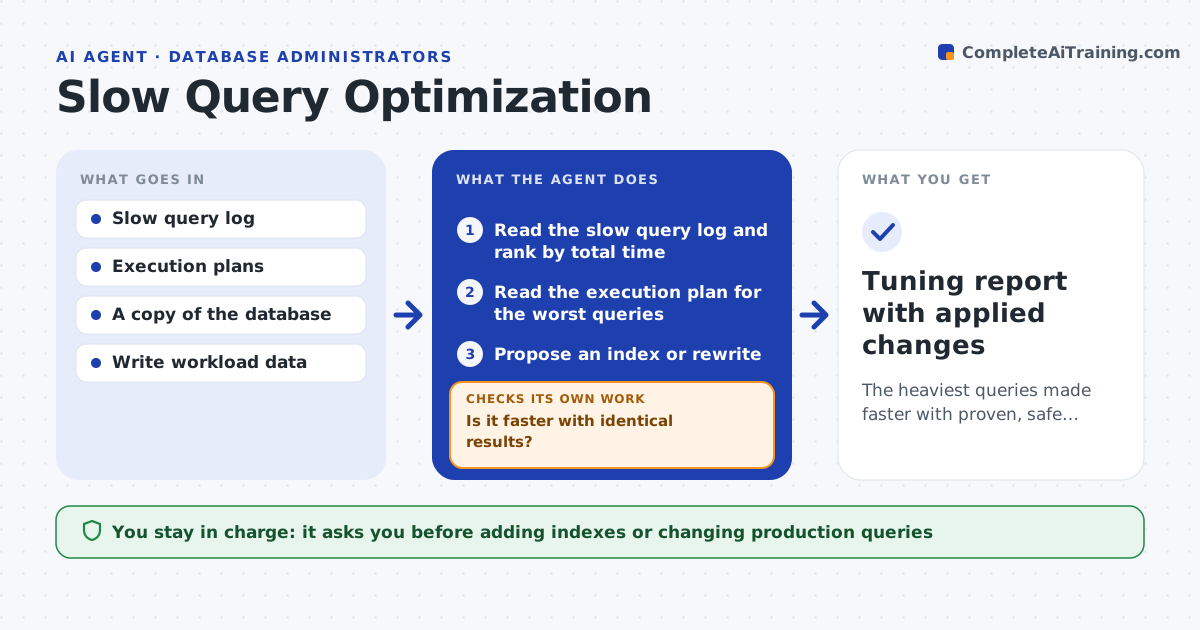
Slow queries bog down a shared database and its reports, and tuning them by hand needs deep expertise. This agent reads the slow query log, ranks queries by total time used, and for the worst ones reads the execution plan to find the cause, such as a missing index or a full table scan. It proposes a fix, like an index or a rewrite, and tests it on a copy of the database. It measures time before and after and checks that the results are identical. If the fix does not help or changes the output, it tries another approach. It also estimates the storage and write cost of any new index. You approve changes to the production database. Edge case: an index that speeds one query but slows many writes is flagged with the trade-off, not applied.
How it works
Follow the arrows from top to bottom. The orange dashed arrow is the loop: when a check fails, the agent goes back and tries again.
Read the steps as a list
- Weekly slow query review
- Read the slow query log and rank by total time
- Read the execution plan for the worst queries
- Propose an index or rewrite
- Test the fix on a copy and measure before and after
- Is it faster with identical results?If not: try another approach and re-test. Back to step 4.
- DBA approves the change on productionThe agent waits here for your OK.
- Tuning report with applied changes
How it decides
It targets the queries using the most total time and accepts a fix only when it is faster on the copy and returns identical results.
- Prioritize queries by total time, not single runtime
- Accept a fix only if output is unchanged
- Flag indexes that slow writes more than they help reads
Make it yours
Every agent is a starting point. You choose these settings for your own situation.
- How many top queries to tune
- Minimum speedup to apply a fix
- Write-cost limit for new indexes
- Review schedule
What keeps you in control
It always asks you first
- Adding indexes or changing production queries
Hard limits
- Never changes production without approval
- Tests every change on a copy first
It stops when
- Done: top queries tuned or trade-offs flagged
- Stop: no database copy to test on
Set it up
We guide you through the set-up, step by step
Members get the full set-up guide for this agent. No technical skills needed: you copy, paste and upload.
- One set of instructions to paste into your AI, with the clicks for ChatGPT, Claude, Microsoft 365 Copilot, Gemini and Grok
- The agent then walks you through connecting your own data, one source at a time
- A downloadable copy with the flow chart, the rules and the full guide