AI agent for plant managers
Solar PV Performance Monitoring Agent
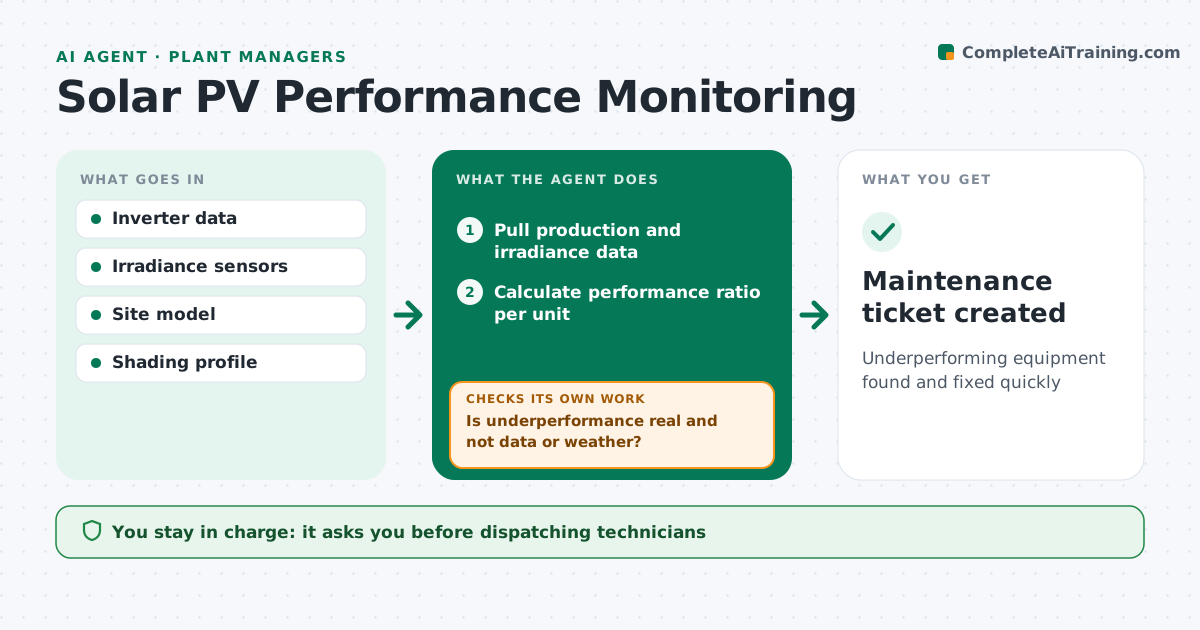
Underperforming equipment found and fixed quickly
What it does
Solar sites can lose output quietly through soiling, inverter faults or failed strings. Each day this agent pulls production and irradiance data and calculates the performance ratio for each inverter and string. It compares units with each other and with the expected model. When one underperforms, it first checks whether the cause is a data problem or seasonal shading at that time of year. If the loss is real, it classifies the likely cause, estimates lost energy and revenue, and drafts a maintenance ticket. The engineer approves every ticket before a crew is sent. Problems the agent could not confirm are rechecked the next day. Edge case: snow cover across all inverters on the same day is noted as weather, not a fault, so no ticket is raised.
How it works
Follow the arrows from top to bottom. The orange dashed arrow is the loop: when a check fails, the agent goes back and tries again.
Read the steps as a list
- Daily check
- Pull production and irradiance data
- Calculate performance ratio per unit
- Is underperformance real and not data or weather?If not: mark as data or weather. Back to step 2.
- Classify causes and estimate losses
- Engineer approves ticketThe agent waits here for your OK.
- Maintenance ticket created
How it decides
It flags units whose performance ratio is below peers by more than the threshold for several days.
- Compare with peer inverters
- Ignore site-wide weather events
- Estimate revenue loss
Make it yours
Every agent is a starting point. You choose these settings for your own situation.
- Threshold (default 5%)
- Days before alert
- Revenue rate
- Ticket format
What keeps you in control
It always asks you first
- Dispatching technicians
Hard limits
- Never changes inverter settings
It stops when
- Done: tickets created
- Stop: data feed down
Set it up
We guide you through the set-up, step by step
Members get the full set-up guide for this agent. No technical skills needed: you copy, paste and upload.
- One set of instructions to paste into your AI, with the clicks for ChatGPT, Claude, Microsoft 365 Copilot, Gemini and Grok
- The agent then walks you through connecting your own data, one source at a time
- A downloadable copy with the flow chart, the rules and the full guide