AI agent for solutions architects
Solution Requirements Gap Agent
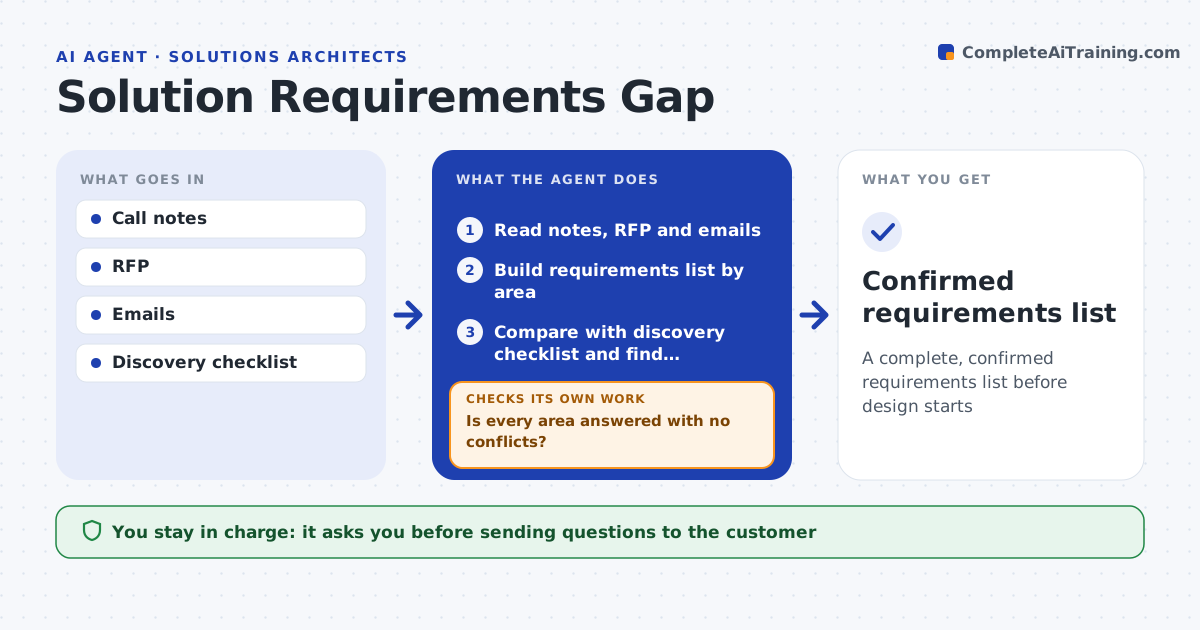
A complete, confirmed requirements list before design starts
What it does
Discovery calls and RFPs leave many unanswered questions about volumes, integrations, security and performance needs, and those gaps become costly surprises later. After a call or when an RFP arrives, this agent reads the notes, documents and emails and builds a requirements list by area. It compares the list with a standard discovery checklist, where non-functional needs are mandatory areas. Each area needs at least one confirmed answer. It writes missing or unclear items as plain questions, and raises conflicting numbers as questions too. The architect approves the question list before it is sent. When answers come back, it updates the list and checks again. If gaps remain, it drafts follow-up questions and loops back. Assumptions are labeled clearly. Edge case: two documents that state different user counts are raised as a conflict, never averaged.
How it works
Follow the arrows from top to bottom. The orange dashed arrow is the loop: when a check fails, the agent goes back and tries again.
Read the steps as a list
- Discovery call ends or RFP arrives
- Read notes, RFP and emails
- Build requirements list by area
- Compare with discovery checklist and find conflicts
- Architect approves the question list before sendingThe agent waits here for your OK.
- Update list with customer answers
- Is every area answered with no conflicts?If not: draft follow-up questions for remaining gaps. Back to step 4.
- Confirmed requirements list
How it decides
Each checklist area must have at least one confirmed answer; conflicting numbers become questions.
- Conflicting numbers are always raised
- Non-functional needs are mandatory areas
- Assumptions are labeled as such
Make it yours
Every agent is a starting point. You choose these settings for your own situation.
- Discovery checklist
- Requirement areas
- Where answers are logged
- Question format
What keeps you in control
It always asks you first
- Sending questions to the customer
Hard limits
- Never sends to customers itself
- Never commits to scope
It stops when
- Done: list confirmed
- Stop: customer cannot answer, record assumptions for approval
Set it up
We guide you through the set-up, step by step
Members get the full set-up guide for this agent. No technical skills needed: you copy, paste and upload.
- One set of instructions to paste into your AI, with the clicks for ChatGPT, Claude, Microsoft 365 Copilot, Gemini and Grok
- The agent then walks you through connecting your own data, one source at a time
- A downloadable copy with the flow chart, the rules and the full guide