AI agent for animators
Storyboard Animatic Timing Agent
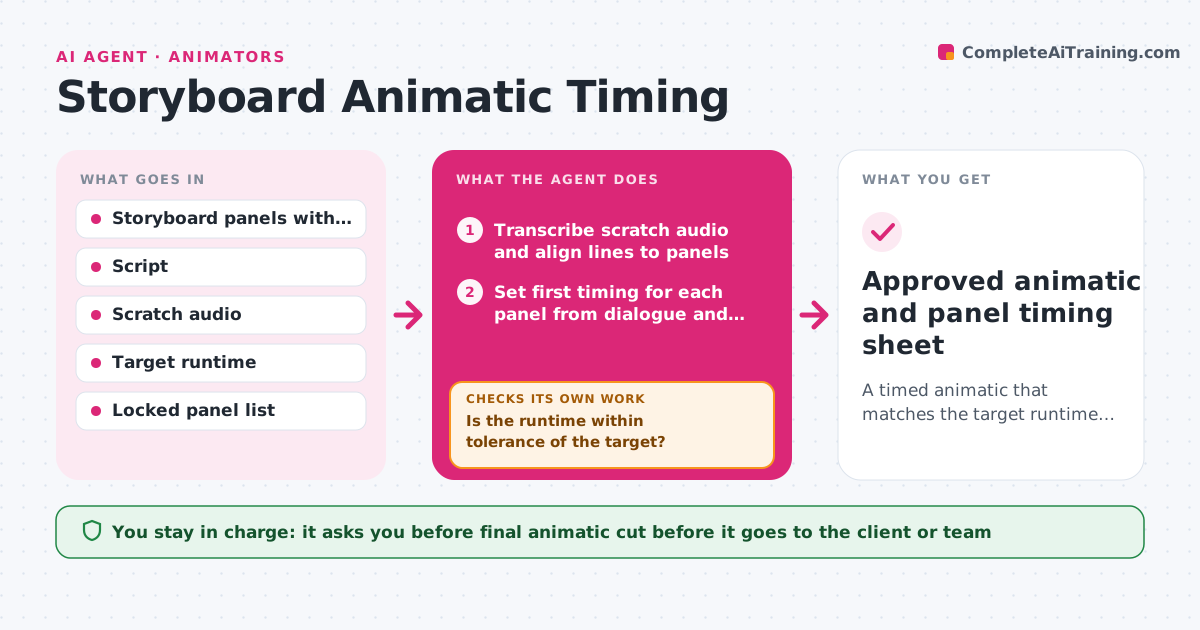
A timed animatic that matches the target runtime with all dialogue fitting its panels
What it does
Early in a project, animators turn storyboard panels into an animatic, and timing is often wrong until several passes later. This agent reads the panels, the script and the scratch dialogue track, and sets a first timing for each panel from the line length and action notes. It then adds up shot lengths and compares them with the target runtime. If the cut runs long, it suggests trims on holds and establishing panels first, not on dialogue. It checks that every line of dialogue still fits inside its panels after trimming and that no panel is shorter than the minimum readable time. It exports the timed animatic for review, and the director or animator approves the cut. Edge case: a joke needs a long pause, so the agent respects panels marked as locked.
How it works
Follow the arrows from top to bottom. The orange dashed arrow is the loop: when a check fails, the agent goes back and tries again.
Read the steps as a list
- Panels and scratch audio uploaded
- Transcribe scratch audio and align lines to panels
- Set first timing for each panel from dialogue and action notes
- Sum shot lengths and compare with target runtime
- Propose trims to holds and establishing panels
- Is the runtime within tolerance of the target?If not: take the next trim from the list; if no trims remain, list scenes that could be cut for the director. Back to step 5.
- Does every dialogue line fit its panels and every panel meet the minimum time?If not: lengthen the affected panels and rerun the trim pass. Back to step 3.
- Export timed animatic and timing sheet
- Director approves the animatic cutThe agent waits here for your OK.
- Approved animatic and panel timing sheet
How it decides
Panel length starts from dialogue duration plus action notes. When over target, it trims holds and establishing shots before dialogue panels and never trims locked panels.
- Runtime is on target within 3%
- No panel shorter than 12 frames unless marked fast cut
- Trim holds before establishing shots, and establishing shots before dialogue panels
- Never trim panels on the locked list
Make it yours
Every agent is a starting point. You choose these settings for your own situation.
- Target runtime and tolerance (default 3%)
- Minimum panel length (default 12 frames)
- Frame rate (default 24)
- Locked panel list
- Export format for the timing sheet
What keeps you in control
It always asks you first
- Final animatic cut before it goes to the client or team
Hard limits
- Never delete panels, only change their timing
- Never alter locked panels
It stops when
- Done: runtime on target and all checks pass
- Stop: target cannot be met without cutting a scene, sent to director
Set it up
We guide you through the set-up, step by step
Members get the full set-up guide for this agent. No technical skills needed: you copy, paste and upload.
- One set of instructions to paste into your AI, with the clicks for ChatGPT, Claude, Microsoft 365 Copilot, Gemini and Grok
- The agent then walks you through connecting your own data, one source at a time
- A downloadable copy with the flow chart, the rules and the full guide