AI agent for music teachers
Studio Billing and Make-up Lesson Agent
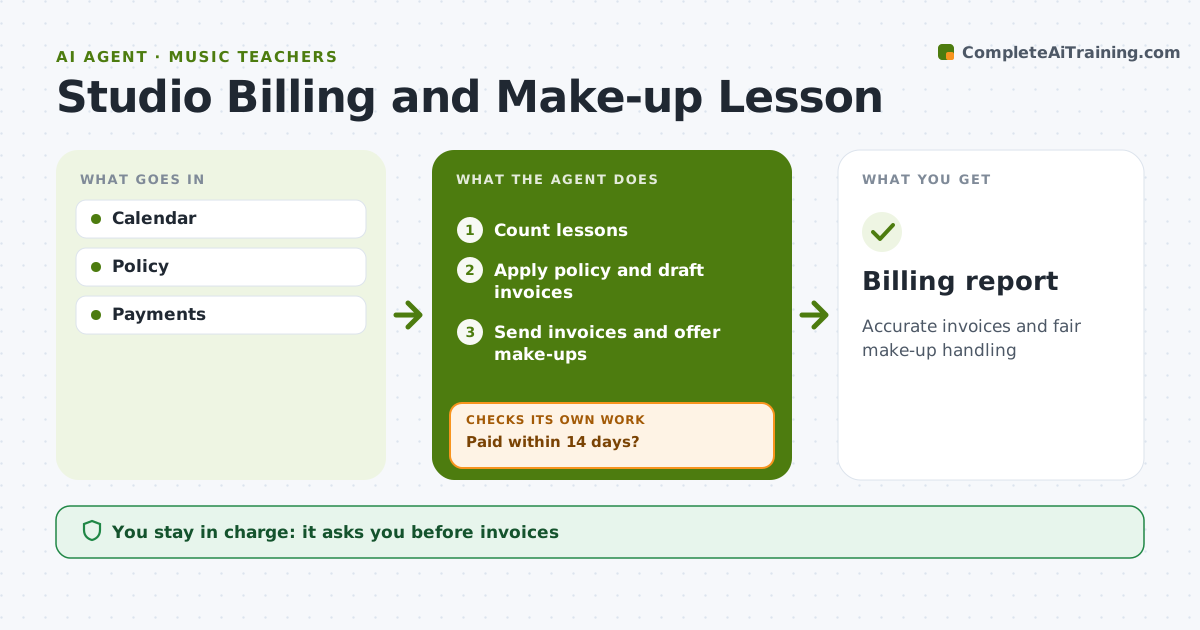
Accurate invoices and fair make-up handling
What it does
Running a music studio means monthly invoices, cancellations, make-up lessons and the occasional dispute about what was agreed. At month end this agent reads the lesson calendar, counts lessons per student, and applies the studio's written policy on notice periods, credits and make-ups. A student who cancels with at least 24 hours notice earns a make-up; later cancellations are charged. It drafts invoices that show the calculation line by line, and the teacher approves every invoice and any exception. It offers open make-up slots for eligible missed lessons and tracks whether they are used before they expire. After sending, it checks payments; if an invoice is unpaid after 14 days, it drafts a polite reminder for the teacher and checks again a week later. Edge case: lessons the teacher cancelled are always credited or rescheduled, whatever the notice rule says.
How it works
Follow the arrows from top to bottom. The orange dashed arrow is the loop: when a check fails, the agent goes back and tries again.
Read the steps as a list
- Month ends
- Count lessons
- Apply policy and draft invoices
- Teacher approves invoicesThe agent waits here for your OK.
- Send invoices and offer make-ups
- Paid within 14 days?If not: send reminder. Back to step 5.
- Billing report
How it decides
Policy rules decide credits and make-ups.
- 24-hour notice for make-up eligibility
- Teacher cancellations credited
- Reminder at 14 days
Make it yours
Every agent is a starting point. You choose these settings for your own situation.
- Policy
- Payment terms
- Make-up window
- Templates
What keeps you in control
It always asks you first
- Invoices
- Exceptions
Hard limits
- No charges without approval
It stops when
- Done: paid
- Stop: student leaves
Set it up
We guide you through the set-up, step by step
Members get the full set-up guide for this agent. No technical skills needed: you copy, paste and upload.
- One set of instructions to paste into your AI, with the clicks for ChatGPT, Claude, Microsoft 365 Copilot, Gemini and Grok
- The agent then walks you through connecting your own data, one source at a time
- A downloadable copy with the flow chart, the rules and the full guide