AI agent for ux writers
Style Guide Compliance Sweep Agent
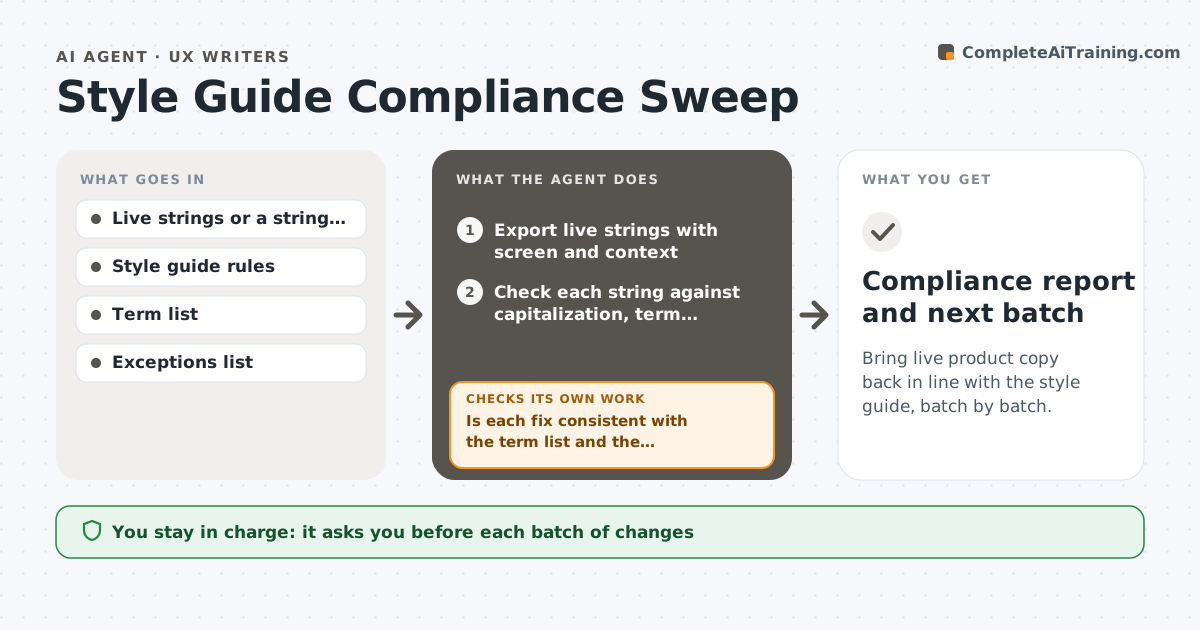
Bring live product copy back in line with the style guide, batch by batch.
What it does
Over months, product copy drifts from the style guide: sentence case becomes title case, terms change, the tone shifts from friendly to formal. This agent reads the live strings from the product and checks them against the style guide rules for tone, capitalization, punctuation, terms and length. It lists violations with the string, the screen and the rule broken, and proposes a fix for each. It groups the fixes into batches by area so they can ship together. After a batch is released, it rereads the live strings to confirm the changes are in and that no new violations were introduced. It never changes copy. The writer approves each batch. Edge case: a legal string that must stay as written is excluded with a note.
How it works
Follow the arrows from top to bottom. The orange dashed arrow is the loop: when a check fails, the agent goes back and tries again.
Read the steps as a list
- Monthly run or release
- Export live strings with screen and context
- Check each string against capitalization, term, punctuation and length rules
- Flag tone issues as suggestions
- Propose a fix for each violation
- Is each fix consistent with the term list and the exceptions?If not: rework the fix or exclude the string with a note. Back to step 4.
- Group fixes into batches by area
- Writer approves each batchThe agent waits here for your OK.
- Reread live strings after the batch ships
- Are the fixes live and free of new violations?If not: list missing fixes and new violations for the next batch. Back to step 4.
- Compliance report and next batch
How it decides
It flags a string when it breaks a rule that can be checked, such as capitalization or a banned term, and sends tone issues to the writer as suggestions, not violations.
- Treat capitalization, banned terms and punctuation as violations
- Treat tone issues as suggestions only
- Exclude strings on the legal exceptions list
- Limit a batch to 50 strings
Make it yours
Every agent is a starting point. You choose these settings for your own situation.
- Style guide rules to check
- Batch size (default 50)
- Exceptions list
- Run schedule
- Areas of the product
What keeps you in control
It always asks you first
- Each batch of changes
Hard limits
- Never edit copy directly
- Never touch strings on the legal list
It stops when
- Done: violations fall under the target
- Stop: strings cannot be exported
Set it up
We guide you through the set-up, step by step
Members get the full set-up guide for this agent. No technical skills needed: you copy, paste and upload.
- One set of instructions to paste into your AI, with the clicks for ChatGPT, Claude, Microsoft 365 Copilot, Gemini and Grok
- The agent then walks you through connecting your own data, one source at a time
- A downloadable copy with the flow chart, the rules and the full guide