AI agent for insurance claims managers
Subrogation Opportunity Agent
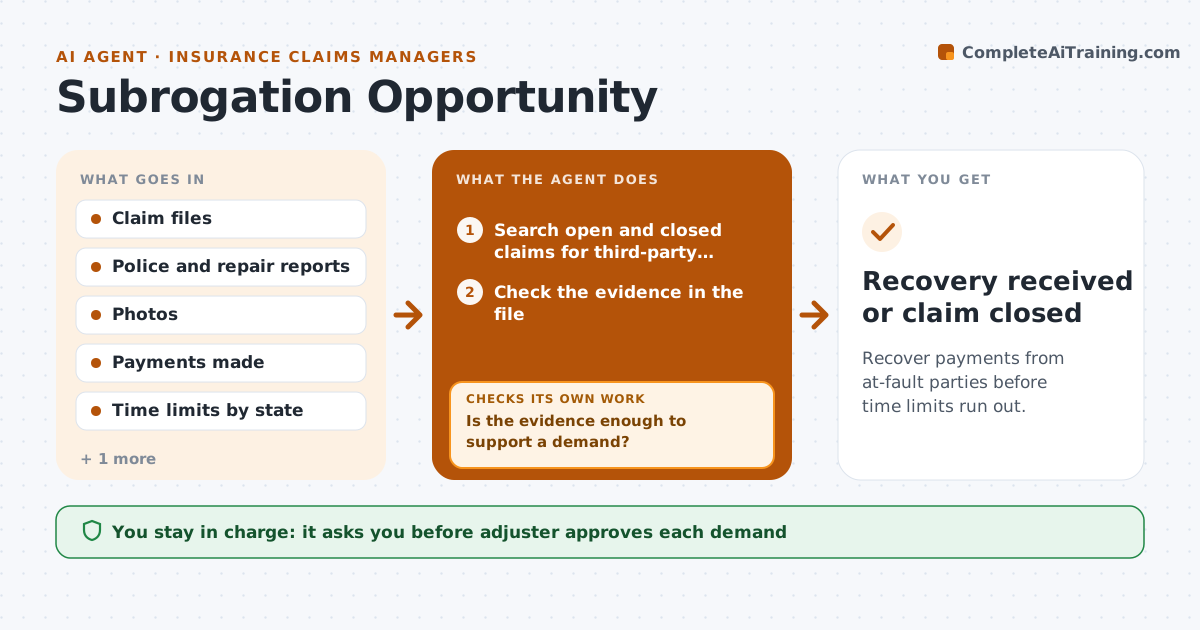
Recover payments from at-fault parties before time limits run out.
What it does
Insurers pay a claim and then forget that someone else may have caused the loss. This agent reviews open and recently closed claims for signs of third-party fault, such as a rear-end collision, a faulty product or a contractor error. It checks the evidence in the file, the time limits for recovery in that state, and the other party's insurer. It assembles a demand package with the payment records, reports and photos. After the adjuster approves, it sends the demand and tracks responses, drafting follow-ups. Edge case: a claim near the end of the time limit is moved to the top and flagged for legal review.
How it works
Follow the arrows from top to bottom. The orange dashed arrow is the loop: when a check fails, the agent goes back and tries again.
Read the steps as a list
- Weekly claim review
- Search open and closed claims for third-party fault signs
- Check the evidence in the file
- Is the evidence enough to support a demand?If not: Request missing reports or statements. Back to step 3.
- Check the time limit and the other party's insurer
- Assemble the demand package
- Adjuster approves the demandThe agent waits here for your OK.
- Send the demand
- Track the response and payment
- Has the other insurer replied within the time limit?If not: Draft a follow-up and flag the file. Back to step 8.
- Recovery received or claim closed
How it decides
It pursues a claim when fault evidence is strong and the potential recovery exceeds the cost, and prioritizes by deadline.
- Pursue claims with recoverable amounts above the set minimum
- Move claims within 90 days of the time limit to the top
- Include every payment and the proof of loss
- Send follow-ups every 21 days
Make it yours
Every agent is a starting point. You choose these settings for your own situation.
- Minimum recovery worth pursuing
- Follow-up interval (default 21 days)
- Time limit table by state
- Claim types to review
What keeps you in control
It always asks you first
- Adjuster approves each demand
Hard limits
- Never send a demand without adjuster approval
- Never include a payment not in the file
It stops when
- Done: the recovery is received or closed
- Stop: the time limit passes or legal takes over
Set it up
We guide you through the set-up, step by step
Members get the full set-up guide for this agent. No technical skills needed: you copy, paste and upload.
- One set of instructions to paste into your AI, with the clicks for ChatGPT, Claude, Microsoft 365 Copilot, Gemini and Grok
- The agent then walks you through connecting your own data, one source at a time
- A downloadable copy with the flow chart, the rules and the full guide