AI agent for travel agents
Supplier Payment Deadline Agent
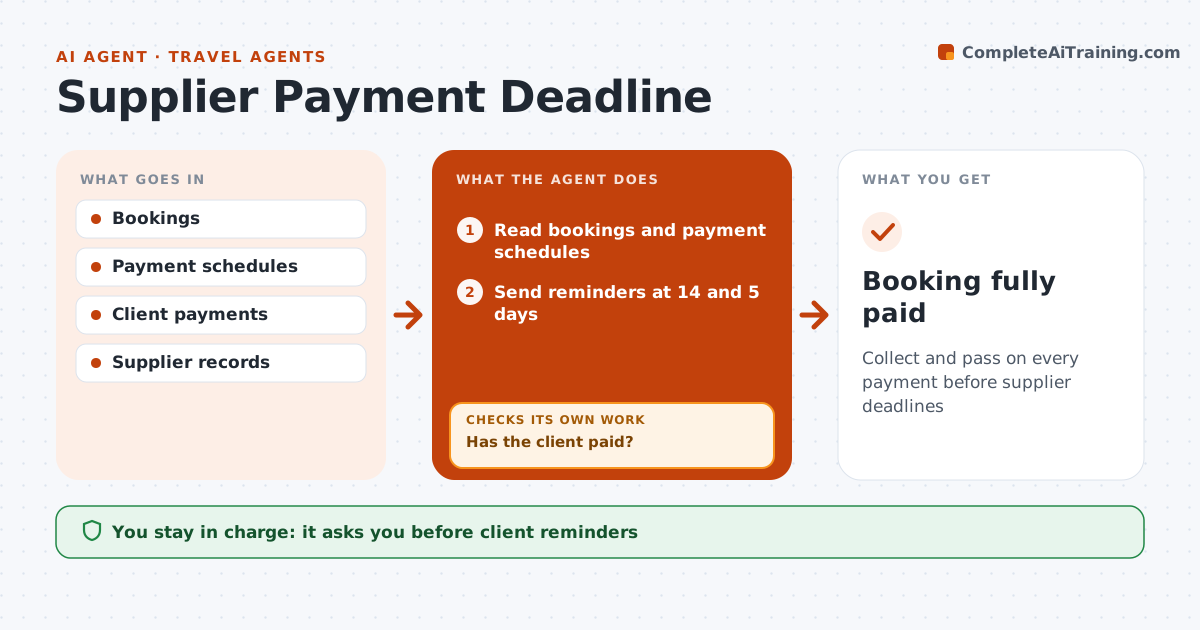
Collect and pass on every payment before supplier deadlines
What it does
Tours, cruises and villas have deposit and final payment deadlines, and a missed one can cancel the booking. Every day this agent reads bookings and logs each payment schedule. It reminds clients 14 and 5 days before each due date and checks whether payment was received. If not, it sends a second reminder and alerts the travel agent; anything still missing 3 days before the supplier deadline is escalated. When the client pays, it prepares the supplier payment for approval. It then checks the supplier's records show the payment and, if not, contacts the supplier with proof. A client who wants to cancel before final payment is told the penalty schedule first. The travel agent approves client reminders and any payment sent to suppliers. Edge case: cancellation requests get the penalty schedule before anything is cancelled.
How it works
Follow the arrows from top to bottom. The orange dashed arrow is the loop: when a check fails, the agent goes back and tries again.
Read the steps as a list
- Daily payment check
- Read bookings and payment schedules
- Send reminders at 14 and 5 days
- Has the client paid?If not: send a second reminder and alert the agent. Back to step 3.
- Escalate any payment still missing 3 days before the supplier deadline
- Agent approves supplier paymentThe agent waits here for your OK.
- Does the supplier show the payment?If not: contact the supplier with proof of payment. Back to step 6.
- Booking fully paid
How it decides
Reminders go 14 and 5 days before client due dates. Missing payments 3 days before the supplier deadline are escalated.
- Reminders at 14 and 5 days
- Escalate 3 days before supplier deadline
- Share cancellation penalties before any cancel
Make it yours
Every agent is a starting point. You choose these settings for your own situation.
- Reminder timing
- Escalation timing
- Payment methods
What keeps you in control
It always asks you first
- Client reminders
- Supplier payments
Hard limits
- Never moves client money itself
- Never cancels bookings
It stops when
- Done: paid in full
- Stop: booking cancelled
Set it up
We guide you through the set-up, step by step
Members get the full set-up guide for this agent. No technical skills needed: you copy, paste and upload.
- One set of instructions to paste into your AI, with the clicks for ChatGPT, Claude, Microsoft 365 Copilot, Gemini and Grok
- The agent then walks you through connecting your own data, one source at a time
- A downloadable copy with the flow chart, the rules and the full guide