AI agent for sustainability analysts
Sustainability Report Claim Evidence Agent
Every figure and claim in the report is traced to evidence or removed
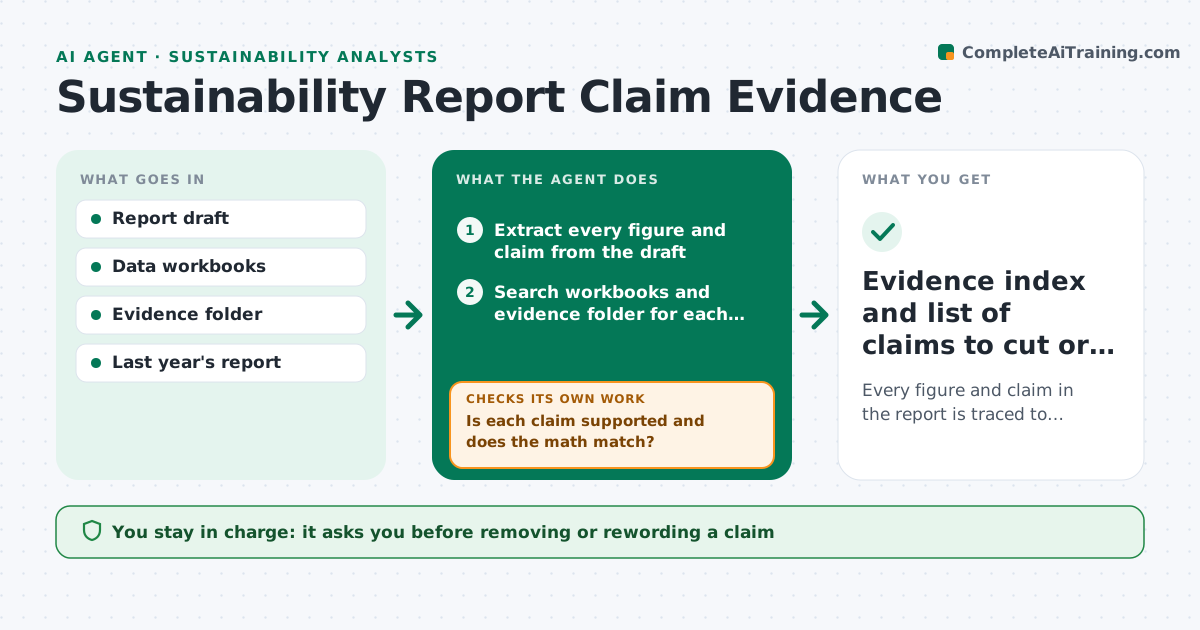
What it does
Before a sustainability report goes to assurance or publication, every number and claim needs a source, and auditors find the gaps fast. This agent reads the draft and pulls out each figure and claim, such as 'reduced water use by 12%'. It searches the evidence folder and data workbooks for support and recalculates percentages and totals where it can. Differences above rounding are treated as errors. When a claim has no source or the math does not match, it sends the gap to the data owner, waits for evidence and searches again. Claims still unsupported at the deadline are recommended for removal or rewording. It also flags vague green words, like 'eco-friendly', that need a definition. It builds an evidence index. The analyst approves the index before it goes to the auditor. Edge case: a restated figure is checked against the restated base year.
How it works
Follow the arrows from top to bottom. The orange dashed arrow is the loop: when a check fails, the agent goes back and tries again.
Read the steps as a list
- Report draft ready for evidence check
- Extract every figure and claim from the draft
- Search workbooks and evidence folder for each one
- Recalculate totals and percentages
- Is each claim supported and does the math match?If not: send the gap to the data owner, wait for evidence, then search again. Back to step 3.
- Build the evidence index
- Analyst approves the index for the auditorThe agent waits here for your OK.
- Evidence index and list of claims to cut or reword
How it decides
A claim passes when a source document supports it and any recalculated figure matches within rounding. Otherwise it goes on the gap list with an owner.
- Differences above rounding are treated as errors
- Unsupported claims after the deadline are recommended for removal
- Vague terms like 'eco-friendly' are flagged for a definition
Make it yours
Every agent is a starting point. You choose these settings for your own situation.
- Rounding tolerance
- Owners per report section
- List of terms that need definitions
- Evidence index format
What keeps you in control
It always asks you first
- Removing or rewording a claim
- Sending the index to the assurance provider
Hard limits
- Never invent or adjust a figure to match
- Never publish the report
It stops when
- Done: all claims traced or removed
- Stop: a key figure cannot be supported, escalate to the report owner
Set it up
We guide you through the set-up, step by step
Members get the full set-up guide for this agent. No technical skills needed: you copy, paste and upload.
- One set of instructions to paste into your AI, with the clicks for ChatGPT, Claude, Microsoft 365 Copilot, Gemini and Grok
- The agent then walks you through connecting your own data, one source at a time
- A downloadable copy with the flow chart, the rules and the full guide