AI agent for tax analysts
Tax Position Memo Support Agent
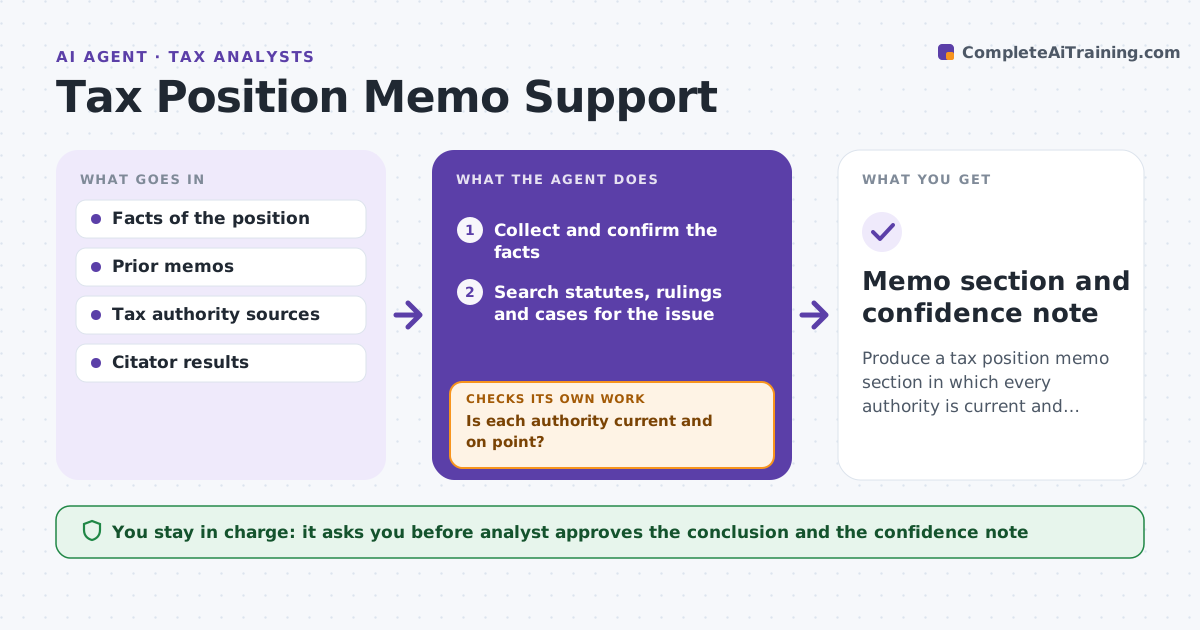
Produce a tax position memo section in which every authority is current and contrary authority has been looked for.
What it does
An uncertain tax position needs written support, and the authorities cited may have changed since the last memo. The agent collects the facts, then searches statutes, rulings and cases for the issue. It checks that each authority is current and tests for contrary authority. If a source is outdated or a contrary one appears, it searches again and revises the analysis. It drafts the support section and a confidence note that states how strong the position is. The analyst approves the conclusion. Edge case: a ruling cited in last year's memo was withdrawn in March, so the agent removes it and looks for a replacement.
How it works
Follow the arrows from top to bottom. The orange dashed arrow is the loop: when a check fails, the agent goes back and tries again.
Read the steps as a list
- Position needs support
- Collect and confirm the facts
- Search statutes, rulings and cases for the issue
- Check the status of each authority
- Is each authority current and on point?If not: Drop or replace it and search for current authority. Back to step 3.
- Search for contrary authority
- Weigh the authorities
- Is the contrary authority addressed in the analysis?If not: Add it with a response and re-weigh. Back to step 7.
- Draft the support section and a confidence note
- Analyst approves the conclusionThe agent waits here for your OK.
- Memo section and confidence note
How it decides
It treats an authority as usable if it is in force and on point. It must search for contrary authority before giving a confidence level. The analyst makes the conclusion.
- Withdrawn or superseded authority is removed
- Contrary authority must be addressed in the memo
- Primary authority outranks commentary
- The confidence note names the weakest point
Make it yours
Every agent is a starting point. You choose these settings for your own situation.
- Jurisdictions and sources
- Confidence scale
- Memo format
- Look-back period for authorities
What keeps you in control
It always asks you first
- Analyst approves the conclusion and the confidence note
Hard limits
- Never gives final tax advice
- Never cites an authority it has not opened
It stops when
- Done: memo section approved
- Stop: authority is unclear, so the analyst is told the question for an adviser
Set it up
We guide you through the set-up, step by step
Members get the full set-up guide for this agent. No technical skills needed: you copy, paste and upload.
- One set of instructions to paste into your AI, with the clicks for ChatGPT, Claude, Microsoft 365 Copilot, Gemini and Grok
- The agent then walks you through connecting your own data, one source at a time
- A downloadable copy with the flow chart, the rules and the full guide