AI agent for technical sales representatives
Technical Discovery Call Prep Agent
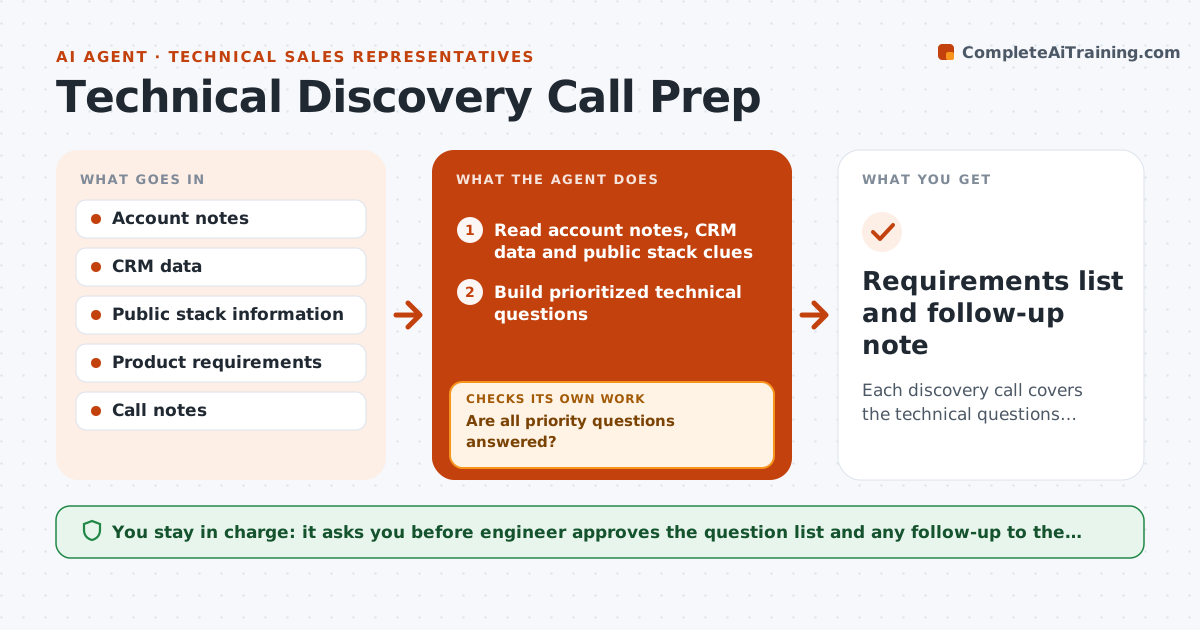
Each discovery call covers the technical questions that matter and leaves a clear requirements list
What it does
Discovery calls go wrong when the sales engineer asks generic questions and finds out about a key system three weeks later. Before each call, this agent reads the account's stack from the CRM, notes, job posts and public pages, and builds a list of technical questions in priority order. After the call it reads the notes and checks which questions were answered and which were not. It updates the requirements list, marks risks such as an unsupported database, and drafts follow-up questions. If an answer reveals a new system, it adds new questions and rechecks. The engineer approves what goes to the customer. Edge case: the customer says they use a system the product does not integrate with, so it flags the gap early.
How it works
Follow the arrows from top to bottom. The orange dashed arrow is the loop: when a check fails, the agent goes back and tries again.
Read the steps as a list
- Discovery call scheduled
- Read account notes, CRM data and public stack clues
- Build prioritized technical questions
- Engineer approves the question listThe agent waits here for your OK.
- After the call, read the notes
- Mark each question as answered, partly answered or open
- Are all priority questions answered?If not: draft follow-up questions and flag the open items. Back to step 3.
- Update the requirements list and mark risks
- Did new answers reveal systems that need new questions?If not: add questions and recheck coverage. Back to step 3.
- Engineer approves what goes to the customerThe agent waits here for your OK.
- Requirements list and follow-up note
How it decides
Questions are ranked by their effect on fit and cost. After the call, any priority question without an answer becomes a follow-up.
- Rank questions by effect on fit, security and cost
- Treat an unanswered priority question as open
- Flag any named system the product does not support
- Add questions whenever a new system appears
Make it yours
Every agent is a starting point. You choose these settings for your own situation.
- Question categories
- Priority rules
- Sources for stack clues
- Follow-up timing
What keeps you in control
It always asks you first
- Engineer approves the question list and any follow-up to the customer
Hard limits
- Do not state unverified stack details as fact
- Never send without approval
- Use public information only
It stops when
- Done: priority questions answered and requirements saved
- Stop: customer declines further discovery
Set it up
We guide you through the set-up, step by step
Members get the full set-up guide for this agent. No technical skills needed: you copy, paste and upload.
- One set of instructions to paste into your AI, with the clicks for ChatGPT, Claude, Microsoft 365 Copilot, Gemini and Grok
- The agent then walks you through connecting your own data, one source at a time
- A downloadable copy with the flow chart, the rules and the full guide