AI agent for global head of its
Technology Debt Modernization Roadmap Agent
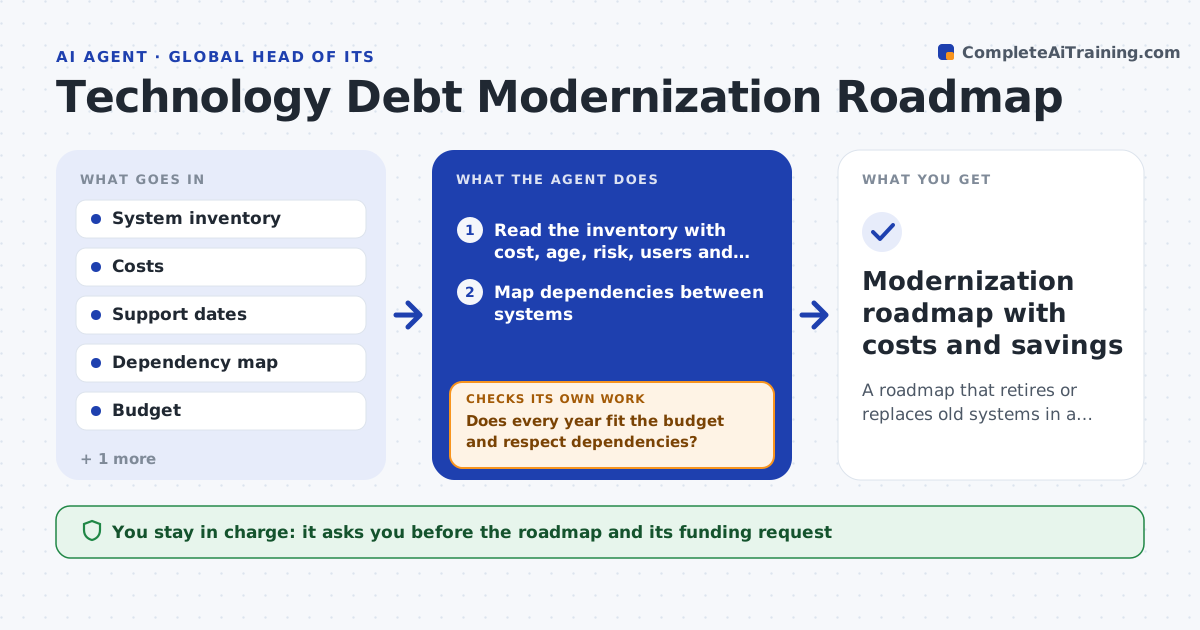
A roadmap that retires or replaces old systems in a feasible order within budget
What it does
Legacy systems keep running because retiring them looks risky and nobody has the full picture. This agent inventories systems by age, cost, security risk, support status, user count and the systems that depend on them. It scores each for retire, replace, keep or modernize using rules the leader sets. It then builds a sequence, putting low-dependency and high-saving items first, and tests it against annual budget, team capacity and dependencies. If an item depends on one scheduled later, or the plan breaks the budget, it reorders or splits it and tests again. It repeats until the plan fits. It produces a roadmap with savings, risk reduction and costs per year. The leader approves. Edge case: a cheap old system feeds four others.
How it works
Follow the arrows from top to bottom. The orange dashed arrow is the loop: when a check fails, the agent goes back and tries again.
Read the steps as a list
- Annual planning starts or the inventory changes
- Read the inventory with cost, age, risk, users and support dates
- Map dependencies between systems
- Score each system as retire, replace, modernize or keep
- Order the actions by saving, risk and ease
- Test the sequence against budget, capacity and dependencies
- Does every year fit the budget and respect dependencies?If not: reorder, split or delay the failing items and retest. Back to step 4.
- Calculate savings and risk reduction per year
- Are the savings above the cost within the plan period?If not: drop or defer items that do not pay back. Back to step 4.
- Leader approves the roadmapThe agent waits here for your OK.
- Modernization roadmap with costs and savings
How it decides
Systems with high cost, high risk and low use go first. A sequence is feasible only if dependencies are respected and each year's spend fits the budget.
- Score down any system with unsupported software or open critical risks
- Never schedule a retirement before its dependent systems move
- Defer items that do not pay back within 3 years
- Treat shared systems as higher risk
Make it yours
Every agent is a starting point. You choose these settings for your own situation.
- Scoring weights
- Payback period (default 3 years)
- Annual budget
- Planning horizon (default 5 years)
What keeps you in control
It always asks you first
- The roadmap and its funding request
Hard limits
- Never retires or changes any system
- Marks estimates as estimates
It stops when
- Done: a feasible, costed roadmap is approved
- Stop: the inventory lacks cost or dependency data
Set it up
We guide you through the set-up, step by step
Members get the full set-up guide for this agent. No technical skills needed: you copy, paste and upload.
- One set of instructions to paste into your AI, with the clicks for ChatGPT, Claude, Microsoft 365 Copilot, Gemini and Grok
- The agent then walks you through connecting your own data, one source at a time
- A downloadable copy with the flow chart, the rules and the full guide