AI agent for translators
Term Base Building Agent
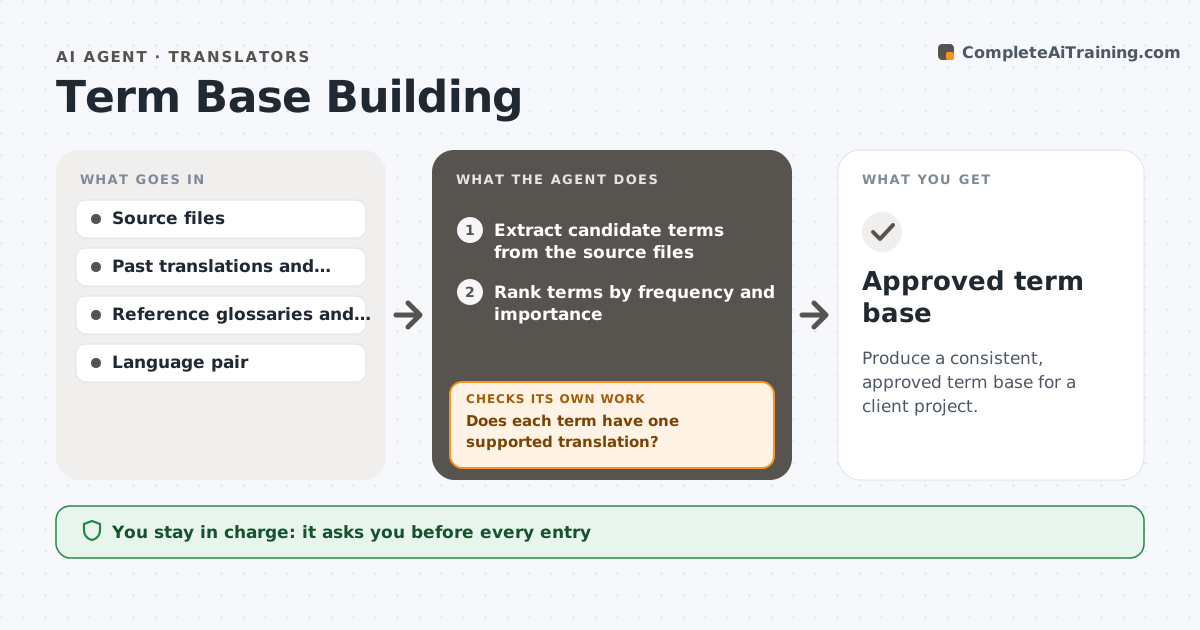
Produce a consistent, approved term base for a client project.
What it does
For a large client project, a translator often builds a term list by copying words from the source files into a spreadsheet, then looking up each translation. It is slow, and the result varies. This agent reads the client's source files and extracts candidate terms by frequency and pattern, such as product names, technical nouns and defined terms. It checks proposed translations against the client's past work, reference materials, standards and trusted glossaries, and flags conflicting entries, such as a term already used differently in an earlier project. It lists the choices for the translator to decide and, after decisions, rechecks the whole list for new conflicts. It never puts a term into use alone. The translator approves the term base before use. Edge case: a term used in two senses is split into two entries.
How it works
Follow the arrows from top to bottom. The orange dashed arrow is the loop: when a check fails, the agent goes back and tries again.
Read the steps as a list
- Project starts or files added
- Extract candidate terms from the source files
- Rank terms by frequency and importance
- Look up translations in past work, references and standards
- Does each term have one supported translation?If not: mark the term with its options and sources for decision. Back to step 4.
- Flag conflicts with existing entries and multi-sense terms
- Translator decides conflicts and approves entriesThe agent waits here for your OK.
- Build the term base with definitions and contexts
- Check the full list for new conflicts and duplicates
- Is the term base free of conflicts and gaps?If not: return the new conflicts to the translator. Back to step 6.
- Approved term base
How it decides
It selects a term when it appears often or is defined in the source, and recommends a translation when past approved work or a standard supports it. Conflicts go to the translator.
- Include terms that appear 3 times or more or are defined in the source
- Prefer the client's past approved translation
- Split terms with two senses into two entries
- Never merge entries with different part of speech without a check
Make it yours
Every agent is a starting point. You choose these settings for your own situation.
- Minimum frequency (default 3)
- Reference glossaries
- Fields in the term base
- Language pair
- Export format
What keeps you in control
It always asks you first
- Every entry
- Resolution of conflicts
Hard limits
- Never use a term before approval
- Always record the source of a translation
It stops when
- Done: term base approved
- Stop: no reference exists for key terms
Set it up
We guide you through the set-up, step by step
Members get the full set-up guide for this agent. No technical skills needed: you copy, paste and upload.
- One set of instructions to paste into your AI, with the clicks for ChatGPT, Claude, Microsoft 365 Copilot, Gemini and Grok
- The agent then walks you through connecting your own data, one source at a time
- A downloadable copy with the flow chart, the rules and the full guide