
AI agent for automotive engineers
Test Data Anomaly Analysis Agent
Trustworthy test results with problems spotted the same day
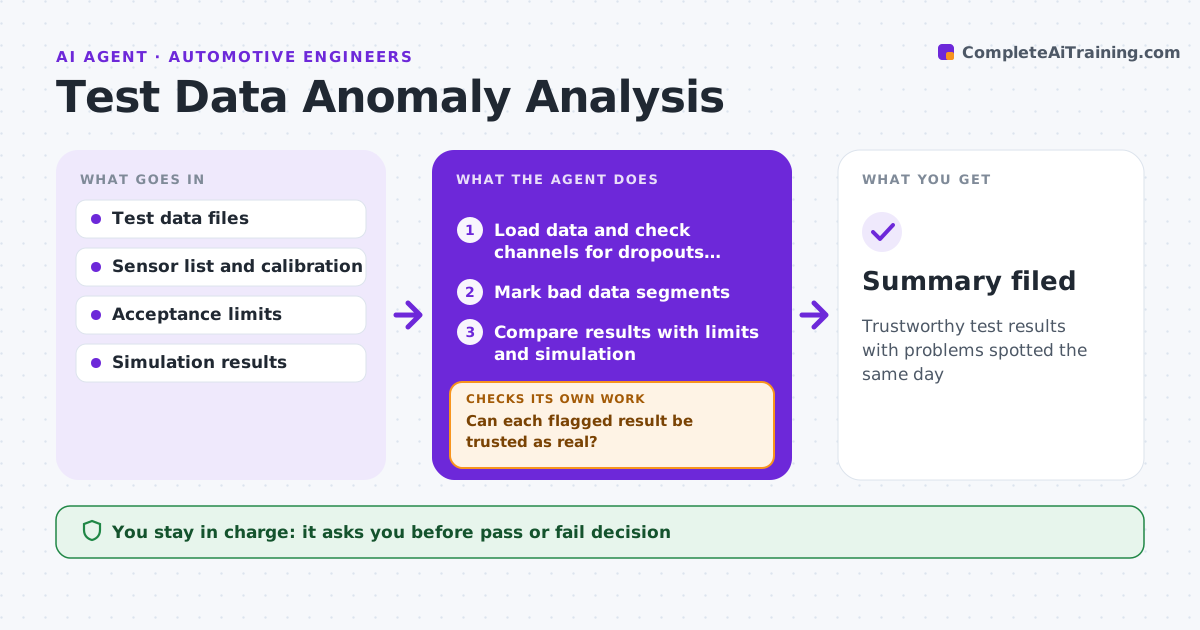
What it does
A bad sensor reading can make a good part look like a failure, and sorting real problems from data glitches takes hours. After each test run, this agent loads the data and checks sensor channels for dropouts, spikes, drift or calibration problems, marking bad segments. It then compares results with the acceptance limits and with simulation predictions. Results outside limits or far from predictions are flagged. Before calling any result a failure, it checks whether a sensor problem could explain it. If the data is too poor to judge, it recommends a re-run instead of guessing. It drafts a test summary with plots and flagged items. The engineer reviews and makes the call. Edge case: a strain reading far from simulation near a weld is flagged for both a possible model issue and a real defect.
How it works
Follow the arrows from top to bottom. The orange dashed arrow is the loop: when a check fails, the agent goes back and tries again.
Read the steps as a list
- Test run data uploaded
- Load data and check channels for dropouts, spikes and drift
- Mark bad data segments
- Compare results with limits and simulation
- Can each flagged result be trusted as real?If not: recheck sensor data or recommend a re-run. Back to step 2.
- Draft test summary with plots
- Engineer reviews and decides pass, fail or re-runThe agent waits here for your OK.
- Summary filed
How it decides
It separates data quality issues from real out-of-spec results before reporting.
- Exclude segments with sensor faults
- Flag results over 15% away from simulation
- Recommend a re-run when key channels fail
Make it yours
Every agent is a starting point. You choose these settings for your own situation.
- Channel quality rules
- Deviation threshold from simulation
- Plot set
- Report template
What keeps you in control
It always asks you first
- Pass or fail decision
- Ordering a re-run
Hard limits
- Never deletes raw data
- Never signs test reports
It stops when
- Done: summary filed
- Stop: data file corrupted
Set it up
We guide you through the set-up, step by step
Members get the full set-up guide for this agent. No technical skills needed: you copy, paste and upload.
- One set of instructions to paste into your AI, with the clicks for ChatGPT, Claude, Microsoft 365 Copilot, Gemini and Grok
- The agent then walks you through connecting your own data, one source at a time
- A downloadable copy with the flow chart, the rules and the full guide



