
Learning path
Learning AI as an Aerospace Engineer
Aerospace engineering runs on careful decisions, clear documents, and safe tests. AI can help you move through that work with more speed and less strain, while you stay in charge of every engineering call.

Your path
Everything in the Aerospace Engineer AI kit, in the order that makes sense. Members tick off each step and see their progress.
Set up your AI
We guide you through each click.
Let skills do your everyday tasks
Connect your apps and pick your AI apps
Hand whole tasks to AI agents
Build your own tools
Keep growing
Everything for aerospace engineers
All the courses, certifications, AI tools, MCP servers and apps for aerospace engineers, most relevant first. Open any list to see more.
Take the prompt courses
A short framework course to learn how to ask, then 8 lessons with ready-to-use prompts for aerospace engineers.
Start with this framework: how to talk to AI
RACE helps you specify role, action, context, and expected quality when analyzing wing stress, so your prompt yields a precise safety report.
Then your prompt course for aerospace engineers- 1Drafting Technical Documents3 prompts
- 2Explaining Complex Concepts3 prompts
- 3Analyzing Flight and Test Data4 prompts
- 4Planning Tests and Certification3 prompts
- 5Checking Calculations and Drawings3 prompts
- 6Estimating Performance and Trade Studies3 prompts
- 7Troubleshooting from Descriptions3 prompts
- 8Preparing Stakeholder Communication and Admin5 prompts
Watch the video courses or add them to your Favorites for later
102 video courses our AI picked for aerospace engineers, most useful first. Save the ones you want to watch later with the heart.
Favorites are saved to your account: sign in or get your AI kit first.
Show all 102 video courses
Get certified, or add certifications to your Favorites
Every course ends in an exam and a certificate you can add to LinkedIn. Save the certifications you are aiming for with the heart.
Favorites are saved to your account: sign in or get your AI kit first.
More certifications for aerospace engineersShow all 24 certifications
Try the AI tools for aerospace engineers
4 AI tools our AI matched to the work of aerospace engineers, best fit first. Each review shows what it does, its alternatives and the jobs it suits.
Favorites are saved to your account: sign in or get your AI kit first.
Connect your AI to the apps aerospace engineers use
MCP servers let ChatGPT, Claude or Copilot look things up and get work done in other apps, like your email, calendar or bookkeeping software. These 9 fit the work of aerospace engineers best, well-known apps first.

MATLAB MCP server
by HanSur94Let your AI write and run MATLAB code, make interactive plots, and run long jobs for you.

viznoir MCP server
by kimimgoTurn simulation data into clear pictures, slices, and animations right from your AI chat.

GNU Units MCP server
by laszlopereLets your AI convert between thousands of units and check unit math, all offline.
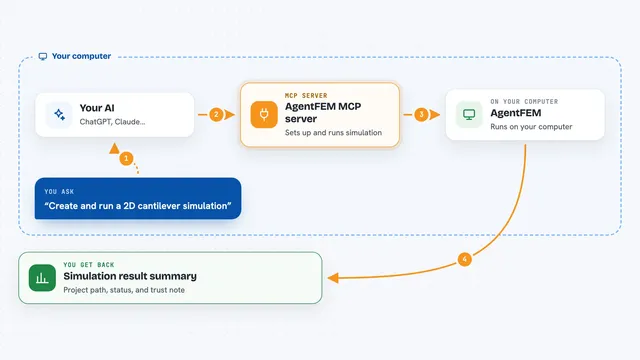
AgentFEM MCP server
by haoming-luoLets your AI set up, run and check finite-element simulations through AgentFEM, with the results kept visible.

AnkusDrive MCP server
by gchen19Lets your AI design 3D mechanical parts and run engineering simulations in FreeCAD for you.

arXiv MCP server
by andybrandtLets your AI search arXiv for research papers and pull up their details and full text.
ResearchNo installShow all 9 MCP servers

Scholar MCP server
by Liyux3Your AI can search academic papers, read them, map citations, and save them into a personal library.
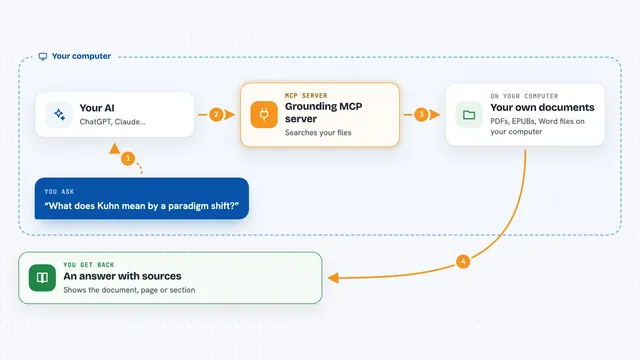
Grounding MCP server
by andyliszewskiSearch your own PDFs, EPUBs and Word files locally and get answers with page and section citations.

Metis MCP server
by SVerITGGives your AI a private, local memory of your papers, notes and meetings, with cited answers.









































































































About this learning path
6 topicsAI for Aerospace Engineers: A Practical Learning Path
Aerospace engineering runs on careful decisions, clear documents, and safe tests. AI can help you move through that work with more speed and less strain, while you stay in charge of every engineering call.
This path starts with simple setup questions, connects AI to your daily tools, and then walks through prompts made for aerospace tasks. You also get video courses chosen for your role and the certifications that come with them.
Why AI matters now
Aircraft and spacecraft programs face tight schedules, strict rules, and constant reviews. AI helps you draft, check, summarize, and explain work so you can spend more time on design judgment and testing.
It is not about replacing engineers. It is about giving you a reliable assistant for the writing, data, and planning load that fills your week.
What the path includes
You begin with setup questions and a guided way to connect your AI tool. Then you learn skills for the job inside your AI, followed by this prompt course for aerospace engineers.
The path also includes video courses picked for your role, plus the certifications of those courses. Everything is built around real aerospace tasks, from test reports to trade studies.
How it saves time
Prompts can turn a rough test note into a structured report, pull themes from telemetry, or build a compliance checklist before a review. You still check the output, but you start from a useful draft instead of a blank page.
That means fewer late nights spent formatting and rewriting. The time you win back goes to analysis, mentoring, and the parts of engineering that need your judgment.
How it protects your career
AI is becoming a normal part of engineering workflows. Knowing how to use it well, and where to stop, keeps your skills current and your work trustworthy.
You will practice safe habits for sensitive data, learn to verify every number and drawing note, and build a clear record of your decisions. That makes you more valuable on programs that need both speed and rigor.
How to start
Start with the setup questions and connect one AI tool you already have access to. Then take the prompt course in order, trying each lesson on a small task from your current project.
Pick one repeated chore this week, such as meeting minutes or a test summary, and use a prompt to draft it. Small wins build the habit quickly.
Frequently asked questions
Do I need to know how to code?
No. The path is written for aerospace engineers who are not technical users of AI. You will learn to write plain prompts and check the results, with optional code help for data tasks.Will AI make engineering decisions for me?
No. AI can suggest causes, draft documents, and summarize data, but you remain responsible for every design, calculation, and safety call. The course teaches you to verify and document your work.Is it safe to use AI with aerospace data?
You should follow your company rules and program security requirements. The course covers privacy habits, what not to paste into public tools, and how to keep sensitive work protected.How long does the path take?
You can move through the lessons at your own pace, fitting them around project deadlines. Most learners start with one lesson a week and practice on real tasks between sessions.