AI agent for internal communications managers
Town Hall Commitment Tracker Agent
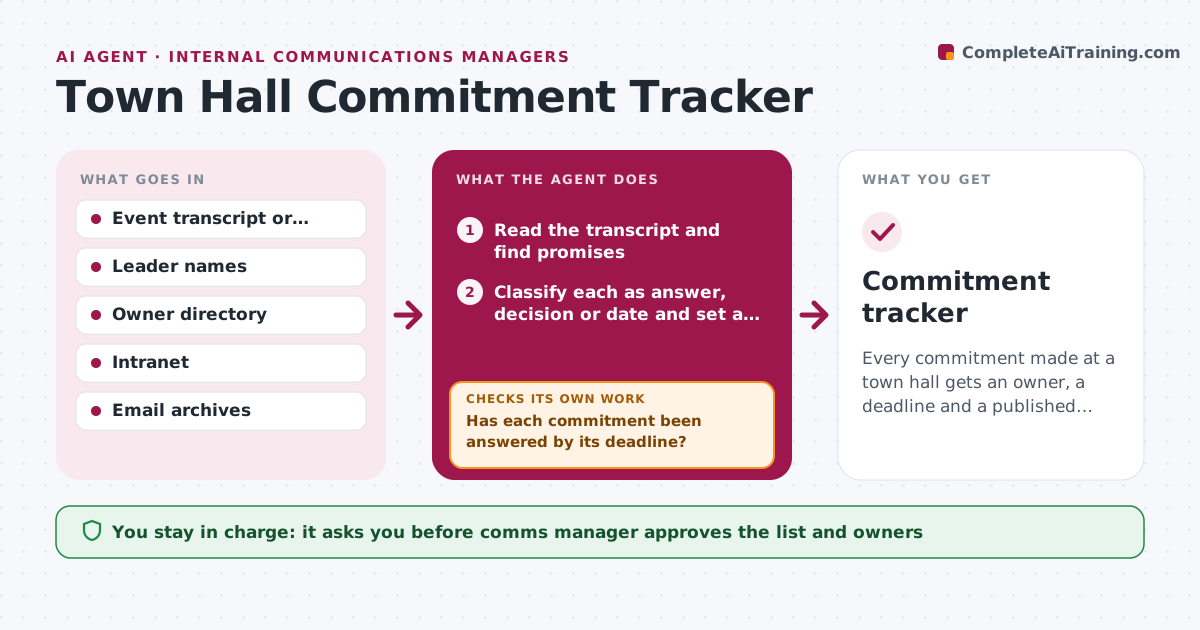
Every commitment made at a town hall gets an owner, a deadline and a published answer.
What it does
A leader says 'we will come back to you on that' at the town hall, and a quarter later nobody remembers. This agent pulls promises from the transcript after each event, such as answers owed, decisions promised or dates given. It assigns an owner to each, sets a deadline, and tracks whether the answer was published in the agreed place. It chases owners with reminders and rechecks the intranet or email archive to see if the answer appeared. You approve each answer before it is published. Edge case: a vague line like 'we will look into it' is marked as an open question with no date and sent to you to confirm if it counts as a commitment.
How it works
Follow the arrows from top to bottom. The orange dashed arrow is the loop: when a check fails, the agent goes back and tries again.
Read the steps as a list
- Town hall finishes
- Read the transcript and find promises
- Classify each as answer, decision or date and set a deadline
- Assign an owner from the directory
- Comms manager approves the list and ownersThe agent waits here for your OK.
- Send tracking reminders to owners
- Check the intranet and email archive for published answers
- Has each commitment been answered by its deadline?If not: Send a reminder and escalate to the leader after the second miss. Back to step 6.
- Draft the public answer for review
- Comms manager approves each published answerThe agent waits here for your OK.
- Commitment tracker
How it decides
A statement counts as a commitment when it names an answer, decision or date owed, and the agent gives it an owner based on topic and role.
- Count a statement as a commitment if it promises an answer, decision or date
- Default deadline of 14 days
- Escalate after 2 missed reminders
- Mark vague statements for confirmation
Make it yours
Every agent is a starting point. You choose these settings for your own situation.
- Default deadline (default 14 days)
- Reminder schedule
- Where answers are published
- Escalation contact
What keeps you in control
It always asks you first
- Comms manager approves the list and owners
- Comms manager approves each published answer
Hard limits
- Never publish or send messages itself
- Never assign commitments to a leader without approval
It stops when
- Done: all commitments answered or withdrawn
- Stop: transcript quality too poor to read
Set it up
We guide you through the set-up, step by step
Members get the full set-up guide for this agent. No technical skills needed: you copy, paste and upload.
- One set of instructions to paste into your AI, with the clicks for ChatGPT, Claude, Microsoft 365 Copilot, Gemini and Grok
- The agent then walks you through connecting your own data, one source at a time
- A downloadable copy with the flow chart, the rules and the full guide