AI agent for diversity and inclusion managers
Training Effectiveness Follow-up Agent
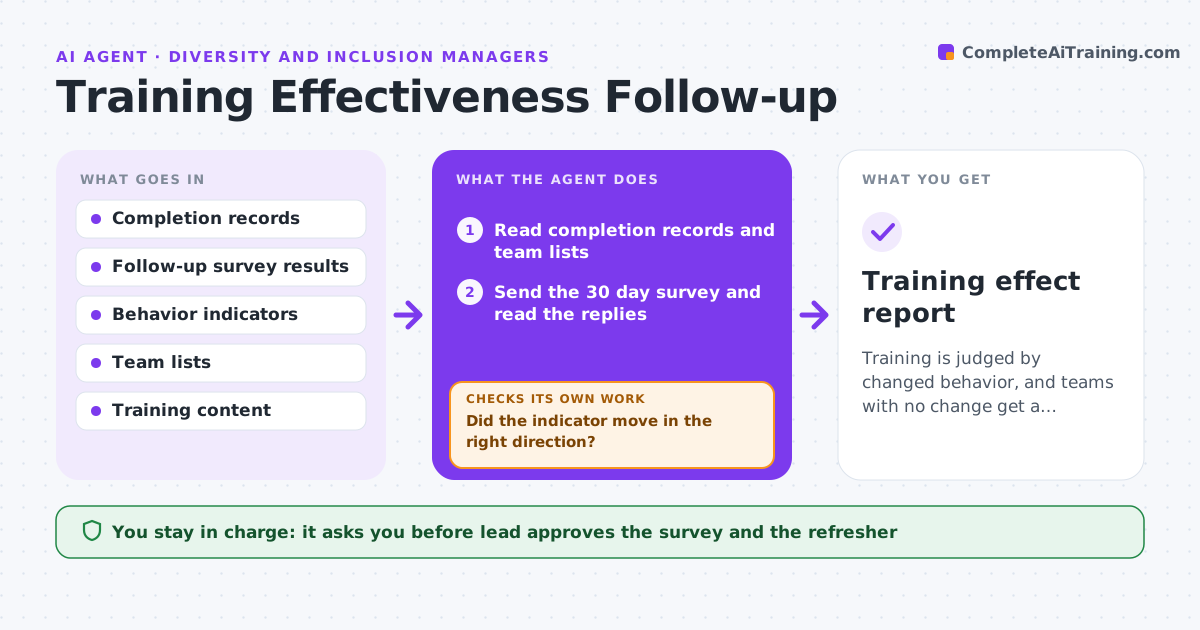
Training is judged by changed behavior, and teams with no change get a targeted next step.
What it does
Completion rates for training are tracked, but behavior change is not. The agent tracks completion, sends a short follow-up survey after 30 days, and compares behavior indicators such as panel diversity, interview structure or meeting participation before and after. It finds teams with no change and proposes a refresher tailored to what did not move. It rechecks results after the refresher, so the lead can see whether the second attempt worked or whether a different step is needed. It never scores individuals. The lead approves the refresher and the survey. Edge case: a team that completed the training but has changed so much in size that the numbers cannot be compared.
How it works
Follow the arrows from top to bottom. The orange dashed arrow is the loop: when a check fails, the agent goes back and tries again.
Read the steps as a list
- Training completed
- Read completion records and team lists
- Send the 30 day survey and read the replies
- Compare behavior indicators before and after
- Did the indicator move in the right direction?If not: Mark the team as no change and read the survey comments. Back to step 4.
- Propose a refresher aimed at what did not move
- Lead approves the refresherThe agent waits here for your OK.
- Schedule it and send invitations
- Recheck the indicators after 90 days
- Has the indicator improved after the refresher?If not: Propose a different step such as manager coaching. Back to step 4.
- Training effect report
How it decides
It compares the indicators before and after for each team and treats no change after 90 days as a signal to propose a refresher.
- Survey after 30 days, indicators after 90 days
- Flag a team with less than 5% change
- Compare only teams of similar size
- Use survey comments to shape the refresher
Make it yours
Every agent is a starting point. You choose these settings for your own situation.
- Survey timing (default 30 days)
- Indicators to track
- Change threshold (default 5%)
- Refresher format
What keeps you in control
It always asks you first
- Lead approves the survey and the refresher
Hard limits
- Never judge individuals by the data
- Do not share team scores publicly
It stops when
- Done: effect measured and refreshers agreed
- Stop: indicators cannot be measured for the team
Set it up
We guide you through the set-up, step by step
Members get the full set-up guide for this agent. No technical skills needed: you copy, paste and upload.
- One set of instructions to paste into your AI, with the clicks for ChatGPT, Claude, Microsoft 365 Copilot, Gemini and Grok
- The agent then walks you through connecting your own data, one source at a time
- A downloadable copy with the flow chart, the rules and the full guide