AI agent for translators
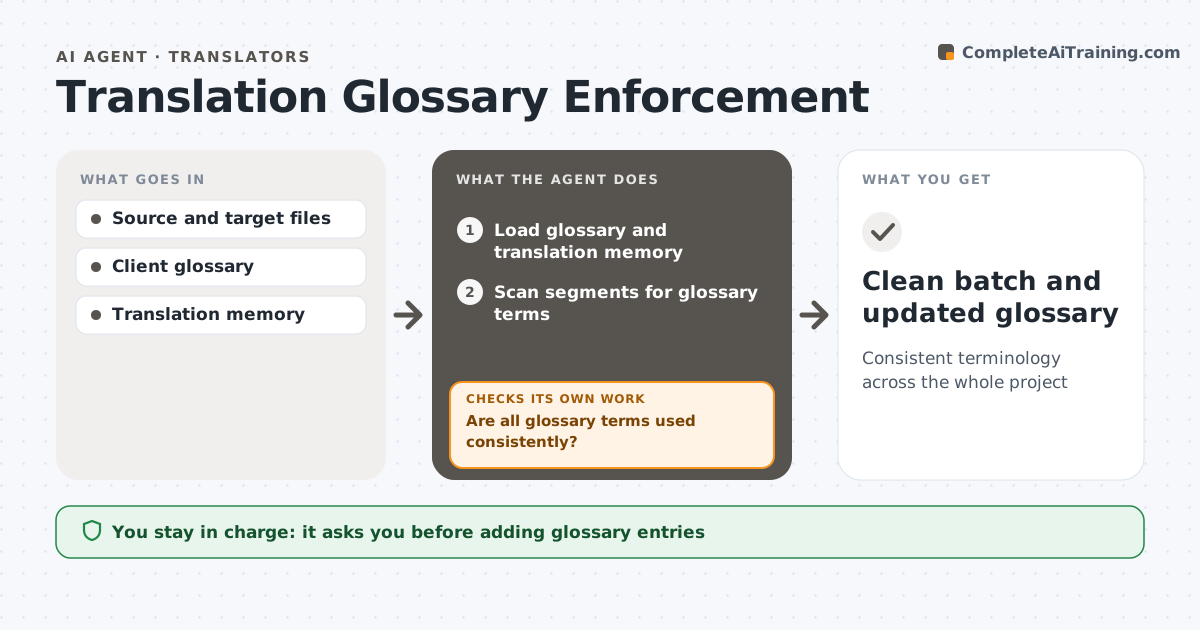
Translation Glossary Enforcement Agent
Consistent terminology across the whole project
What it does
On long translation projects the same term ends up translated three different ways, and clients notice. This agent loads the client glossary and translation memory, then scans each finished batch for source terms and the target terms used. It lists every inconsistent use with segment numbers so the translator can fix them quickly. It also spots new recurring terms not yet in the glossary and proposes entries with context. After the translator edits, it rescans the batch. It then checks that proposed glossary entries do not clash with existing ones. Where a term has two meanings, like a legal and a casual sense, it shows context rather than forcing a change. The translator approves new entries and any queries to the client. Edge case: a term correct in its legal sense is left alone with a note.
How it works
Follow the arrows from top to bottom. The orange dashed arrow is the loop: when a check fails, the agent goes back and tries again.
Read the steps as a list
- Batch finished
- Load glossary and translation memory
- Scan segments for glossary terms
- List inconsistent and new terms
- Are all glossary terms used consistently?If not: translator fixes listed segments, then rescan. Back to step 3.
- Draft new glossary entries with context
- Do new entries avoid clashes with existing terms?If not: suggest a different target term. Back to step 6.
- Translator approves new glossary entries and client queriesThe agent waits here for your OK.
- Clean batch and updated glossary
How it decides
It flags a segment when a glossary source term appears and the target term differs, unless context shows a different meaning.
- Flag differing target terms
- Propose new entries for terms used more than the set times
- Show context for terms with multiple meanings
Make it yours
Every agent is a starting point. You choose these settings for your own situation.
- Recurring term threshold (default 5 uses)
- Glossary format
- Batch size
- Query template
What keeps you in control
It always asks you first
- Adding glossary entries
- Sending term queries to the client
Hard limits
- Never changes segments itself
- Never sends client queries without approval
It stops when
- Done: batch passes
- Stop: glossary conflicts with client instructions; ask client
Set it up
We guide you through the set-up, step by step
Members get the full set-up guide for this agent. No technical skills needed: you copy, paste and upload.
- One set of instructions to paste into your AI, with the clicks for ChatGPT, Claude, Microsoft 365 Copilot, Gemini and Grok
- The agent then walks you through connecting your own data, one source at a time
- A downloadable copy with the flow chart, the rules and the full guide