AI agent for travel agents
Travel Itinerary Preparation Agent
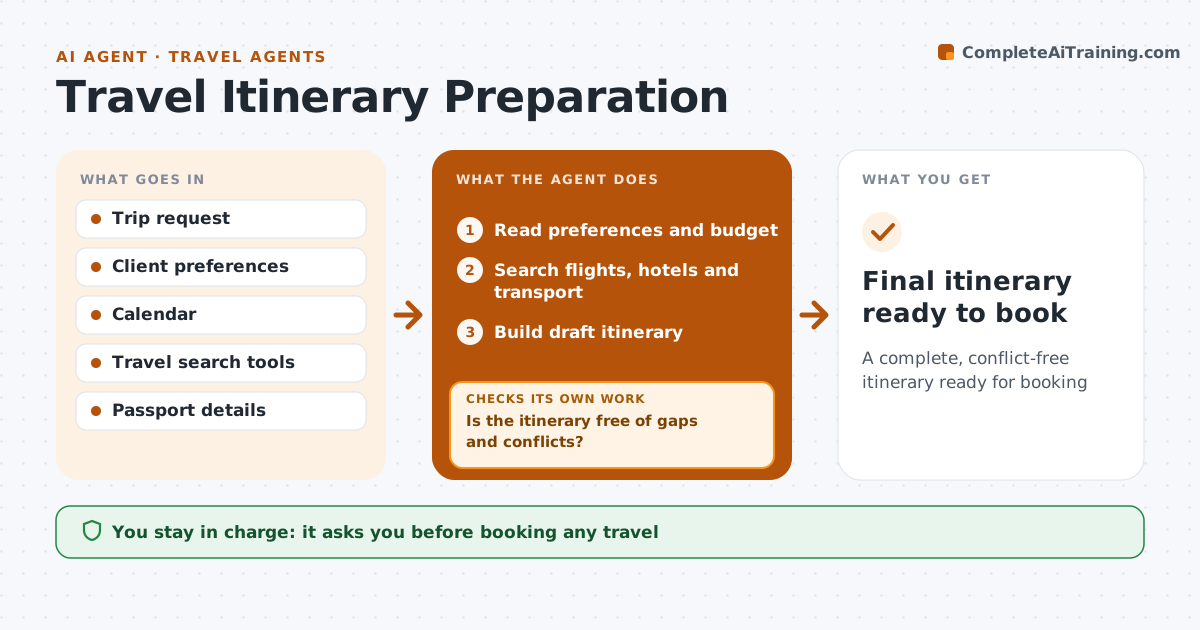
A complete, conflict-free itinerary ready for booking
What it does
Arranging travel means matching flights, hotels and meetings across time zones, and gaps are often found on the road. This agent reads the trip request and the client's preferences: airlines, seat, hotel style and budget. It searches options and builds a draft itinerary with flights, hotel, ground transport and meetings. It checks for gaps: connections under the minimum time, nights without a hotel, meetings that clash with travel. An overnight flight arriving the next day needs the hotel from that date. If it finds a gap, it swaps the option and rechecks. It also checks passport and visa needs. It drafts the itinerary with a short list of choices. The client approves before anything is booked.
How it works
Follow the arrows from top to bottom. The orange dashed arrow is the loop: when a check fails, the agent goes back and tries again.
Read the steps as a list
- Trip request received
- Read preferences and budget
- Search flights, hotels and transport
- Build draft itinerary
- Is the itinerary free of gaps and conflicts?If not: swap the problem option and rebuild. Back to step 4.
- Check passport and visa needs
- Is the total within budget?If not: search cheaper options that keep the schedule. Back to step 3.
- Client approves before bookingThe agent waits here for your OK.
- Final itinerary ready to book
How it decides
It ranks options by preferences and budget, and accepts the itinerary only when no gap or conflict remains.
- Minimum connection 75 minutes, 2 hours international
- Overnight flights move hotel dates
- Stay within budget unless the client says otherwise
Make it yours
Every agent is a starting point. You choose these settings for your own situation.
- Client preferences
- Minimum connection times
- Budget
- Itinerary format
What keeps you in control
It always asks you first
- Booking any travel
- Spending above budget
Hard limits
- Never books or pays
- Never stores passport numbers in shared files
It stops when
- Done: itinerary approved
- Stop: visa cannot be obtained in time; tell the client
Set it up
We guide you through the set-up, step by step
Members get the full set-up guide for this agent. No technical skills needed: you copy, paste and upload.
- One set of instructions to paste into your AI, with the clicks for ChatGPT, Claude, Microsoft 365 Copilot, Gemini and Grok
- The agent then walks you through connecting your own data, one source at a time
- A downloadable copy with the flow chart, the rules and the full guide