AI agent for accounts payable specialists
Vendor Bank Change Verification Agent
Every bank detail change verified by an independent callback before it is used
What it does
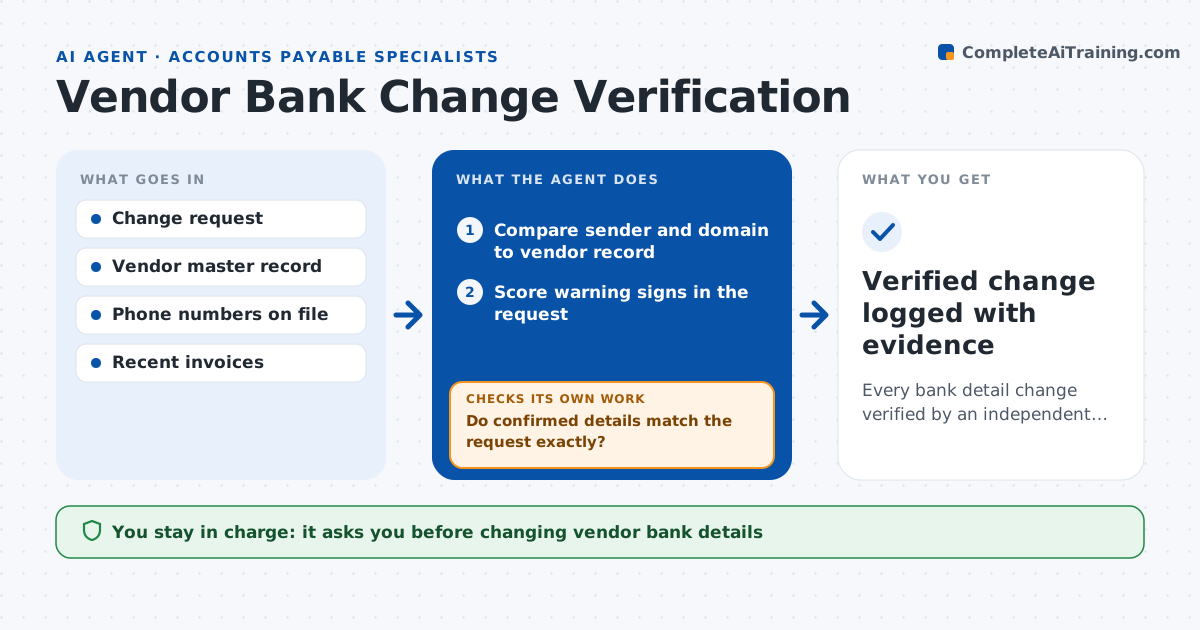
Fake bank change requests are a common fraud, and a busy team can approve one in seconds. When a vendor asks to change bank details, this agent runs the verification steps. It reads the request, compares the sender address and domain to the vendor record, checks the new bank country and name against past details, and scores warning signs like urgency or a recent invoice spike. It prepares a callback script using the phone number already on file, never the one in the email. After the specialist logs the callback, it checks that the confirmed details match the request exactly, digit by digit. If anything differs, it holds the change and sets up a second contact. Only then does it prepare the change for a second person to approve. Edge case: the vendor's email domain differs by one letter, so the agent stops and routes it to fraud review.
How it works
Follow the arrows from top to bottom. The orange dashed arrow is the loop: when a check fails, the agent goes back and tries again.
Read the steps as a list
- Bank change request received
- Compare sender and domain to vendor record
- Score warning signs in the request
- Prepare callback script with number on file
- Specialist logs callback result
- Do confirmed details match the request exactly?If not: hold the change and prepare a second callback to a different contact. Back to step 4.
- Second person approves the vendor master changeThe agent waits here for your OK.
- Verified change logged with evidence
How it decides
It scores warning signs such as domain mismatch, new country and urgency. Any mismatch after the callback stops the change.
- Domain differs from record: stop and send to fraud review
- New bank country differs: require a second contact
- Callback details differ in any digit: reject the request
Make it yours
Every agent is a starting point. You choose these settings for your own situation.
- Warning signs that trigger fraud review
- Number of contacts needed for high-value vendors
- Payment hold period after a change
- Who is the second approver
What keeps you in control
It always asks you first
- Changing vendor bank details
- Releasing a held payment
Hard limits
- Never uses contact details from the request itself
- Never changes bank details without two people
It stops when
- Done: change verified and approved
- Stop: callback not possible or warning signs too high
Set it up
We guide you through the set-up, step by step
Members get the full set-up guide for this agent. No technical skills needed: you copy, paste and upload.
- One set of instructions to paste into your AI, with the clicks for ChatGPT, Claude, Microsoft 365 Copilot, Gemini and Grok
- The agent then walks you through connecting your own data, one source at a time
- A downloadable copy with the flow chart, the rules and the full guide