AI agent for accounts payable specialists
Vendor Tax Form and 1099 Readiness Agent
Every reportable vendor has a valid tax form and correct totals before year-end
What it does
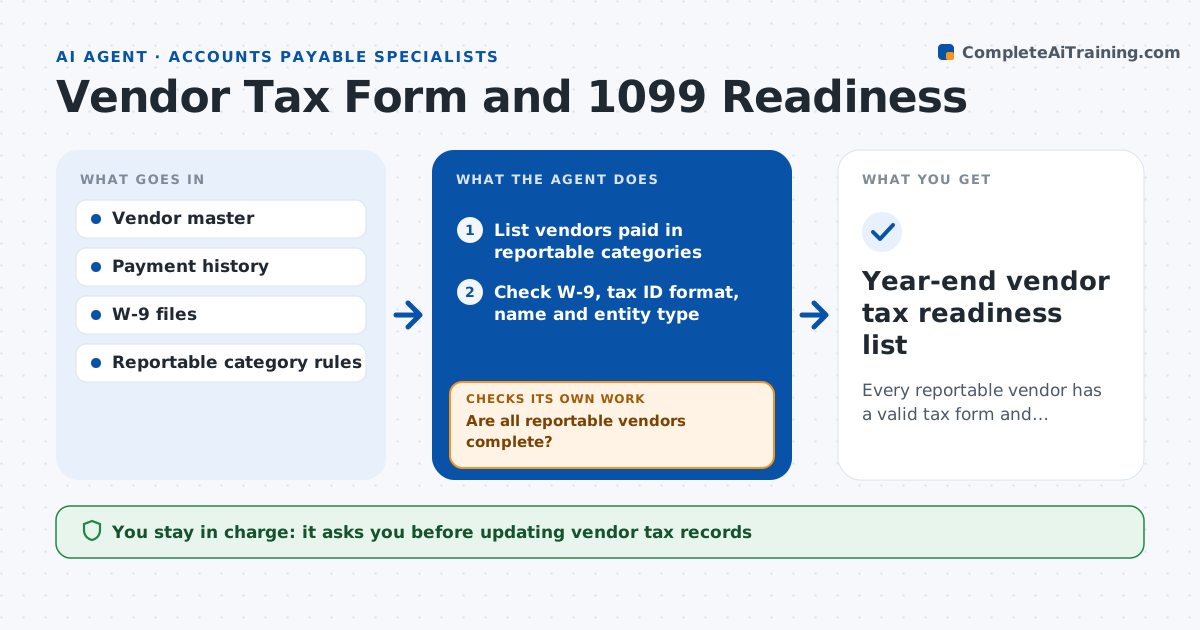
Missing vendor tax forms cause a January scramble when 1099s are due. This agent keeps vendor tax records ready all year. Each month it lists vendors paid in reportable categories and checks each one for a current W-9, a valid tax ID format, a matching legal name and the right entity type. It runs the name and tax ID through the TIN match check if the business uses it. For vendors with gaps, it drafts a request for a new form and tracks replies. When a form arrives it re-checks the record, and a mismatch goes back for follow-up. Close to year-end, it totals payments by vendor and box type and lists anyone still incomplete. The specialist approves requests and record updates. Edge case: a corporation paid for legal services is still reportable, so the agent keeps it on the list.
How it works
Follow the arrows from top to bottom. The orange dashed arrow is the loop: when a check fails, the agent goes back and tries again.
Read the steps as a list
- Monthly tax record review begins
- List vendors paid in reportable categories
- Check W-9, tax ID format, name and entity type
- Run TIN match where available
- Draft form requests for vendors with gaps
- Are all reportable vendors complete?If not: send reminders and re-check forms as they arrive. Back to step 3.
- Specialist approves record updatesThe agent waits here for your OK.
- Year-end vendor tax readiness list
How it decides
It flags vendors paid over the reporting threshold who lack a valid form or show a name and ID mismatch.
- Paid over the threshold with no W-9: request immediately
- Legal services paid to a corporation: still reportable
- Name and tax ID mismatch: hold record update until resolved
Make it yours
Every agent is a starting point. You choose these settings for your own situation.
- Reporting threshold and categories
- Reminder schedule for missing forms
- Whether to use TIN matching
- Who reviews mismatches
What keeps you in control
It always asks you first
- Updating vendor tax records
- Sending form requests
Hard limits
- Never stores full tax IDs in notes or emails
- Never files returns
It stops when
- Done: all reportable vendors complete
- Stop: vendor refuses to provide a form, escalate to the controller
Set it up
We guide you through the set-up, step by step
Members get the full set-up guide for this agent. No technical skills needed: you copy, paste and upload.
- One set of instructions to paste into your AI, with the clicks for ChatGPT, Claude, Microsoft 365 Copilot, Gemini and Grok
- The agent then walks you through connecting your own data, one source at a time
- A downloadable copy with the flow chart, the rules and the full guide