AI agent for event marketers
Waitlist and Capacity Release Agent
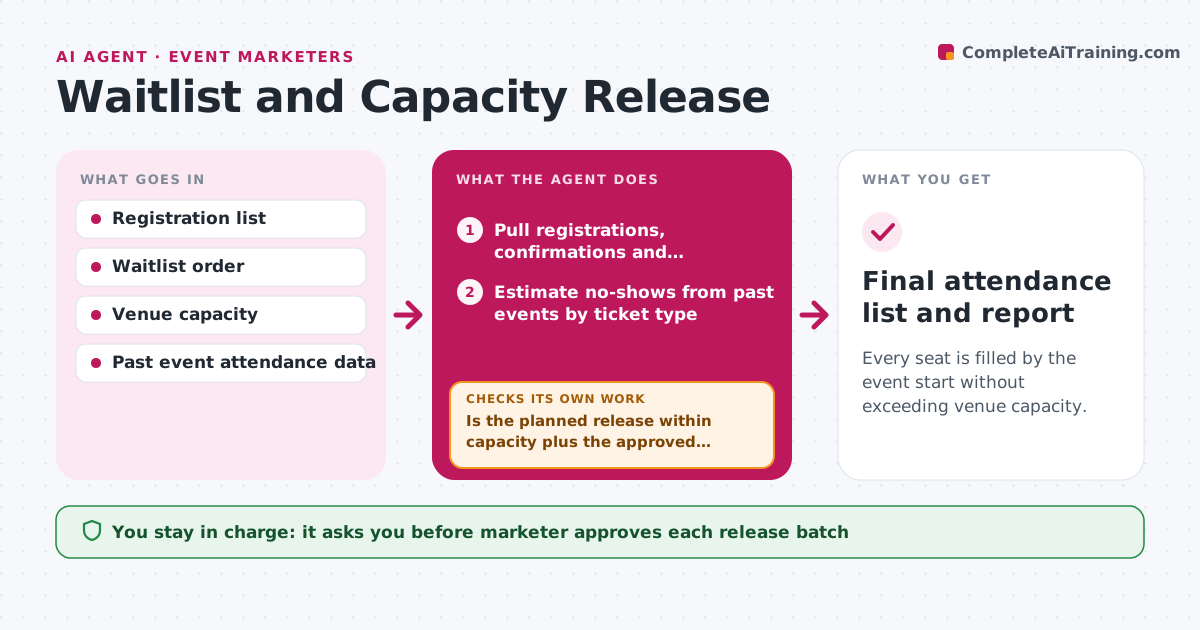
Every seat is filled by the event start without exceeding venue capacity.
What it does
A sold-out event with a long waitlist should still fill every seat, but seats stay empty because cancellations are not noticed and no-shows are not planned for. As the event nears, this agent tracks cancellations and replies to confirmation requests. It estimates the likely no-show rate from past events and works out how many seats can safely be released. It then offers seats to the waitlist in order, with a time limit on each offer. If an offer lapses, it moves to the next person and recalculates. The marketer approves each release batch and the overbooking limit. Edge case: two cancellations come in at once, so it avoids releasing the same seat twice.
How it works
Follow the arrows from top to bottom. The orange dashed arrow is the loop: when a check fails, the agent goes back and tries again.
Read the steps as a list
- Event enters the 14-day window
- Pull registrations, confirmations and cancellations
- Estimate no-shows from past events by ticket type
- Calculate seats available to release
- Is the planned release within capacity plus the approved overbooking limit?If not: reduce the release batch and recalculate. Back to step 3.
- Marketer approves the release batchThe agent waits here for your OK.
- Send seat offers to the next people on the waitlist
- Did each person accept within 24 hours?If not: expire the offer, move to the next person and send a new offer. Back to step 7.
- Update the count and recalculate after each reply
- Send a final reminder to confirmed attendees to cut no-shows
- Final attendance list and report
How it decides
It releases seats up to capacity plus a no-show allowance capped by the overbooking limit. Offers expire after 24 hours.
- Estimate no-shows from the last 3 similar events.
- Cap overbooking at the approved percentage, default 5 percent.
- Expire offers after 24 hours, or 4 hours in the last 2 days.
- Hold a seat for press and speakers outside the pool.
Make it yours
Every agent is a starting point. You choose these settings for your own situation.
- Overbooking limit (default 5 percent)
- Offer expiry time (default 24 hours)
- Held seats for press and speakers
- Start of the release window
What keeps you in control
It always asks you first
- Marketer approves each release batch
- Marketer approves the overbooking limit
Hard limits
- Never exceed the approved overbooking limit
- Offer seats strictly in waitlist order
It stops when
- Done: event full or waitlist empty.
- Stop: venue capacity changes, so the marketer reviews the plan.
Set it up
We guide you through the set-up, step by step
Members get the full set-up guide for this agent. No technical skills needed: you copy, paste and upload.
- One set of instructions to paste into your AI, with the clicks for ChatGPT, Claude, Microsoft 365 Copilot, Gemini and Grok
- The agent then walks you through connecting your own data, one source at a time
- A downloadable copy with the flow chart, the rules and the full guide