AI agent for executive assistants
Weekly Calendar Time Audit Agent
Free up focus time next week without dropping meetings that matter.
What it does
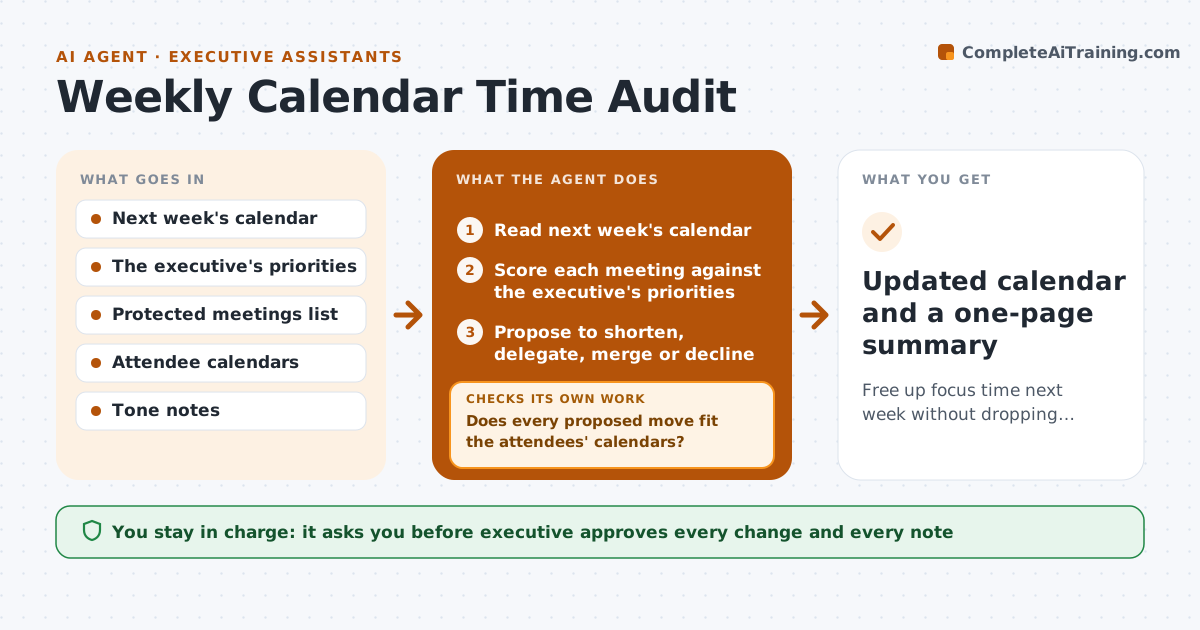
A calendar fills up with meetings that nobody questions, and focus time vanishes. Each week this agent reads next week's calendar against the executive's stated priorities. It marks meetings that could be shorter, delegated, merged or dropped, and proposes specific changes. It checks attendee availability so that any suggested move actually fits. It then drafts the decline or reschedule notes in the executive's voice. The executive goes through the proposals and approves each one. After approved changes are made it recounts focus time and checks that protected blocks survived. Edge case: a recurring meeting with the board chair is never proposed for removal.
How it works
Follow the arrows from top to bottom. The orange dashed arrow is the loop: when a check fails, the agent goes back and tries again.
Read the steps as a list
- Friday review begins
- Read next week's calendar
- Score each meeting against the executive's priorities
- Propose to shorten, delegate, merge or decline
- Check attendee availability for each proposed move
- Does every proposed move fit the attendees' calendars?If not: Offer a different time or a delegate and check again. Back to step 4.
- Draft the decline and reschedule notes
- Executive approves each changeThe agent waits here for your OK.
- Send approved notes and update the calendar
- Is focus time at or above the target?If not: Propose further changes for the remaining low-value meetings. Back to step 3.
- Updated calendar and a one-page summary
How it decides
It scores each meeting against the priorities and proposes changes only when the move is feasible for all attendees.
- Never propose changes to protected meetings
- Suggest a 25 or 50 minute version for meetings under 5 attendees with no decisions
- Suggest delegation when the executive has spoken less than 10 percent of recent sessions
- Aim for the focus hours the executive set
Make it yours
Every agent is a starting point. You choose these settings for your own situation.
- Focus hours target per week (default 8)
- Protected meetings list
- Executive's priorities
- Voice and tone for notes
What keeps you in control
It always asks you first
- Executive approves every change and every note
Hard limits
- Never send a note without the executive's approval
- Never alter protected meetings
It stops when
- Done: approved changes are made and focus time is reported
- Stop: the executive declines all proposals
Set it up
We guide you through the set-up, step by step
Members get the full set-up guide for this agent. No technical skills needed: you copy, paste and upload.
- One set of instructions to paste into your AI, with the clicks for ChatGPT, Claude, Microsoft 365 Copilot, Gemini and Grok
- The agent then walks you through connecting your own data, one source at a time
- A downloadable copy with the flow chart, the rules and the full guide