AI agent for health coachs
Weekly Client Check-in Agent
Keep clients on track between sessions
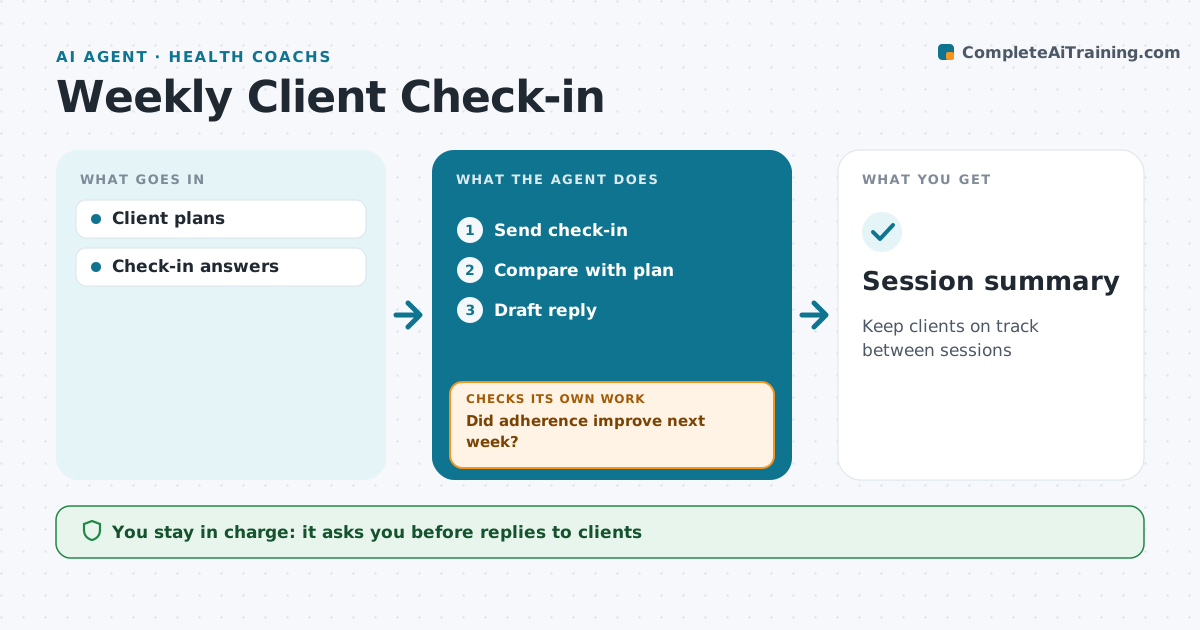
What it does
Progress happens between sessions, and clients who struggle quietly often drop out. Each week this agent sends every client a short check-in about the actions they agreed: workouts done, meals logged, habits kept, energy and any problems. It compares the answers with the client's plan and flags low adherence, setbacks or worrying replies. For each client it drafts a short personal reply for the professional to edit and send, and prepares a summary before the next session. The following week it checks whether the issue improved. If not, it flags the client for a plan change at the next session. The professional approves every reply. Edge case: replies that mention injury, fainting or extreme food restriction go to the professional at once.
How it works
Follow the arrows from top to bottom. The orange dashed arrow is the loop: when a check fails, the agent goes back and tries again.
Read the steps as a list
- Check-in day
- Send check-in
- Compare with plan
- Draft reply
- Professional edits and sends replyThe agent waits here for your OK.
- Did adherence improve next week?If not: flag for plan change at next session. Back to step 3.
- Session summary
How it decides
Answers compared with plan targets.
- Under half of planned actions flags
- Two weeks low flags plan review
- Safety replies alert at once
Make it yours
Every agent is a starting point. You choose these settings for your own situation.
- Check-in day
- Questions
- Thresholds
- Reply tone
What keeps you in control
It always asks you first
- Replies to clients
Hard limits
- No plan changes without the professional
It stops when
- Done: weekly cycle
- Stop: client pauses
Set it up
We guide you through the set-up, step by step
Members get the full set-up guide for this agent. No technical skills needed: you copy, paste and upload.
- One set of instructions to paste into your AI, with the clicks for ChatGPT, Claude, Microsoft 365 Copilot, Gemini and Grok
- The agent then walks you through connecting your own data, one source at a time
- A downloadable copy with the flow chart, the rules and the full guide