
Learning path
Learning AI as a Dietitian
This learning path helps dietitians use AI tools like ChatGPT to save time on meal plans, client education, and progress notes. You will set up your AI, learn prompts for your daily work, and pick video courses that fit your practice.
Your path
Everything in the Dietitian AI kit, in the order that makes sense. Members tick off each step and see their progress.
Set up your AI
We guide you through each click.
Let skills do your everyday tasks
Connect your apps and pick your AI apps
Hand whole tasks to AI agents
Build your own tools
Keep growing
Everything for dietitians
All the courses, certifications, AI tools, MCP servers and apps for dietitians, most relevant first. Open any list to see more.
Take the prompt courses
A short framework course to learn how to ask, then 9 lessons with ready-to-use prompts for dietitians.
Start with this framework: how to talk to AI
CARE fits dietitian work because a diabetes consult note becomes context, action, result, and a repeatable meal plan example.
Then your prompt course for dietitians- 1Explaining Nutrition Basics3 prompts
- 2Drafting Meal Plan Ideas3 prompts
- 3Analyzing Food Intake3 prompts
- 4Creating Client Education Materials2 prompts
- 5Preparing for Client Consultations3 prompts
- 6Monitoring Client Progress2 prompts
- 7Coordinating with Healthcare Team2 prompts
- 8Staying Updated on Nutrition Research4 prompts
- 9Practice Admin and Marketing2 prompts
Watch the video courses or add them to your Favorites for later
84 video courses our AI picked for dietitians, most useful first. Save the ones you want to watch later with the heart.
Favorites are saved to your account: sign in or get your AI kit first.
Show all 84 video courses
Get certified, or add certifications to your Favorites
Every course ends in an exam and a certificate you can add to LinkedIn. Save the certifications you are aiming for with the heart.
Favorites are saved to your account: sign in or get your AI kit first.
More certifications for dietitiansShow all 24 certifications
Try the AI tools for dietitians
10 AI tools our AI matched to the work of dietitians, best fit first. Each review shows what it does, its alternatives and the jobs it suits.
Favorites are saved to your account: sign in or get your AI kit first.
Show all 10 AI tools
Connect your AI to the apps dietitians use
MCP servers let ChatGPT, Claude or Copilot look things up and get work done in other apps, like your email, calendar or bookkeeping software. These 12 fit the work of dietitians best, well-known apps first.

Nutrients MCP server
by ericblair1903Your AI can look up calories, macros, vitamins, minerals and allergens for any food, from a photo or a description.
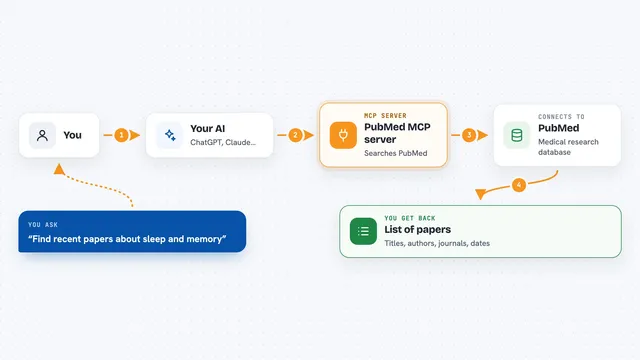
PubMed MCP server
by andybrandtLets your AI search medical and life sciences papers on PubMed and read their abstracts and full text.

PubMed Search MCP Server
by pubsproLet your AI search medical research papers on PubMed and give you plain-English summaries.

NCBI PubMed MCP server
by vitorpavinatoSearch PubMed's millions of research articles and get summaries, authors, and related papers through your AI.

Bing Search MCP server
by leehanchungLets your AI search the web, news, and images through Microsoft Bing while you chat.

Google Search MCP server (AceDataCloud)
by AceDataCloudLets your AI run Google searches for web, images, news, videos, places and maps, and hand you the results.
ResearchNo installShow all 12 MCP servers

Brave Search MCP server
by braveLets your AI search the web, news, images, and places through Brave Search.
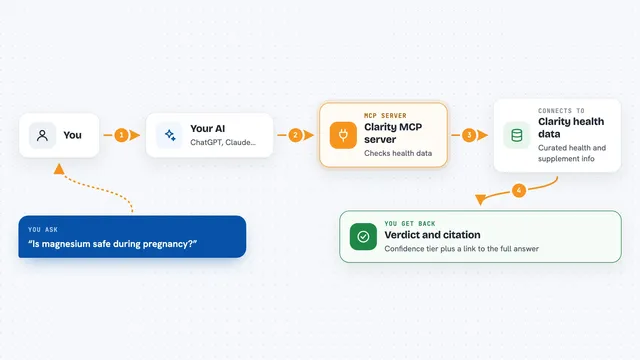
Clarity MCP server
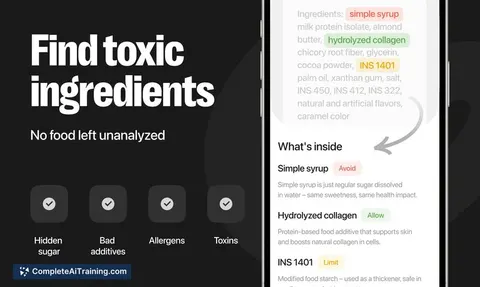
by thehealthaiLets your AI check ingredients, supplements and health claims against conditions like pregnancy or allergies, with sources.
Health and learningResearchNo install
DuckDuckGo Search MCP server
by zhsamaLets your AI search the web through DuckDuckGo and bring back results for you.

macalc Calculator MCP server
by tresor4kLets your AI run everyday calculators: taxes, salary, mortgage, BMI, conversions and more.
Finance and cryptoNo install
Web Search MCP server
by pskill9Lets your AI search the web through Google and bring back titles, links, and short descriptions.

OpenNutrition MCP server
by deadletterqLets your AI look up foods, nutrition facts and barcodes from a local food database.
Build your own AI apps for dietitians
Apps you build yourself with your own AI, no coding needed and no monthly fee. Our AI picked the one that fits the work of dietitians.


















































































About this learning path
6 topicsAI for Dietitians: Save Time, Improve Client Care
Dietitians juggle meal plans, client education, progress notes, and team communication. AI can help you draft, summarize, and organize so you spend more time with clients and less on paperwork.
This learning path walks you through setting up your AI, connecting it to your workflow, and using prompts made for dietitian tasks. You also get video courses chosen for your job and the certifications that come with them.
Why AI matters now
Clients expect personalized care and quick answers. AI helps you keep up without working longer hours.
New tools can draft meal ideas, analyze food diaries, and write progress notes. Learning them now keeps your skills sharp.
What the path includes
You start with setup questions to choose the right AI tool for your practice. Then you connect your AI and learn skills for the job inside your AI.
The path includes this prompt course and video courses picked for dietitians. Each video course comes with a certification you can add to your profile.
How it saves you time
Meal plans, client handouts, and progress updates can take hours. With the right prompts, you get a strong first draft in minutes.
You review and adjust, so your clinical judgment stays in charge. The time you save goes back to client care or your own day.
How it protects your career
AI will not replace dietitians, but dietitians who use AI well will have an edge. You stay current with research and guidelines more easily.
You also protect your license by keeping client data private and following your workplace rules. The path shows you how.
How to get started
Begin with the setup questions and connect your AI. Then take the prompt course and practice with one client task, like a meal plan draft.
Add a video course that fits your setting, such as clinical, community, or sports nutrition. Move at your own pace.
Frequently asked questions
Do I need to be technical to use AI as a dietitian?
No. The tools work like a chat window. If you can write an email, you can use these prompts. The path starts with setup questions to guide you.Is my client data safe when I use AI?
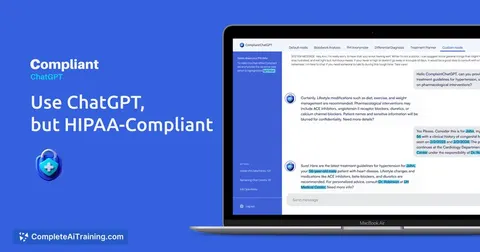
You should never paste identifying details into public AI tools. Use initials or de-identified summaries. The course covers privacy rules for dietitians and how to stay compliant.How long does the learning path take?
Most dietitians finish the prompt course in a few sittings. The video courses vary in length, so you can fit them around your schedule. You keep access to the materials.Will AI replace dietitians?
No. AI cannot assess a client in person or build trust. It handles drafts and summaries. Your expertise and judgment remain the core of care.