AI agent for restaurant managers
Weekly Food Cost Variance Agent
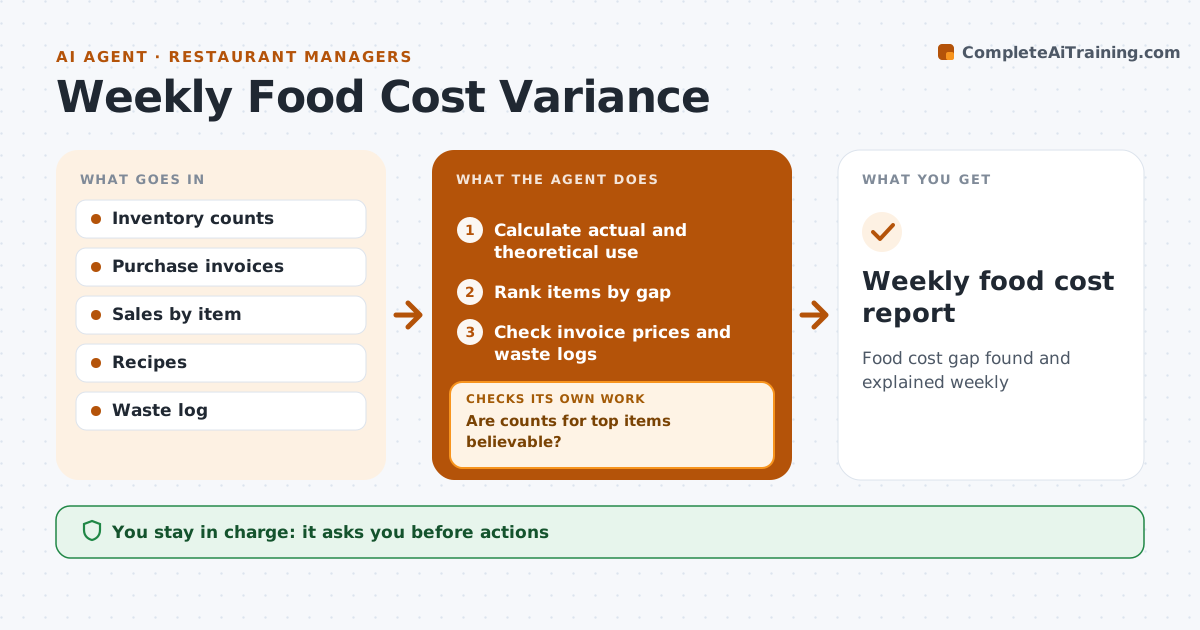
Food cost gap found and explained weekly
What it does
Actual food cost often runs above theoretical cost, and nobody finds out why before the next week starts. This agent compares the week's actual food cost from inventory counts and purchases with theoretical cost from sales and recipes. It breaks the gap down by item and ranks items by dollar impact. For the biggest gaps it checks invoice prices, waste logs and count errors in turn. If a count looks wrong, it asks for a recount before blaming the kitchen. A supplier price rise shows as variance until recipes are updated, so it flags recipe costs to update. It drafts a short report with likely causes and actions. The manager approves actions such as portion training or a supplier call.
How it works
Follow the arrows from top to bottom. The orange dashed arrow is the loop: when a check fails, the agent goes back and tries again.
Read the steps as a list
- Weekly count done
- Calculate actual and theoretical use
- Rank items by gap
- Are counts for top items believable?If not: ask for a recount. Back to step 2.
- Check invoice prices and waste logs
- Draft causes and actions
- Manager approves actionsThe agent waits here for your OK.
- Weekly food cost report
How it decides
It ranks items by dollar gap between actual and theoretical use.
- Gap over set percent is flagged
- Recount when change is unusual
- Update recipe costs when prices change
Make it yours
Every agent is a starting point. You choose these settings for your own situation.
- Variance threshold
- Items tracked
- Report day
What keeps you in control
It always asks you first
- Actions
Hard limits
- Never accuses staff
It stops when
- Done: report done
- Stop: count missing
Set it up
We guide you through the set-up, step by step
Members get the full set-up guide for this agent. No technical skills needed: you copy, paste and upload.
- One set of instructions to paste into your AI, with the clicks for ChatGPT, Claude, Microsoft 365 Copilot, Gemini and Grok
- The agent then walks you through connecting your own data, one source at a time
- A downloadable copy with the flow chart, the rules and the full guide