About Dictura
Dictura is an AI-driven desktop app for macOS and Windows that converts speech into clean, formatted text directly at your cursor. Hold a key, speak naturally, and release - the transcription or translated text appears in any app without switching windows or copying and pasting. The app offers built-in translation across dozens of languages and a privacy-focused approach where audio is not stored.
Review
Dictura offers a simple, focused workflow for people who want faster text entry and easy translations without interrupting their current tasks. It combines a quick "hold-to-speak" input method with automatic insertion into any text field, and provides both an on-device engine for offline use and a cloud option for higher-accuracy transcription and broader language coverage.
Key Features
- Hold-key dictation: press and hold a hotkey, speak, then release to insert formatted text at the cursor in any app.
- Built-in AI translation: speak in one language and get output in another; supports 60+ languages for translation output.
- Two transcription engines: an on-device engine with unlimited free use and a cloud engine that offers higher accuracy and wider language support.
- Privacy-focused: audio is not stored, and on-device processing is available for users who prefer offline transcription.
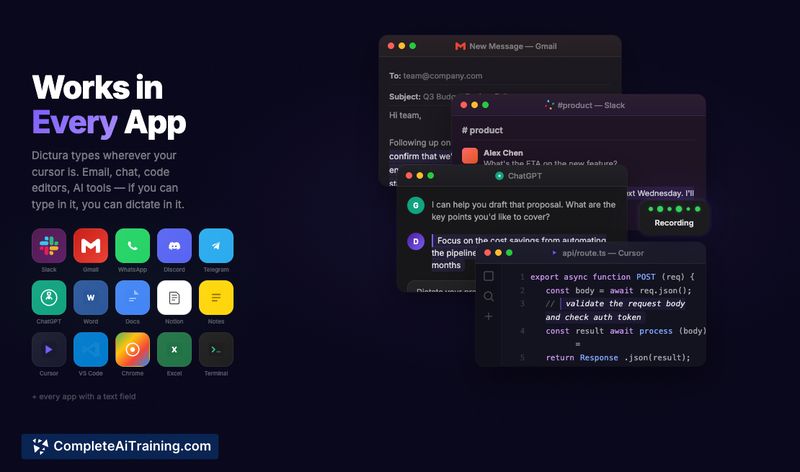
- Works across apps and fields (email, chat, code editors, browsers) with no manual copy-paste or app switching required.
Pricing and Value
Dictura offers a genuinely usable free tier that includes unlimited on-device transcription and translation and does not require an account to get started. Paid plans add access to the cloud transcription engine for improved accuracy and extended language support; paid plans start at $5.99 per month. For frequent typists, multilingual communicators, and people who switch between many apps, the subscription can pay for itself by reducing context switching and speeding up text entry.
Pros
- Fast, low-friction input model that inserts text directly where you type.
- Built-in translation removes the need for separate translator apps or workflows.
- Useful free tier with unlimited on-device usage and no account requirement to start.
- Privacy-oriented options with on-device transcription and a stated policy of not storing audio.
- Cross-application compatibility makes it practical for email, chat, documentation, and coding tasks.
Cons
- Best accuracy and broader language coverage require the cloud option, which is a paid feature.
- Desktop-only at launch (macOS and Windows), so mobile users need alternative solutions.
- The hold-to-speak workflow may not suit everyone's habits or accessibility needs.
Dictura is a strong fit for professionals who write a lot across multiple apps and frequently switch languages - for example, remote teams, multilingual writers, and developers who want to speed up notes and messages. It's especially useful if you prefer a lightweight, privacy-aware dictation tool that minimizes app switching and keeps a straightforward, consistent workflow.
Open 'Dictura' Website
Your membership also unlocks: