About Mina Meeting Assistant
Mina Meeting Assistant is an AI meeting teammate that can join calls, speak during conversations, and take actions while meetings are happening. It pulls context from connected tools, captures decisions and action items, and retains meeting memory to help move work forward before, during, and after calls.
Review
Mina stands out from passive notetakers by offering both reactive and proactive modes: you can invoke it when needed, or configure it to participate and execute tasks automatically. It supports custom skills and integrates with many common productivity and CRM tools, which makes it flexible for a range of meeting types.
Key Features
- Real-time participation: joins Google Meet, Zoom, and Microsoft Teams as a participant and can speak or post interim updates live.
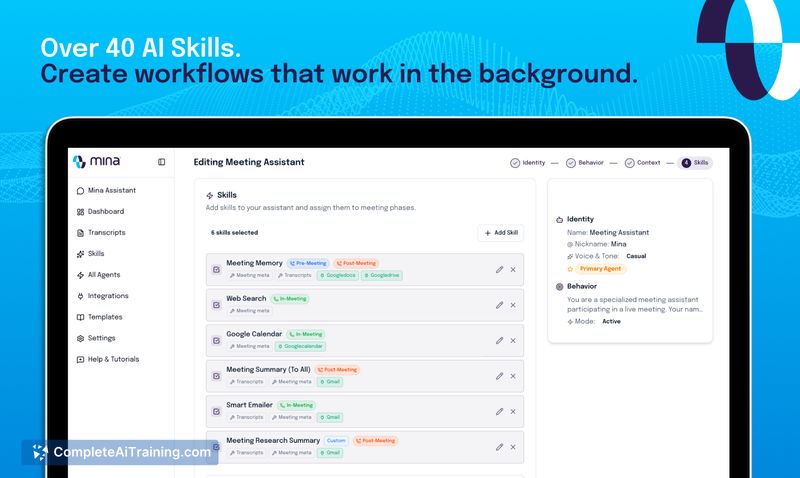
- Skills and no-code agent builder: create reusable workflows (skills) to automate meeting tasks like proposals, follow-ups, and assessments.
- Broad integrations: connects with 200+ tools including Slack, HubSpot, Salesforce, Jira, Notion, GitHub and more to read and update external systems.
- Action capture and automation: captures decisions and action items live, assigns tasks, and can update CRMs or ticketing systems during or after meetings.
- Memory and context: can preload and retain meeting context across sessions so assistants can reference prior conversations or records.
Pricing and Value
Mina offers a free tier to get started and additional Product Hunt credits were made available at launch. The product differentiates between reactive assistants (invoked on command) and proactive assistants (always listening and responding), with proactive functionality noted as higher-cost. For teams that frequently rely on meetings to make decisions, Mina's ability to execute tasks live can reduce post-meeting follow-up work, but teams should evaluate the cost of proactive features and the effort required to configure skills and integrations.
Pros
- Reduces manual post-meeting work by generating summaries, action items, and even drafting proposals during the call.
- Flexible configuration with reusable skills and a no-code builder to adapt the assistant to different meeting types (sales, interviews, standups).
- Deep integrations allow Mina to pull and push data across many tools, so context can be applied directly where work lives.
- Options for reactive or proactive behavior let teams control how much the assistant speaks or acts in a meeting.
Cons
- Privacy and recording concerns: some participants may be uncomfortable with an assistant listening or speaking during confidential calls, so governance and opt-out controls are required.
- Latency and conversational timing: spoken responses that require reasoning or multi-tool queries can introduce noticeable delays and sometimes need filler phrases (e.g., "Give me a second").
- Context accuracy depends on setup: pulling context from many tools can surface the wrong information without careful skill configuration and testing.
Ideal users for Mina are teams that run frequent, action-oriented meetings-sales demos, customer reviews, standups, interviews, and onboarding sessions-and are willing to invest time in configuring skills and integrations. Organizations with strict privacy requirements should evaluate the assistant's controls and deployment options before using proactive listening features, while teams seeking to cut down manual follow-up work will find Mina's live execution capabilities particularly useful.
Open 'Mina Meeting Assistant' Website
Your membership also unlocks: