Build & Sell Grokbot AI Agents in 2 Hours (Video Course)
Build AI teammates that handle your email, create tasks, run reports, and work while you sleep,then package that skill into a service clients pay for. Learn the setup, training method, and pricing ladder in two focused hours.
Related Certification: Certification in Building and Selling Grokbot AI Agents
Also includes Access to All:
What You Will Learn
- Build and deploy a team of specialized Grokbot agents (executives and operators)
- Connect and authenticate Gmail, Google Drive, ClickUp, Slack, Fireflies, Composeio and other tools
- Create reusable skills, routines, and a shared file system for automated workflows
- Train agents using the Bike Method and implement verification loops for safe autonomy
- Package and monetize Grokbot implementations with the AI Service Ladder and Three P's
Study Guide
Why This Course Exists
Most business owners don't need another chatbot. They need someone to actually handle the repetitive work that eats their day. That's the gap this course fills. You're going to learn how to build, train, and deploy Grokbot agents that don't just answer questions, they take action. They read your email, create tasks, generate reports, produce marketing assets, and talk to each other while you're away from your desk.
This isn't a surface-level demo. We're going deep into the architecture, the setup process, the training philosophy, and the business model behind selling this as a service. By the end, you'll know how to turn a collection of AI agents into a real operational system, not a pile of disconnected bots.
The value here is simple: a $30 per month tool can replace hours of manual labor. If you're a solo operator, that's leverage. If you're a consultant, that's a service you can sell. If you run a team, that's a way to remove bottlenecks without hiring.
What You'll Actually Be Able To Do
Build a working AI team from scratch
You'll create executive agents, operator agents, and the rules that let them work together. You'll understand why one giant agent fails and why specialization wins.
Connect real tools and data
You'll authenticate Gmail, Google Drive, ClickUp, Slack, Fireflies, and third-party services through Composeio. You'll learn the difference between read access and write access, and why that distinction matters more than most people think.
Create reusable skills and routines
You'll turn one-off instructions into repeatable recipes. You'll schedule agents to run on a cadence, triggered by time or events, so the system works even when you're asleep.
Train agents properly
You'll use the Bike Method to build trust gradually. You'll implement verification loops so agents check their own work before you see it. You'll learn why skipping these steps creates dangerous situations.
Monetize the skill
You'll see the AI Service Ladder, from free work to retainers. You'll learn the Three P's framework for outreach and why being your own proof is the strongest sales asset you can have.
The Core Idea: AI Teammates, Not Chatbots
Grokbot is not a single assistant. It's a platform for building a team of AI agents, each with a name, a role, a description, and a memory. These agents share a virtual computer. They can sign into your tools. They can message one another. They can delegate work. They can run on schedules. That's a fundamentally different thing from asking a chatbot to write a paragraph.
Think of it like hiring a small operations team. You have a chief of staff who talks to you directly. That chief of staff manages specialists who handle email, project management, reporting, and content. You don't talk to every specialist every day. You talk to a few key people, and the work gets routed behind the scenes.
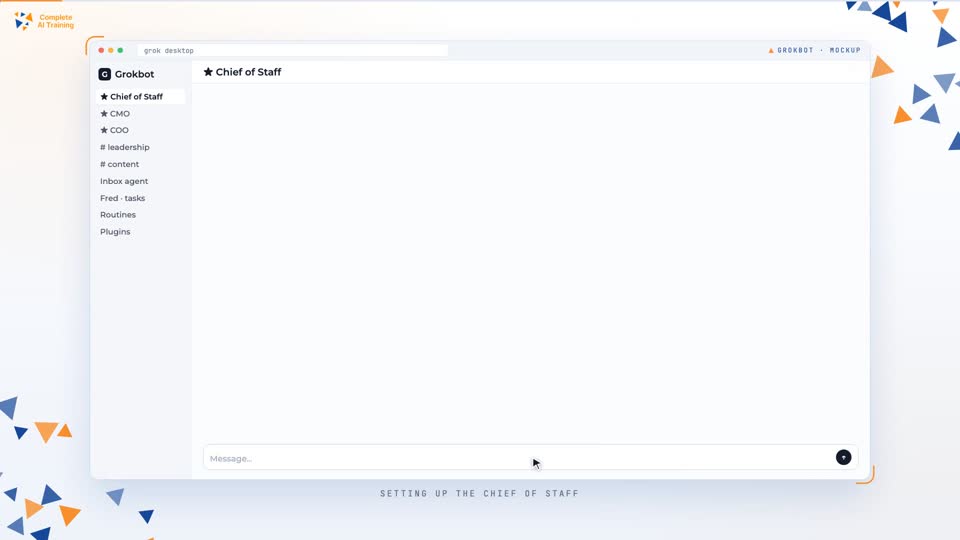
The interface looks like a messaging app. You have direct messages with individual agents, group channels where multiple agents collaborate, pinned agents for your primary contacts, and organizational sections for grouping by function. There's also a shared file system, a routine dashboard, and usage tracking.
The Shared Virtual Computer
Every agent in your Grokbot ecosystem shares the same virtual computer. That's a critical design choice. It means authentication to third-party services happens once and becomes available to all agents. Plugins and skills are universal. Files saved in the local directory are accessible to every agent. If one agent downloads a document, another agent can read it. If one agent creates a spreadsheet, another agent can update it.
But there's a nuance. Shared computer does not mean shared memory. Each agent keeps its own memory. A shared memory layer holds only base-level information that applies to everyone: your name, business location, timezone, communication preferences, connected accounts. Role-specific knowledge stays with the agent that needs it. Your email triage agent doesn't need to know your quarterly marketing strategy, just like your human customer service rep doesn't need access to the CMO's planning docs.
This separation prevents context dilution. When every agent knows everything, they get confused about what they're supposed to do. When agents know only what's relevant, they stay focused.
Why a Single Mega-Agent Fails
There's a temptation to build one super agent that controls everything. It looks clean in theory. One brain, many arms. But in practice, it breaks down fast. The mega-agent gets overwhelmed by the number of tasks, tools, and subordinate agents it has to manage. It starts confusing roles. It duplicates work. It drops things. The system becomes unwieldy as it scales.
The better model mirrors a human organization. You interact with a small number of executive agents. Those executives understand high-level goals and delegate to specialists. The specialists do one thing very well. That's the hierarchy principle.
The Hierarchy Principle: Executives and Operators
Your role as the operator
You communicate primarily with three to five pinned executive agents. You don't need to manage every specialist. You give direction to your chief of staff, your CMO, or your operations lead, and they route the work.
Executive agents
These agents understand the big picture. They know your business goals, your priorities, and which specialists to call for different tasks. They manage, delegate, and synthesize. Examples include a Chief of Staff, a Chief Marketing Officer, a COO, or a CFO.
Operator agents
These agents execute. One handles email triage. One manages ClickUp tasks. One pulls meeting transcripts. One generates images. One edits video. They're narrow, focused, and effective.
This structure keeps your interface manageable. You pin the few agents you actually talk to. The rest live in the background, doing their jobs.
Agent-to-Agent Communication
Agents in Grokbot can message each other. They read each other's outputs. They delegate work. For example, an inbox agent can tell a customer that someone will follow up. That same inbox agent can message the task management agent with the customer's details. The task agent then creates a card in ClickUp. The human never has to manually transfer information between systems.
This inter-agent communication is governed by descriptions and context. If you write clear role descriptions, agents know who to contact and why. If you write vague descriptions, they guess. And guessing leads to errors.
The Four C's Framework
The entire system rests on four pillars: Context, Connections, Capabilities, and Cadence. The first two form the informational foundation. The last two are the mechanisms that let agents move faster and operate autonomously. If you build all four together, you get an AI operating system. If you skip one, the system limps.
Context: Making Agents Specific
Context is everything that makes an agent specific to you and your business. It includes your personal information, communication preferences, business model, services, pricing, company values, brand guidelines, long-term goals, and existing documentation. Without context, an agent is generic. It writes generic emails. It makes generic decisions. It doesn't understand why your business is different.
You can provide context through conversation, but structured documents are better. A knowledge base document with your company snapshot, hours of operation, services, and pricing gives the agent something to ingest and save to memory. The quality of the agent's output is directly proportional to the quality of the context you provide.
Example one
A home services company called Summit Home Services provides HVAC work in the Twin Cities. The owner shares a Google Drive link with a company overview, service list, pricing, and emergency response policy. The chief of staff reads it, saves key details to memory, and now drafts emails that reflect the actual business, not a generic template.
Example two
A marketing consultant shares brand guidelines, tone of voice, and a list of past client wins. The CMO agent uses that context to brief a designer agent on image generation, so the visuals match the consultant's style instead of looking like stock AI output.
Connections: Giving Agents Real Access
Connections are authenticated integrations. They let agents read real-time data and take action. The main ones covered in this course are Google Workspace, ClickUp, Fireflies, Slack, Composeio, and Key.ai. Each connection expands what your agents can do.
Connections are managed through a Plugins interface. You authenticate accounts, label them clearly, and manage permissions. If you have multiple Google accounts, labeling is essential. You don't want an agent pulling from the wrong inbox.
A critical security distinction is download access versus edit, create, and delete access. Start with read-only where possible. Expand permissions as trust builds. You wouldn't hand a new employee admin access on day one. Same principle applies to agents.
Example one
You connect Gmail with read and draft access. The inbox agent can read new messages, label them, and create draft replies. It cannot send anything without your approval. That's the right starting point.
Example two
You connect Google Drive with edit access. The reporting agent can create a new Google Sheet, add charts, and update it weekly. That's a task where edit access is necessary for the agent to do its job.
Capabilities: Building Reusable Skills
Capabilities are step-by-step instruction sets. Think of them as recipes. You document how to perform a specific task, and the agent can execute that recipe repeatedly. When the result falls short, you update the recipe.
Skills are stored as private plugins and can be invoked with slash commands. Every new process you automate should become a skill. Over time, you build a library of institutional knowledge that compounds.
Example one
A weekly email report skill tells the agent to aggregate labeled emails, create a Google Sheet, add analytics and charts, and apply visual styling. The first run is plain. You provide feedback on colors and chart types. The agent updates the skill. Next week, the report looks better.
Example two
A "log to ClickUp" skill standardizes how tasks are created. The agent includes customer name, contact info, service needs, and urgency level. Every task follows the same format, so nothing gets lost.
Cadence: Automating the Work
Cadence is the automation layer. It's what makes agents work without you prompting them. There are time-based routines, like checking email every 30 minutes or generating a report every Friday at 5 PM. There are event-based triggers, like responding to new Slack messages. There are event-driven actions, like an inbox agent telling a customer someone will follow up, which triggers the task agent to create a ClickUp card.
Routines have instructions, schedules, and run history. You can test them, deactivate them, or delete them. The run history shows when each routine executed and whether action was taken. That visibility is how you maintain trust as the system scales.
Example one
An emergency watch routine runs every 30 minutes. It checks Gmail for new messages that match emergency criteria. If it finds something urgent, like a customer with no heat and a newborn, it flags it and drafts a response. If nothing urgent exists, it reports no action needed.
Example two
A meeting transcript routine runs every weekday at 6 PM. It pulls new transcripts from Fireflies, organizes them by month, and stores them in the shared file system. Other agents can then reference those transcripts for context.
Setting Up Your First Agent
Start with one agent. Don't build fifteen on day one. Create a chief of staff as your primary point of contact. Give it a clear label, like "Chief of Staff," and pin it to the top of your interface.
The setup process is straightforward. Sign up for the Super Grok plan, download the desktop app, and authenticate. Then create your first agent. When it asks what you need, provide clear information: your name, technical comfort level, business type, team size, growth goals, and communication preferences.
Share existing documentation. If you have an operations handbook, a knowledge base, or a company snapshot, give the agent access. Let it read and save the relevant details to memory. This is much faster than explaining everything manually.
Then allow the chief of staff to create specialized agents as needs arise. It will draft a briefing message that includes business information, pricing, triage instructions, and source of truth references. You review that briefing before the new agent goes live.
The Email Triage System in Detail
Email is the universal starting point. It's time-consuming, rules-based, and measurable. For most small businesses, it's the highest-leverage automation opportunity.
The system demonstrated in this course uses a labeling taxonomy with six labels: Emergency, Needs You, Quote, Schedule, Billing, and Warranty. The inbox agent reads new messages, applies labels, and identifies priority items. When it finds an urgent customer email, it drafts a contextually appropriate reply that includes emergency fee disclosures and next-step instructions.
Human approval is built in at the start. The agent drafts, but it never sends without explicit authorization. That's the supervised phase of the Bike Method. You review the draft, approve it, and the agent learns from your feedback.
The emergency watch routine runs every 30 minutes to monitor for urgent situations. If a customer has no heat with a newborn, that's an emergency. If a water heater is leaking, that's an emergency. The agent flags those immediately.
Feedback loops are essential here. If the agent mislabels an email, you tell it why. If the draft tone is off, you correct it. The agent incorporates that feedback into its instructions. Over time, the labeling and drafting improve.
Project Management Integration
Once email triage works, the next step is connecting it to your project management system. In this course, we use ClickUp. A dedicated task agent, named Fred, handles all ClickUp operations. Fred has one job: manage tasks in ClickUp.
When the inbox agent tells a customer that someone will follow up, it messages Fred with the relevant details. Fred creates a ClickUp card with the customer's name, contact information, service needs, and urgency level. The connection between inbox agent, task agent, and ClickUp is established through inter-agent messaging.
This is where the hierarchy principle shows its value. The inbox agent doesn't need to know how to use ClickUp. The task agent doesn't need to know how to triage email. Each specialist does its job, and they communicate through the shared system.
Reporting Automation and Verification Loops
Weekly reporting is another high-value use case. You create a skill for generating a Google Sheet report every Friday at 5 PM. The agent aggregates labeled emails, calculates response times, creates charts, and applies formatting.
The first version is usually plain. You provide feedback: use these colors, add a chart, format the header. The agent updates the skill. But here's the important part: the agent also verifies its own work. It notices that its changes didn't stick, reverifies, and resolves the issue independently before delivering the final version.
That's a verification loop. Instead of giving you V1, the agent gives you V4 or V7. It reviews its output against defined quality criteria, identifies and corrects errors, and delivers a refined version. This closes the gap between initial output and final quality without requiring you to micromanage every revision.
Example one
A reporting agent creates a Google Sheet with the right data but no charts. Its verification instructions tell it to check for charts, formatting, and color guidelines. It notices the missing chart, adds it, and then delivers the report.
Example two
A content agent drafts a social media post. Its verification loop tells it to check for brand voice, length, and call-to-action. It finds the post is too long, shortens it, and confirms the CTA is present before sending it to you.
Content Production and Marketing Agents
Marketing is another area where specialized agents shine. In the demonstration, a CMO agent named Aaron oversees marketing operations. Two operator agents report to Aaron: Slice, a video editor, and Studio, a designer.
Slice is configured with access to Hyperframes, an HTML-to-video rendering tool. Studio is created for image generation via Key.ai, with access to premium models like GPT Image 2 and Nano Banana 2. When the user requests marketing assets, Aaron delegates to the appropriate specialist.
This is a practical example of the executive-operator hierarchy. You don't talk to Slice or Studio directly. You tell Aaron what you need. Aaron figures out which specialist to use, gives them the context, and reviews the output before it reaches you.
Example one
You need a short video for a product launch. Aaron briefs Slice with the product details, target audience, and desired style. Slice uses Hyperframes to render the video. Aaron reviews it, requests revisions if needed, and delivers the final asset.
Example two
You need profile images for a new team member. Aaron briefs Studio with the brand guidelines and image requirements. Studio uses Key.ai to generate images. Aaron checks them against the brand guidelines before sending them to you.
The Bike Method: Training Agents Through Progressive Trust
The Bike Method is the most important training philosophy in this course. The analogy is simple: you don't put a kid on a bike and expect them to pedal perfectly without help. You hold the handlebars. You give specific feedback. You gradually reduce support. You add training wheels. You remove them. But you still watch from the driveway.
Agents work the same way. Phase one is high supervision. The agent performs tasks while you observe closely and provide immediate feedback. Phase two is guided iteration. The agent incorporates feedback into revised instructions. Phase three is expanded autonomy. The agent gets broader latitude, like sending pre-approved email templates. Phase four is monitored independence. The agent operates autonomously on defined routines, but you maintain visibility through logs, reports, and exception notifications.
The warning is explicit: don't skip phases. People who build fifteen agents on day one and grant full autonomy without testing are the ones who run into trouble when clients get messages that shouldn't have gone out. The principle is: you can outsource the thinking, but you cannot outsource the understanding.
Example one
Your inbox agent starts in draft-only mode. You review every draft for two weeks. You correct labeling errors and tone issues. After consistent acceptable performance, you allow it to send pre-approved templates for common inquiries. High-risk emails still require your approval.
Example two
Your task agent starts by creating tasks in a test ClickUp list. You check the formatting and data accuracy. After a week of correct task creation, you allow it to create tasks in the live project list. You still review the work log weekly.
Verification Loops in Practice
Verification loops are a related best practice. They're instructions that require an agent to review and improve its own output before presenting it to you. This mirrors human management: effective employees review their own work before submission.
Verification loops don't produce perfect results, but they significantly close the gap. You can instruct an agent to check its work against specific quality criteria, identify errors, correct them, and deliver a refined version. You can also ask for screenshots or evidence of verification when appropriate.
Example one
A reporting agent is told to verify that the Google Sheet has the correct tabs, the charts are present, and the colors match brand guidelines. It checks all three, finds a missing tab, adds it, and then delivers.
Example two
A video editor agent is told to verify that the video length is under 60 seconds, the captions are correct, and the outro includes the website URL. It reviews the render, fixes a caption error, and re-renders before delivery.
Memory Architecture: Shared vs. Specific
Understanding memory is critical to building a system that doesn't collapse under its own weight. Grokbot maintains two memory layers. Shared memory holds base-level information accessible to all agents: your name, business location, timezone, communication preferences, and connected accounts. Specific memory holds role-specific context that only relevant agents possess.
The inbox agent knows email triage protocols. The task agent knows ClickUp workflows. The CMO knows marketing strategy. The chief of staff knows a bit of everything but not every detail. This separation keeps operator agents from being burdened with irrelevant information while executives maintain broader awareness.
Don't assume all agents know everything. Information must be deliberately shared through the shared memory layer or via inter-agent communication. If you want the task agent to know about a new service offering, you either add it to shared memory or have the chief of staff message the task agent with the update.
Example one
You change your business hours. You update the shared memory. Now every agent knows the new hours. The inbox agent uses them when drafting replies. The reporting agent uses them when calculating response times.
Example two
You launch a new pricing tier. You tell the chief of staff. The chief of staff updates the inbox agent and the CMO. The task agent doesn't need to know pricing, so it stays unchanged.
The Local File System
Beyond memory, agents share a local file directory within their virtual computer. This is a workspace for project files, transcripts, generated media, context documents, and skills. Agents pass work between one another by referencing file paths. It's similar to a shared drive in a human organization.
A recommended structure includes folders for context and projects. Context holds company information. Projects hold individual deliverables. When an agent creates a video, it saves the file to the projects folder. Another agent can then access that file if needed.
Platform Comparisons and Use-Case Delineation
Grokbot is not a replacement for code-centric harnesses like Claude Code or Codex. They serve different purposes. Grokbot is built for personal agents, automations, and on-the-go management. It's non-technical friendly and phone-accessible. It runs in the cloud and continues working when your device is off.
Claude Code and Codex are built for production coding, software building, and complex project work. They're desktop-oriented and session-based. They offer better session control, version management, and organizational structure for software development.
Grokbot can handle simple landing pages and HTML reports, but it operates closer to vibe coding territory. For production software, use a dedicated coding harness.
Appropriate Grokbot use cases
Email triage, meeting transcript management, weekly reporting, marketing asset generation, project management, Slack-based team communication, social media monitoring, and routine automation triggered by time or events.
Higher-risk work
Production software development, website building, and complex coding projects should go to Claude Code or Codex. Grokbot isn't designed for that level of control.
Bot Templates and Community Sharing
Grokbot includes a template-sharing mechanism. You can package an agent's memories, skills, routines, and plugin configurations into a shareable format. The process is simple: open the bot's settings, select "Share as Template," review the contents, exclude personal details and unused connectors, and publish with a unique link.
When you adopt a template, you review the context, memories, and integrations before installation. You authenticate your own accounts because templates don't carry credentials. Then you customize the bot with your own context.
Safety matters here. Review template contents for potentially malicious instructions. Don't install a template blindly. The same caution applies to any shared automation.
Example one
You build an excellent email triage agent for HVAC companies. You package it as a template, excluding your personal Gmail connection and business-specific details. Another HVAC company adds the template, authenticates their own Gmail, and customizes the context with their pricing and service area.
Example two
You find a template for a weekly reporting agent. You review the skills and routines, confirm there's nothing suspicious, add it to your instance, and connect your own Google Drive. You then adjust the report format to match your brand.
Commercial Applications: The AI Service Ladder
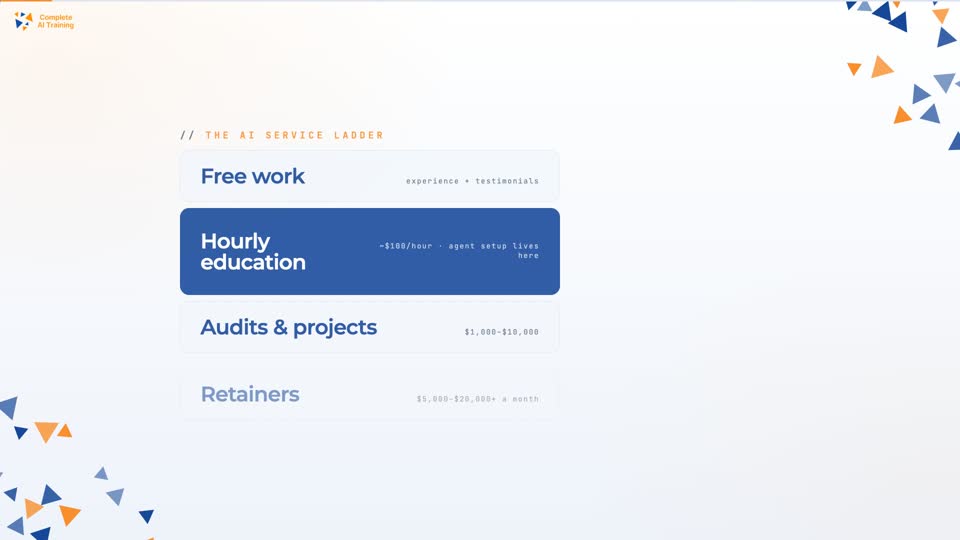
For consultants and agencies, Grokbot implementation is an entry-point offering. The service ladder has four rungs. Free work builds experience and testimonials. Hourly education and consulting is the first paid rung, often around $100 per hour for a five-hour engagement. Paid audits and projects range from $1,000 to $10,000. Retainers are the ultimate goal, ranging from $5,000 to $20,000 or more per month.
Grokbot setup fits primarily in the hourly education and consulting rung. You help a business set up their own agent ecosystem. The risk is low for the client. The value is immediate. The relationship can ladder into larger engagements.
The most compelling sales asset is your own deployment. If you can demonstrate that your business continues to function seamlessly during a week of vacation because your AI ecosystem handles email triage, meeting documentation, reporting, and task management, you have a persuasive offering. That's the "be your own proof" principle.
The Three P's framework guides outreach. Person: precisely identify the target decision-maker. Pain: understand their specific operational bottleneck or cost center. Promise: articulate how the AI implementation will solve that pain. These three elements should be embedded in your agent's context so any outreach it performs is precisely targeted.
Example one
You run a marketing agency. You implement Grokbot for your own business. Your inbox agent handles client inquiries, your reporting agent generates weekly performance reports, and your content agents produce social media assets. You take a week off. The system keeps running. When you pitch a client, you show them your own dashboard and run history. That's proof.
Example two
You target dental practices. The person is the office manager. The pain is missed appointment follow-ups and overflowing email. The promise is an AI system that triages email, drafts responses, and creates follow-up tasks in their project management tool. You offer a fixed-scope engagement for $500 to set up the email triage system. That's a low-risk entry point.
Practical Action Plan
Start with a single chief of staff agent. Provide comprehensive context about your business. Spend at least a week using only that agent before expanding. Document your existing processes before automating them. Those documents become the foundation for skills and agent training.
Begin with the inbox. Email management is measurable, rules-based, and immediately demonstrates value. Apply the Bike Method rigorously. Hold agents in draft-only mode for at least two weeks. Provide explicit feedback on every output. Grant send or execute permissions only after consistent acceptable performance.
Build the feedback habit. After every agent interaction, take 30 seconds to note what worked and what didn't. Instruct the agent to incorporate that feedback into its instructions. Maintain a work log in ClickUp or an equivalent platform to track all agent projects, tasks, and routines.
For agencies, implement Grokbot for your own business first. Package a simple entry-point offering. Use the Four C's as your delivery framework. Develop before and after metrics. Target businesses with identifiable bottlenecks: overflowing inboxes, missed follow-ups, manual reporting processes.
Common Mistakes to Avoid
Building too many agents too fast
You create fifteen agents on day one, grant full autonomy, and then wonder why clients get inappropriate messages. Slow down. Start with one. Test. Expand gradually.
Skipping verification loops
You let agents deliver V1 output. You spend more time fixing their work than you saved. Instruct agents to verify their own work before delivery.
Ignoring the shared vs. specific memory distinction
You assume every agent knows everything. They don't. Deliberately manage what each agent knows. Update shared memory when information applies to everyone. Update specific agents when information applies only to them.
Treating Grokbot like a coding harness
You try to build a production web app with Grokbot. It's not the right tool. Use it for operations, automations, and agent work. Use Claude Code or Codex for software development.
Not being your own proof
You pitch Grokbot implementation services without having built anything for yourself. Your pitch falls flat. Build your own system first. Document the results. Show the work.
Key Takeaways
Specialization beats consolidation. Build many narrow-purpose agents rather than one general-purpose mega-agent. The executive and operator hierarchy prevents system confusion and task duplication.
The Four C's are interdependent. Context, Connections, Capabilities, and Cadence must grow together. An agent with connections but no context cannot produce useful work. An agent with context but no capabilities lacks the means to act.
Progressive trust is non-negotiable. Agents should start in draft or supervised mode and earn autonomy through demonstrated competence. Skipping this progression creates operational risk.
Verification loops close the quality gap. Instruct agents to review and refine their own work before delivery. This transforms V1 outputs into V4-quality deliverables without human intervention.
The inbox is a universal starting point. Email management is time-consuming, rules-based, and measurable. It's the most immediate, high-value automation opportunity for most small businesses.
Skills compound into organizational IP. Every process turned into a reusable skill builds a library of institutional knowledge that scales across all agents and use cases.
Shared memory versus specific memory matters. Deliberately managing what each agent knows prevents context dilution while ensuring executives have sufficient awareness to orchestrate effectively.
The feedback loop is the development process. AI agents improve through explicit, iterative feedback, the same way humans learn. Users who skip feedback loops get stuck with mediocre performance.
Thirty dollars a month can replace significant human labor. The demonstrated system, email triage, meeting documentation, reporting, task management, and content creation, represents what would traditionally require multiple part-time hires.
Grokbot implementation is a trust-building service offering. For agencies, low-cost Grokbot implementations serve as an entry point that can ladder into audits, projects, and high-value retainers.
Final Thoughts
The promise of systems like Grokbot is not that they replace human judgment. They absorb the repetitive, rules-based work that consumes disproportionate human attention. You remain responsible for understanding the business, providing context, reviewing consequential outputs, and making strategic decisions. What the AI ecosystem provides is the ability to execute at a scale and speed that would otherwise require a team.
Effective AI systems are designed, not assembled. The difference between a chaotic collection of chatbots and a coherent operational system lies in deliberate attention to hierarchy, information architecture, progressive trust-building, and documentation discipline. Master those principles, and you'll extract significantly more value from AI agent platforms than those who treat them as interchangeable chatbot tools.
The commercial opportunity is real. As AI capabilities become commodity infrastructure, the value shifts to those who can configure, orchestrate, and manage these systems on behalf of others. The framework presented here, moving from free work through hourly consulting, paid projects, and retainers, offers a pragmatic pathway for practitioners building careers at the intersection of business operations and AI implementation.
Start small. Build your own system. Document everything. Use the Bike Method. Create verification loops. Then show the world what you've built. That's how you learn this skill, and that's how you sell it.
Frequently Asked Questions
This FAQ is a practical reference for anyone taking the "Build & Sell Grok Bots (2 Hour Course)" and using Grokbot to create and monetize AI agent teams. It collects the most common questions,from "What is this thing?" to "How do I sell it as a service?",and answers them in plain language so you can move from theory to working systems quickly. Use it as a checklist, a troubleshooting guide, and a strategy map as you build, deploy, and sell your own Grok bots.
Core Platform & Concepts
1. What is Grokbot and how does it actually work?
Grokbot is an AI teammate platform where you create specialized bots (agents) that do real work across your tools. Each agent has a purpose, memory, and instructions. It can sign into services like Gmail, Google Workspace, ClickUp, Slack, GitHub and more, then read information, take action, and ship deliverables.
Each bot includes: a name (how you refer to it), an optional label (its "job title"), a description (what it owns), its own memory, access to shared memory, and a shared computer (browser + file system) used by all agents. You chat with them in a familiar interface while they run longer workflows in the background.
Real-world example: You might create a "Chief of Staff" bot that knows your business, a separate inbox bot that triages email, and a ClickUp bot that logs tasks. You message your Chief of Staff, it delegates to the specialists, and work happens even when your laptop is closed.
2. How does Grokbot differ from other AI tools like Claude Code or Codex?
Claude Code and Codex are great for focused, desk-bound work like writing production code or managing large codebases. You stay in the loop, review every change, and treat them like advanced coding assistants. Grokbot is different: it's built for autonomous, ongoing operations.
Think in two buckets: 1) Coding copilots (Claude Code, Codex) for building apps, libraries, or infrastructure where you need tight control. 2) Agent teams (Grokbot) for ongoing tasks like email triage, social posting, research, reporting, or running back-office workflows while you're away from your computer.
Practical rule of thumb: Use Grokbot for task-based, repeatable work (approve, check, organize, send, summarize). Use coding tools when you're shipping software where structure, versioning, and long-term maintainability matter more than continuous background automation.
3. What are the pricing options and system requirements for Grokbot?
Grokbot uses a subscription model. The entry "Super Grok" plan is roughly the cost of a gym membership per month, with higher tiers available if you need more usage. Each plan includes a weekly usage allowance shown as a percentage in your account; background routines, browser use, and long reasoning chains consume more of it.
Practical capacity: The entry plan is enough to build a serious agent team with multiple bots and automations, as long as you're intentional about what runs frequently. Heavy tasks such as constant social scraping or large browser sessions may require an upgrade.
System requirements: Download the desktop app for your OS from the Grokbot site, sign in with the email tied to your subscription, and optionally install the mobile app. Because everything runs in the cloud, your agents keep working even if your personal device is offline.
4. What is the recommended architecture for organizing a Grokbot team?
The biggest mistake is trying to build one "mega bot" that does everything. It becomes confused, slow, and unpredictable. A better approach mirrors a company org chart: a few executives, many specialists.
Executive layer: Three to four top-level agents (Chief of Staff, COO, CMO, maybe a CFO). You talk mainly to them. They understand your business and delegate work to specialists. They rarely do hands-on execution.
Operator layer: Specialist agents with one job each: Email Triage, ClickUp Logging, Meeting Transcripts, LinkedIn Content, YouTube Editor, etc. Their descriptions clearly state what they own and when to hand work to others.
Example: You ask your Chief of Staff to "prepare a weekly client report." It fetches meeting transcripts from the meetings bot, tasks from the ClickUp bot, and drafts follow-ups with the inbox bot. You stay high-level; agents handle the busywork.
5. What is the "Four C's" framework for building an effective AI operating system?
The Four C's give you a mental model for building Grok bots that do real work instead of shallow demos.
1. Context: Who you are, what your business does, your goals, your tone, and your constraints. Without this, agents sound generic and mis-prioritize tasks.
2. Connections: The tools they can access (Gmail, Drive, ClickUp, Slack, Fireflies, etc.). Connections are the difference between "chatting" and "getting things done."
3. Capabilities: Reusable skills (recipes) that explain how to complete tasks: write proposals, log work, pull analytics, edit videos, prepare reports.
4. Cadence: Routines that define when work runs (every morning, after each meeting, when a Slack message arrives). This turns one-off skills into systems that run on their own.
Key idea: As you add more context, connections, capabilities, and cadence, your AI operating system compounds in usefulness,much like adding staff, tools, and SOPs to a human team.
6. How do I add context to my Grokbot agents?
Context is your agents' "situational awareness." You add it in a few practical ways.
1. Direct conversation: Tell the agent who you are, what your business does, your offers, decision style, and preferences. Example: "I run a home services company with a small team. Keep responses concise and avoid technical jargon."
2. Document sharing: Give agents links or files for SOPs, pricing sheets, sales pages, and internal docs. Ask them to read and store the information in memory so you don't have to re-explain everything.
3. Shared vs individual memory: Put universal info (your name, time zone, brand voice) in shared memory; role-specific details (email rules, reporting formats) in each agent's own memory.
4. File system: Create a "context" folder in the shared computer with markdown docs summarizing your business, offers, and clients. Instruct new agents to read these on creation. That way, every bot starts with a baseline understanding.
7. What are connections and how do I manage them?
Connections are integrations between Grokbot and your external tools. They let agents read data and take action without APIs or custom code. You manage them in the Plugins section.
Setup flow: Search for a tool (Gmail, ClickUp, Slack, Fireflies, etc.), click "authenticate," and log in through the normal UI. Once connected, every agent on your account can use that connection,no need to reconnect per bot.
Management best practices: Label connections clearly ("Gmail - Support Inbox," "Slack - Agency Workspace") so agents know which account to use. Pay attention to permission requests (read vs write). If you change a password or revoke app access, be ready to re-authenticate.
Example: You might connect two different Gmail accounts (personal and support). Labels help agents send customer emails only from the support inbox while leaving your personal email untouched.
8. What are capabilities and skills, and how do I create them?
Capabilities in Grokbot show up as "skills",reusable instruction sets that tell agents exactly how to do a task. Think of them as written SOPs that bots can execute on demand.
A typical skill includes: a name, when to use it, detailed steps, required inputs, output format, and quality checks. For example, "Create Weekly Email Performance Report" might define which Gmail labels to scan, what metrics to collect, and how to format a Google Sheet.
How to create skills quickly: Talk to an agent: describe the task, ask it to interview you until it fully understands, then have it draft the skill. Run the skill, review the output, give feedback, and tell the agent to update the skill accordingly.
Key distinction: Skills are the "how." Routines are the "when." You might build a "Draft Client Recap Email" skill, then create a routine that runs it after every client meeting.
9. What are routines (cadence) and what triggers are available?
Routines are schedules or triggers that tell agents when to act without you asking each time. They're how you shift from "cool demo" to "this runs my operations."
Time-based triggers: Run on a clock. Example: every 30 minutes, your inbox bot checks for urgent emails; every weekday at 6 PM, your meeting bot pulls transcripts; every Friday afternoon, your reporting bot generates weekly summaries.
Event-based triggers: Fire when something happens in a tool. Currently, Slack triggers (new messages, mentions, reactions) are supported, with more sources rolling out over time.
Management: Each routine has settings, a test button, an enable/pause switch, and a run history. Always test routines before fully enabling them and build verification into the instructions so the agent checks its own work before logging success.
10. What is the "Bike Method" for training agents?
The Bike Method is how you build trust with agents without gambling your reputation. You treat them like a kid learning to ride a bike: lots of support up front, gradual independence later.
Phase 1 - Heavy supervision: Agents draft but never send. You review every email, report, or message. You give specific feedback: what worked, what didn't, and how to change it.
Phase 2 - Training wheels: Agents start handling low-risk tasks (internal messages, simple labels) with minimal review. You still watch, but from a distance.
Phase 3 - Partial autonomy: For patterns they've nailed, you allow auto-send or auto-implementation with spot checks. High-stakes work (client emails, money-related tasks) keeps a human in the loop longer.
Core principle: "You can outsource the thinking, but you cannot outsource the understanding." You remain responsible for outcomes, even when agents do the heavy lifting.
11. How do I verify that agent work is correct?
Verification is non-negotiable. You want agents that check themselves before work ever hits your screen.
Self-verification loops: Build explicit checks into skills: "After creating the report, re-open the Google Sheet, confirm all formulas work, and fix any errors before sharing the link." Or, "After writing an email, scan for incorrect names, dates, and links, and correct them before presenting a draft."
Multi-step tasks: For complex workflows (video creation, research, multi-tool actions), tell the agent to create internal versions (V1-V3) that it never shows you. It improves each one, then only surfaces the best attempt.
Human review: For anything that touches clients, money, or legal implications, keep human approval as the final gate. Use agents to propose, format, and draft,but you make the call. That balance gives you leverage without losing control.
12. How does the shared file system work for agents?
All Grokbot agents share a single virtual computer with folders and files they can all read and write. Think of it as a company drive every bot can access.
What lives there: Context docs, skills, meeting transcripts, exports from tools, videos, images, spreadsheets, cloned GitHub repos, and any other artifacts agents create. When one bot finishes something, it saves it there and passes a file path to another bot.
Why this is powerful: Instead of each agent working in isolation, they collaborate through shared files. Your video bot can use a portrait created by your design bot. Your reporting bot can read CSVs saved by a data bot.
Best practice: Create a simple structure such as "/context," "/projects," and "/meetings." Instruct agents to follow that structure and always log important outputs with links or paths in ClickUp or another tracker, so you can find work later.
Certification
About the Certification
Get certified in building and selling Grokbot AI agents. You'll build AI teammates that handle email, create tasks, and run reports on autopilot, then package and price that service for clients with a clear pricing ladder.
Official Certification
Upon successful completion of the "Certification in Building and Selling Grokbot AI Agents", you will receive a verifiable digital certificate. This certificate demonstrates your expertise in the subject matter covered in this course.
Benefits of Certification
- Enhance your professional credibility and stand out in the job market.
- Validate your skills and knowledge in cutting-edge AI technologies.
- Unlock new career opportunities in the rapidly growing AI field.
- Share your achievement on your resume, LinkedIn, and other professional platforms.
How to complete your certification successfully?
To earn your certification, you’ll need to complete all video lessons, study the guide carefully, and review the FAQ. After that, you’ll be prepared to pass the certification requirements.
Join 20,000+ Professionals, Using AI to transform their Careers
Join professionals who didn’t just adapt, they thrived. You can too, with AI training designed for your job.