MCP server · Security
Ghidra MCP server
by 13bm
Lets your AI look inside software files, decompile them, and explain what the code does.
This is a helper that connects your AI assistant to Ghidra, a free tool that takes apart software files so people can see how they work. Once it is set up, you can ask your AI questions about a file you have open in Ghidra and get real answers back. It is handy for anyone who has to look at unfamiliar software, like security analysts, students, or curious tinkerers.
What is an MCP server? The 30-second version
On its own, your AI can only chat with you using what it already knows. An MCP server is a small helper program that gives your AI a new skill or a connection to another app. This one connects your AI to Ghidra, the program you use to take software apart. So when you ask about a file, your AI can actually look inside it through Ghidra and tell you what it finds.
What this MCP server does
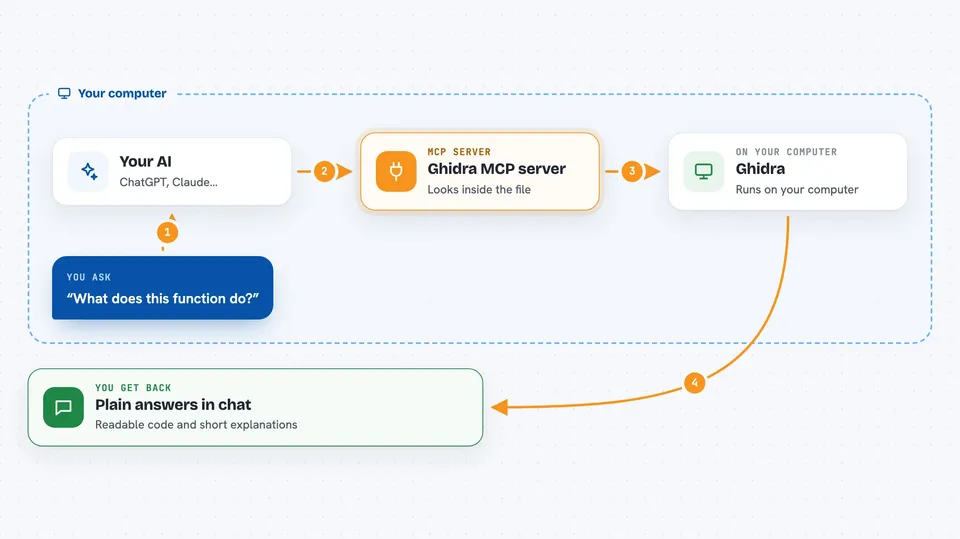
You open a software file in Ghidra and turn on this plugin. Then you ask your AI something like "what does this function do?" The AI sends that request to a small helper program, which passes it to the plugin running inside Ghidra. Ghidra does the work, such as decompiling the function into readable code, and the answer comes back to you in the chat. You can also ask it to rename things, leave notes, or search for suspicious patterns.
 Click to zoom
What you can do with it
- List the functions, strings, and imports inside a file
- Decompile a function into readable C-like code
- Rename functions, variables, and data labels
- Add comments and bookmarks to keep your notes
- Search for byte patterns or obfuscated strings
- Detect security protections and common weaknesses
- Extract indicators of compromise from a suspicious file
Try asking your AI
- “Decompile the function at address 0x401000 and explain what it does”
- “List all the strings in this binary that look like URLs or IP addresses”
- “Rename this function to decrypt_config and add a comment saying it looks like AES”
- “Find any format string vulnerabilities in this program”
What it gives back to you
You get answers in plain chat: lists of functions or strings, decompiled code you can read, or short explanations of what a piece of code seems to do. When you ask it to change something, like renaming a function, it tells you the change was made and you can see it in Ghidra right away. For big jobs it can start the work and let you check back later for the result.
Before you start
What you need
- Ghidra 12.0.3 or newer installed on your computer
- Java 21 or newer
- An AI app that supports MCP, like Claude Desktop or Claude Code
- A software file you want to look at, opened in a Ghidra project
Good to know
It can change things inside your Ghidra project, like renaming functions or patching bytes, so keep a backup or work on a copy if you are unsure.
Install it with your AI
Add Ghidra MCP server to your AI, no technical skills needed
You don't install anything by hand. You copy one prompt, paste it into an AI that can work on your computer, and it checks, installs and connects the server for you, asking you when it needs something.
Sign in to get the install prompt
Members get a ready-made prompt that lets the Claude desktop app check Ghidra MCP server, install it and connect it for them, step by step. You don't need any technical skills: you copy, paste and answer a few questions. Your connected AI can also find and install any of the 4,609 MCP servers here for you.
Who it's for
Security analysts, malware researchers, and anyone who needs to understand unfamiliar software but is not a full-time reverse engineer.