MCP server · Developer tools · official
4EVERLAND Hosting MCP server
by 4everland · official
Lets your AI publish a small website to decentralized storage and hand you back a live link.
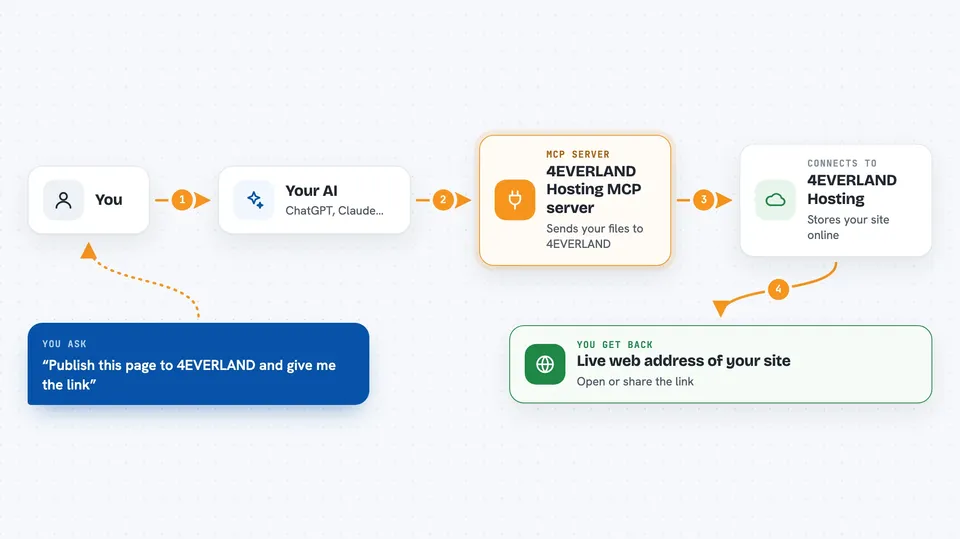
This is a small helper that connects your AI assistant to 4EVERLAND Hosting, a service that puts websites on decentralized storage networks. Once it is set up, you can ask your AI to publish the page it just wrote for you and get a working web address in return. It is handy for people who want to share a quick page or demo without learning how hosting normally works.
What is an MCP server? The 30-second version
On its own, your AI can only chat with you. An MCP server is a small helper program that gives your AI one new skill, in this case the ability to send files to 4EVERLAND Hosting. You install it once and add a token, and from then on your assistant can hand your files to 4EVERLAND when you ask. 4EVERLAND then stores them on a decentralized network and gives back a link you can open in a browser.
What this MCP server does
You ask your AI to publish a page or a small site you have been working on. The AI takes the files, wraps them up, and passes them to this helper. The helper sends them to 4EVERLAND Hosting using your account token. 4EVERLAND stores the files on the network you chose, like IPFS, Arweave, or Greenfield, and creates a public web address for them. The AI then tells you the link so you can open it or share it.
 Click to zoom
What you can do with it
- Publish a single HTML page your AI just wrote
- Deploy a small multi-file site with its own folder structure
- Choose which storage network to use: IPFS, Arweave, or Greenfield
- Update an existing project by reusing its project ID
- Get back a live web address you can share right away
- Manage and rename your deployed projects later in the 4EVERLAND dashboard
Try asking your AI
- “Publish this HTML page to 4EVERLAND and give me the link”
- “Deploy my portfolio site to Arweave using the project name my-portfolio”
- “Put these files on IPFS through 4EVERLAND and send me the URL”
- “Update my existing project my-landing-page with these new files”
What it gives back to you
You get a short confirmation in the chat with the live web address of your deployed site. If you asked to update an existing project, it tells you that too. The files themselves live on 4EVERLAND, not in the chat, so the link is what you use. You can also log in to the 4EVERLAND dashboard later to see and manage everything you deployed.
Before you start
What you need
- A 4EVERLAND account (free to create)
- A Hosting Auth Token from your 4EVERLAND dashboard, under Hosting then Auth Token
- Node.js installed on your computer, since the helper runs with npx
- The Claude desktop app or Cursor, so you can add the helper to your AI
Good to know
Anything you deploy becomes publicly reachable on the web through the link, so do not publish private files or secrets.
Install it with your AI
Add 4EVERLAND Hosting MCP server to your AI, no technical skills needed
You don't install anything by hand. You copy one prompt, paste it into an AI that can work on your computer, and it checks, installs and connects the server for you, asking you when it needs something.
Sign in to get the install prompt
Members get a ready-made prompt that lets the Claude desktop app check 4EVERLAND Hosting MCP server, install it and connect it for them, step by step. You don't need any technical skills: you copy, paste and answer a few questions. Your connected AI can also find and install any of the 4,361 MCP servers here for you.
Who it's for
Anyone who wants to share a small website or page quickly, like designers, writers, students, or developers making quick demos, without setting up traditional hosting.